Meshcentral: Manage Clipboard in remote viewing
Great Great Software, awesome, thanks a lot for your work.
I'm introducing meshcentral in my company, instead of ammyy or teamviewer, works great.
Only thing I miss is clipboard between remote and local machines (agent based), very useful for my purposes (copying scripts or configurations and pasting directly on remote screen side)
Is there a way to achieve this function? Or simply I don't know how to get it ?
 merlinweb
All 29 comments
@merlinweb This feature will be implemented soon. See #41 for reference.
 whalehub
on 14 Mar 2019
whalehub
on 14 Mar 2019
Actually I just finished this feature, for both Windows and Linux. I pushed all the changes to GIT for the agent, and I gave Ylian the code to integrate into the webapp. So it should be released very soon... MacOS support will come later, as I'm heading out on vacation...
 krayon007
on 14 Mar 2019
krayon007
on 14 Mar 2019
thanks both, sorry for duplicating, but searching for "clipboard" don't let me find #41
Amazing...
merlinweb
on 14 Mar 2019
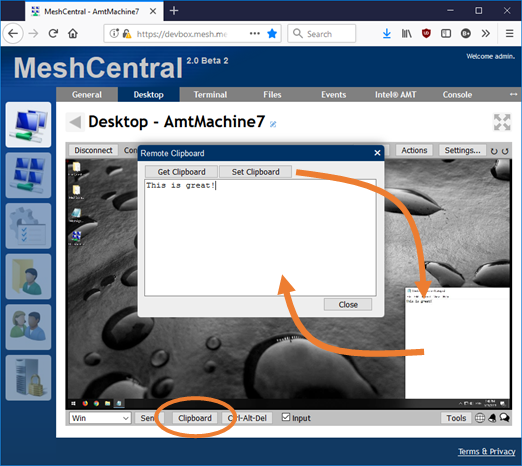
Just published @MeshCentral v0.3.0-m with clipboard transfer support for Windows and Linux. Large and very difficult work done by Bryan to get this working on so many platforms. Linux is especially difficult. No MacOS support yet. Testing and feedback appreciated.
 Ylianst
on 15 Mar 2019
Ylianst
on 15 Mar 2019
Hi Ylian, I just updated our Mesh Central server (which is running on Server 2019) to 0.3.0-n. I can see the Clipboard button when viewing the desktop of devices. Clicking the button brings up the Remote Clipboard dialog box- but you can't get or send any data through it. Clicking on 'Get Clipboard' doesn't pull in the remote device clipboard data. Nor does clicking Set Clipboard send any data to the remote device. I tried both using Google Chrome and Microsoft Edge browsers.
 PathfinderNetworks
on 16 Mar 2019
PathfinderNetworks
on 16 Mar 2019
What OS is the target machine that you are remoted into?
krayon007
on 16 Mar 2019
Server 2019. I'll try some Win10 machines and see how it acts. Just tried a Win10 box (release 1809) and a Server 2016 box and it's doing the same as I had mentioned.
PathfinderNetworks
on 16 Mar 2019
Is there more than one user logged into the Server 2019 target? I wonder if it's using the wrong user's context.
krayon007
on 16 Mar 2019
No, only one user (which is the administrator). Same for the other devices I just tried.
PathfinderNetworks
on 16 Mar 2019
Interesting.. I have a bunch of Windows 10 release 17134, and it works great... I'll build a test system with the latest updates...I do know Server 2019 has some issues I need to fix, because MS changed the behavior of some things, regarding the terminal...
krayon007
on 16 Mar 2019
I'll see if I can add an older device (such as Windows 7) to my MeshCentral2 server. I still have most all of my devices under MeshCentral1 and have only moved over a small handful of newer devices to test.
PathfinderNetworks
on 16 Mar 2019
I just tested it on Windows Server 2016 release 14393, and clipboard works in both direction... What build is your server 2016?
krayon007
on 16 Mar 2019
I just added a Server 2008 R2 device to my MeshCentral2 setup- it's not working there either. So I wonder if it's something to do on the MeshCentral server side of things? I just updated tonight to 0.3.0-n. As mentioned, it is running on Server 2019.
PathfinderNetworks
on 16 Mar 2019
The Server 2016 box is release 17763.348
PathfinderNetworks
on 16 Mar 2019
If you are administrator on your server, click on a device, go to the "console" tab and use the "getclip" and "setclip" commands you get and set the remote clipboard. If that works, then it's certainly a server side problem.
Ylianst
on 16 Mar 2019
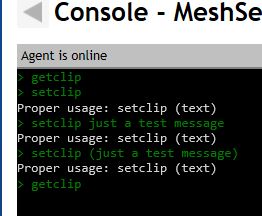
I just tried that- that also does not work. The commands show up in the console but no clipboard data is transferred from (via getclip) or to (via setclip) the device.
PathfinderNetworks
on 16 Mar 2019
What language/region is your windows machine set to? Really strange you are having issues with Windows, the windows clipboard API is straightforward, it's the Linux clipboard api that is complex.
Another test you can do is to run the agent in console mode. When you run it in console mode, the agent doesn't need to spawn a child process into the user's context to access the clipboard.
krayon007
on 16 Mar 2019
Actually. To use the setclip command, you need to specify the data too. Unless you are saying the text you typed was lost? From the image your posted it looks like it didn't even try to access the clipboard because it didn't receive any text to write.
Did you type something like:
setclip testdata
krayon007
on 16 Mar 2019
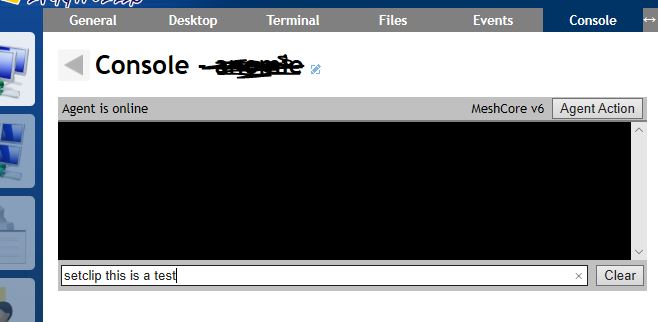
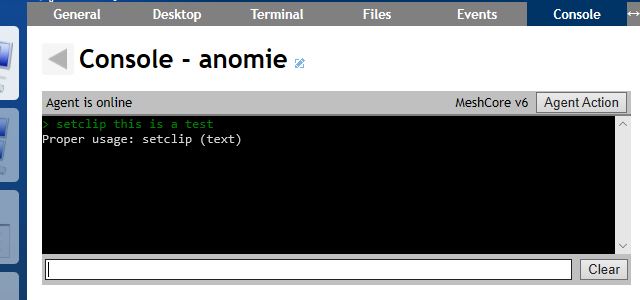
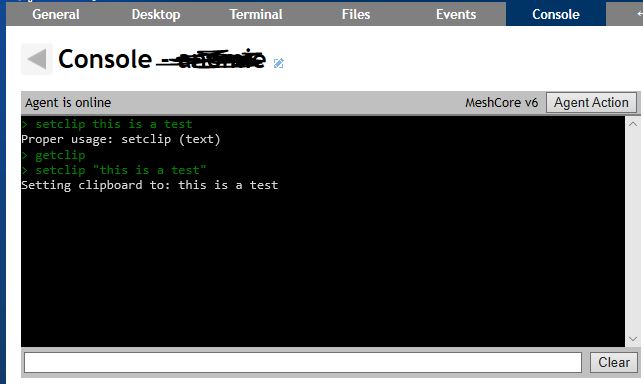
It's set to English/US. I'm trying this from a Windows 10 machine (version 1809). In both Edge and Chrome. Here are a coupe more screen grabs. The first is the command I'm entering. The second is the result of that command. The data 'this is a test' is never sent to the remote clipboard.
PathfinderNetworks
on 17 Mar 2019
You have to use setclip with one argument like this:
setclip hello
setclip "hello this is bob"
Without the quotes the setclip command will think it's multiple arguments and will fail, I will try to make the help message more clear. Can you try it again?
Ylianst
on 17 Mar 2019
Using quotes did result in a different response- which looks like it sent the clipboard data. But, when viewing the desktop of the device, that clipboard data (in this case the text 'this is a test') is still not actually sent to the remote device.
PathfinderNetworks
on 17 Mar 2019
If you do getclip after the setclip, what does it show?
Ylianst
on 17 Mar 2019
The getclip command shows the data that was set with setclip. Which means you'd think that is the data that is present on the remote device. But it's not. When I view the desktop of that same device and try to paste data from the clipboard there is nothing there (or, if there is data there, it's data that was copied to the clipboard previously in that same Windows session by using the 'copy' command or Ctrl-C).

PathfinderNetworks
on 17 Mar 2019
Ok, this is likely because the MeshAgent is setting the clipboard in the wrong user context. One thing you can try is to stop the MeshAgent windows service. Launch MeshAgent.exe again and hit the "connect" button. This will launch a temporary MeshAgent in the current user context. Then try set/getclip again. It will probably work. Let us know if you try it and what you see.
Ylianst
on 17 Mar 2019
Ok, doing that does allow the setting and getting of the clipboard. Still strange, however, as the same user that the MeshAgent was installed under is the user I'm logging in to the device as. And is the same user I'm running the MeshAgent as 'Running as temporary agent' for this test.
PathfinderNetworks
on 17 Mar 2019
Good. When installing as a background service, the agent run in a completely different context unrelated to the users that installed it. The agent has to try to figure out in what user context to set to clipboard. It's also possible no user is logged in at all. Bryan will have to investigate when he gets back from vacation. But this is likely an agent side issue.
You can test the server by doing a set clipboard using the server UI and using "getclip in the agent console to see if the agent got it. Also the opposite, use setclip and fetch the clipboard using the server UI.
Ylianst
on 17 Mar 2019
Bryan pointed out the getclip and setclip commands in the agent did not work the same way as the code used by the server. Just published MeshCentral v0.3.0-o that fixes that. If you can retry the getclip and setclip on that version, would be great.
Ylianst
on 18 Mar 2019
Thanks Ylian, I just updated my server to 0.3.0-n. That fixed the clipboard issues. It's now working correctly both through the console and via the Clipboard button. Perfect!
PathfinderNetworks
on 18 Mar 2019
Perfect. Thanks.
Ylianst
on 18 Mar 2019
Related issues
PathfinderNetworks
·
3Comments
 vish84
·
3Comments
vish84
·
3Comments
 coolwormgit
·
3Comments
coolwormgit
·
3Comments
 hellofaduck
·
3Comments
hellofaduck
·
3Comments
 MailYouLater
·
3Comments
MailYouLater
·
3Comments
Most helpful comment
Just published @MeshCentral v0.3.0-m with clipboard transfer support for Windows and Linux. Large and very difficult work done by Bryan to get this working on so many platforms. Linux is especially difficult. No MacOS support yet. Testing and feedback appreciated.