Mentorship-android: Add click effect to each option on Settings screen
Description
As a user,
I need clean and interactive UI,
so that I can have a pleasant user experience.
Currently, when you click an item in the settings screen you don't have any click feedback. Be aware that the only option working right now is the "Logout" one.
Also, it would be nice if each option had an icon attached (maybe?).
You can see Material Design for lists for this issue.
Mocks
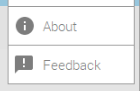
Some icons Isabel has chosen in the first UI design (UP for discussion of course):
Acceptance Criteria
Update [Required]
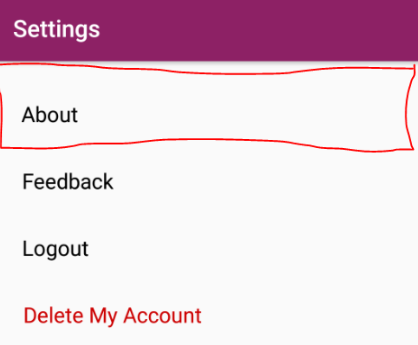
- [ ] Clickable effect in each settings option (this should be a big area, how is shown in the 1º mock ui image, in red)
- [ ] Each option has an icon attached (optional maybe)
- [ ] Options not implemented yet can show a toast saying that the feature is not implemented or something
Definition of Done
- [ ] All of the required items are completed.
- [x] Approval by 1 mentor.
Estimation
2 hours
 isabelcosta
All 37 comments
Hey, this can be implemented by a first timer with the help of - https://stackoverflow.com/questions/7175873/click-effect-on-button-in-android
Also, instead of giving a toast that the functionality is not available, can we disable the click for those buttons ?
@isabelcosta
 shiv07tiwari
on 31 Dec 2018
shiv07tiwari
on 31 Dec 2018
@shiv07tiwari thank you for the tip :) sure we could do that as well.
isabelcosta
on 31 Dec 2018
Hey, I'm a first timer and would like to work on this. Can you please assign this issue to me.
 shimonanverma
on 6 Jan 2019
shimonanverma
on 6 Jan 2019
Yes @shimonanverma you can work on this :) send a pull request once you are ready and if you have any questions regarding this issue feel free to ask them.
isabelcosta
on 6 Jan 2019
@shimonanverma do you have any updates on this issue? Tell us if you need any help
isabelcosta
on 9 Jan 2019
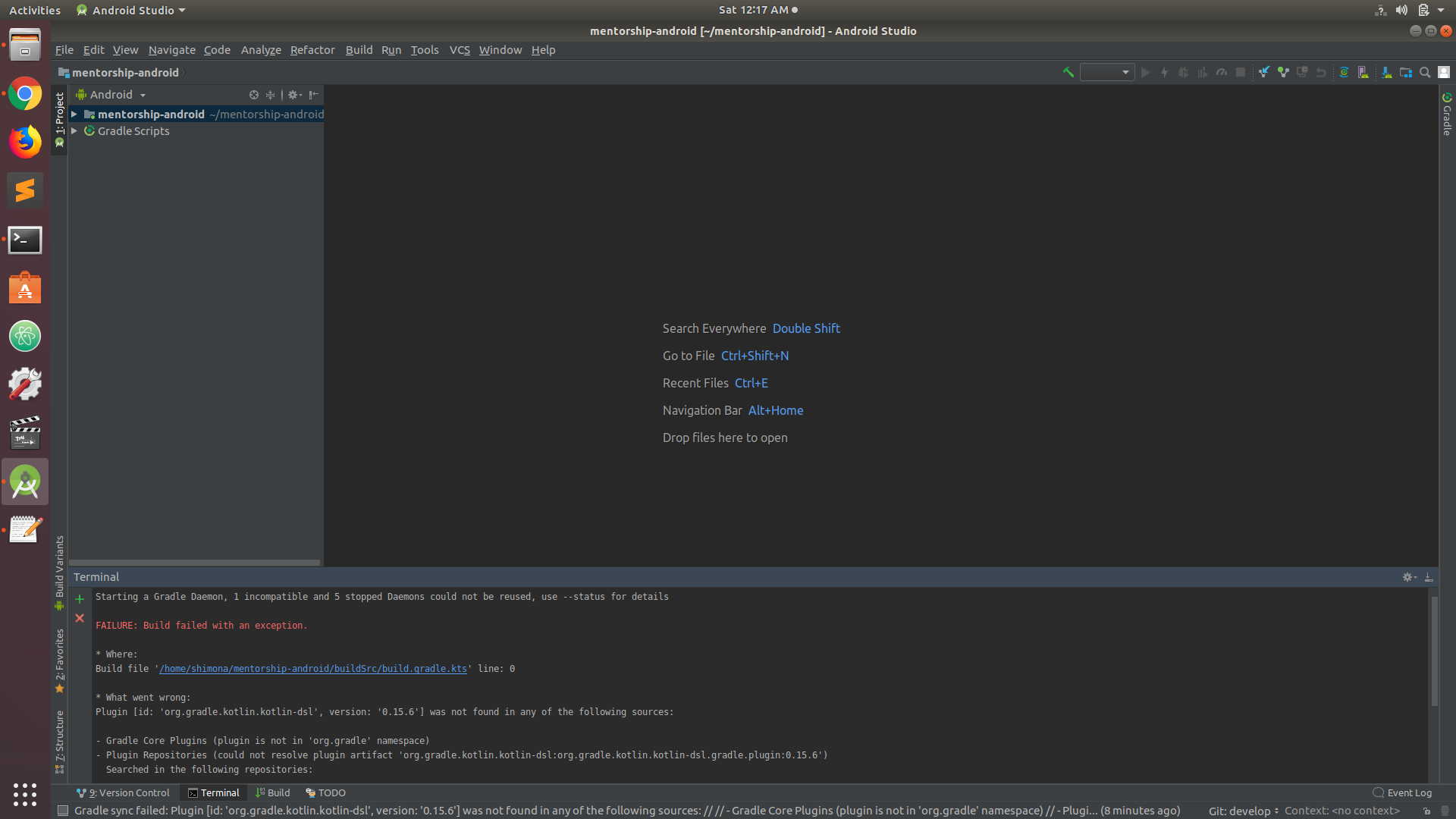
hey @isabelcosta I'm having some trouble with opening the project in android studio. Everytime I try to build , it gives me an error
""
Plugin [id: 'org.gradle.kotlin.kotlin-dsl', version: '0.15.6'] was not found in any of the following sources:
- Gradle Core Plugins (plugin is not in 'org.gradle' namespace)
- Plugin Repositories (could not resolve plugin artifact 'org.gradle.kotlin.kotlin-dsl:org.gradle.kotlin.kotlin-dsl.gradle.plugin:0.15.6')
Searched in the following repositories:
Gradle Central Plugin Repository ""
can you please help me with this?
shimonanverma
on 10 Jan 2019
Oh. I don't understand it. How did you run the app? @shimonanverma
Can you share screenshots? If you want you can share this on Slack as well, so that more people can try to help you?
isabelcosta
on 10 Jan 2019
I opened the project in android studio and while running the app this error showed up. I'm attaching screenshot.
shimonanverma
on 11 Jan 2019
@shimonanverma which Android API version are you running? Can you share this on Systers Open Source Slack? Do you have access? I never got that error, but others might have. If you cannot share it there, tell me and I can share it.
isabelcosta
on 15 Jan 2019
Hello, I'm a first timer and would like to work on this. Can you please assign this issue to me :)
 Lavanyagaur22
on 18 Jan 2019
Lavanyagaur22
on 18 Jan 2019
Hey @Lavanyagaur22 👋 this issue is being worked on by @shimonanverma for now. Can you pick other "first timers only" issue? There are plenty available issues for newcomers ;)
isabelcosta
on 18 Jan 2019
hey @isabelcosta i tried a lot to solve the error , but i can't. I'm not working on this issue anymore. Can you please make this issue available again.
shimonanverma
on 19 Jan 2019
@shimonanverma thank you so much for updating me on it! I'm worried about why can't you run that. I would love to help you solve that. I'll make this available again.
I will share your screenshot on our Slack just to know if anyone has experienced that and knows the solution.
@Lavanyagaur22 if you're still interested you can work on this :)
isabelcosta
on 20 Jan 2019
Hey, I'm a first timer and would like to work on this. If this issue is not being worked on can you please assign it to me?
 sashrikakaur
on 22 Jan 2019
sashrikakaur
on 22 Jan 2019
@sashrikakaur yes sure. You can work on it, since I got no other responses.
isabelcosta
on 22 Jan 2019
Sorry @isabelcosta for delay:/. @sashrikakaur In case of any problem, I would love to help you out.
Thanks :) . I would solve another one. No problem :)
Lavanyagaur22
on 23 Jan 2019
@Lavanyagaur22 no problem about the delay :) I'm sure you'll be able to solve other issues!
isabelcosta
on 23 Jan 2019
can I work on this issue
 ghost
on 29 Jan 2019
ghost
on 29 Jan 2019
@prabhakar369 it depends... @sashrikakaur are you working on this? Do you need any help?
isabelcosta
on 29 Jan 2019
@isabelcosta yeah it made 7 days back know i solved this issue in my local repository
ghost
on 29 Jan 2019
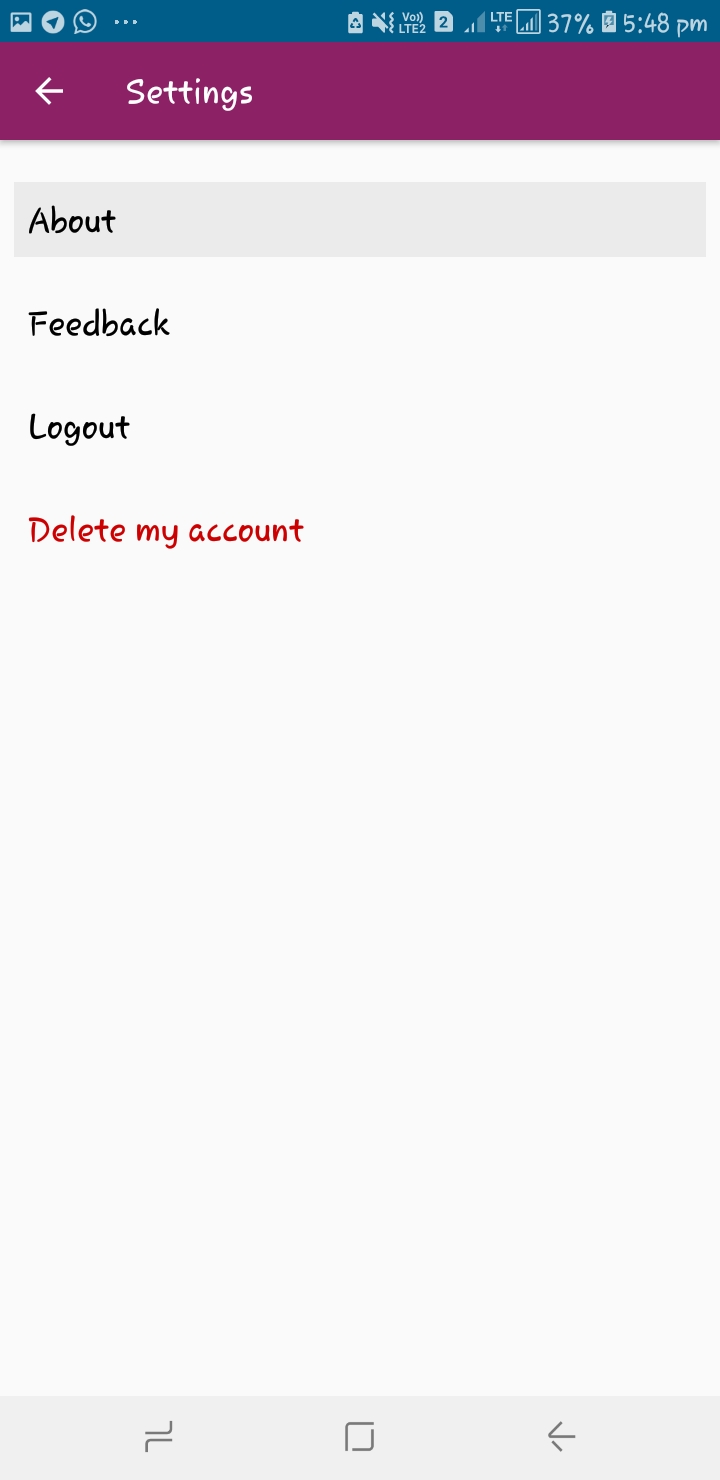
@isabelcosta i did like this when we that text view it happen like that
ghost
on 29 Jan 2019
@isabelcosta I created a pr request for this issue. Please review it and let me know the changes that need to be done. PR #145
sashrikakaur
on 29 Jan 2019
@isabelcosta can i work on this issue as he can not doing the changes from past 8 days
ghost
on 8 Feb 2019
@isabelcosta I am working on this issue but I need help. If @prabhakar369 has completed the issue you can assign it to him. I would love to get some help to see how it's done.
sashrikakaur
on 8 Feb 2019
@sashrikakaur I left a comment on your PR asking in what do you need help ;)
isabelcosta
on 10 Feb 2019
Is this issue still available? If yes, I would like to work on it!
 Shubham1304
on 13 Feb 2019
Shubham1304
on 13 Feb 2019
This is available now @Shubham1304 , are you still interested in this issue?
isabelcosta
on 20 Mar 2019
@isabelcosta can I take this one please?
 jenpaff
on 11 Apr 2019
jenpaff
on 11 Apr 2019
Sure @jenpaff :)
isabelcosta
on 13 Apr 2019
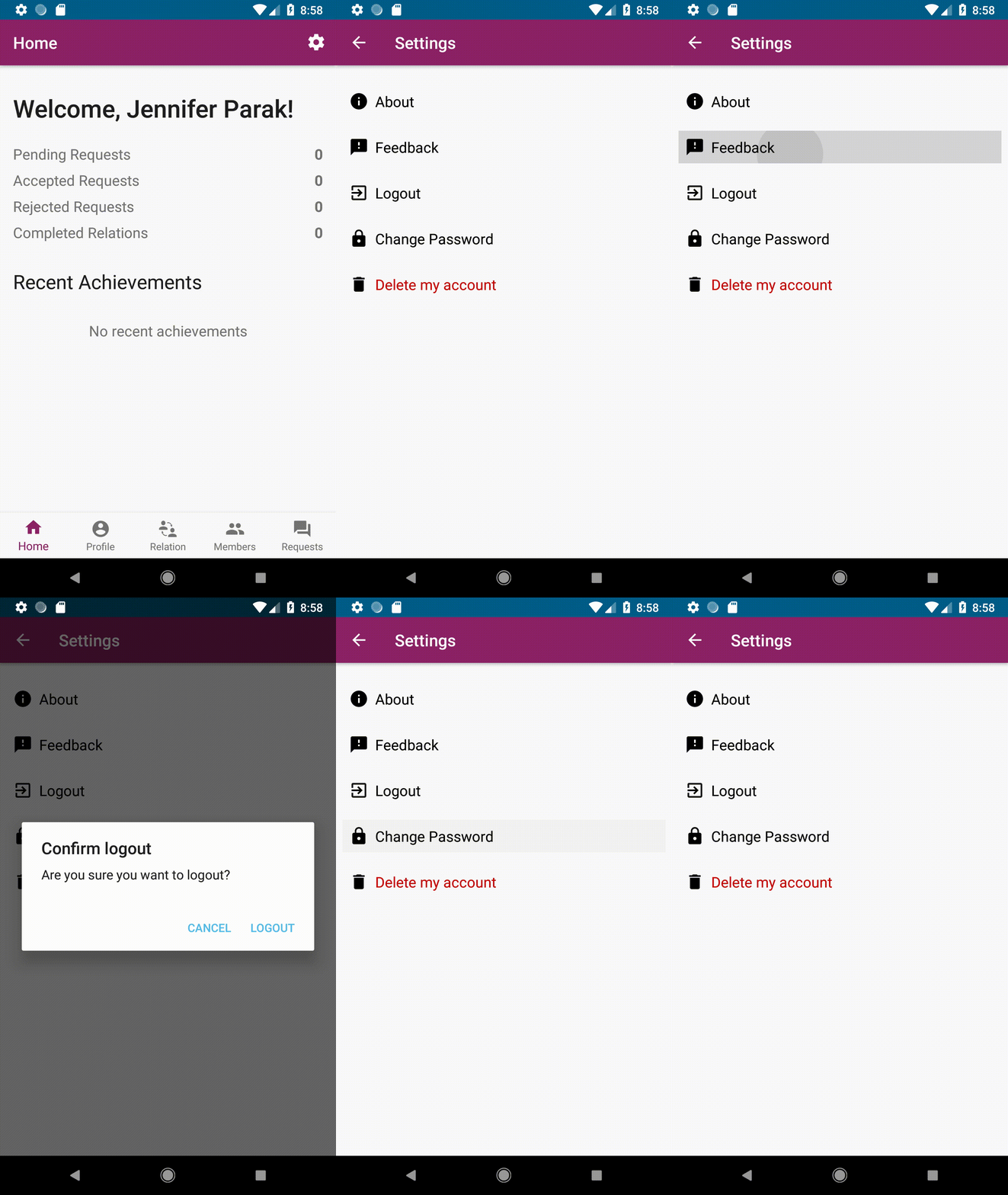
update: I'm actually done from my part, just waiting for some feedback on slack if the icons & the click effect are okay, feel free to give me some feedback too and i'll send you the PR @isabelcosta
jenpaff
on 17 Apr 2019
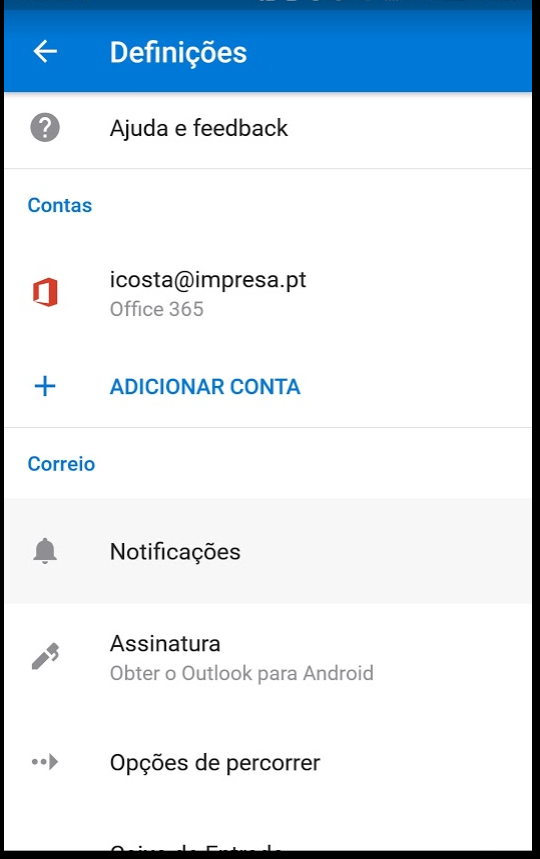
I love the icons @jenpaff 🙌 The click effect, maybe is just me but what I thought was the click area of the "button" reaching the full width and reaching the top of the area above or the area below. An example would be the Outlook app, on the settings, it is like that. When I click the "Notifications" option, the area occupies the full width of the screen and the height is equidistant, and right next to the other options. Does this make sense? Its a small thing I see. (image is in portuguese :P)
isabelcosta
on 18 Apr 2019
@isabelcosta sure, I can update that :)
jenpaff
on 18 Apr 2019
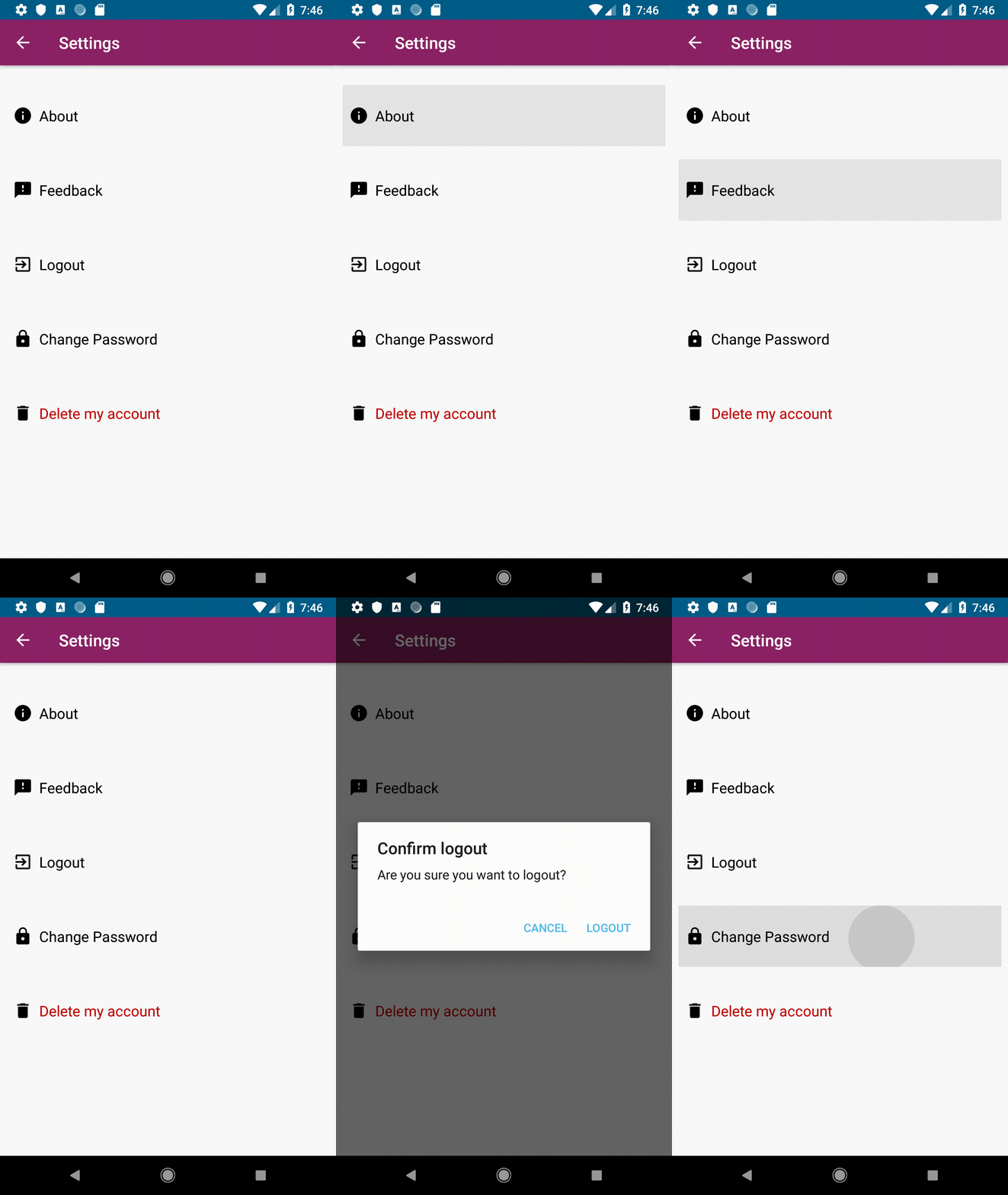
Hi @isabelcosta I've updated the height of the effect on your request (see gif). Always feel free to give me feedback until it looks perfect no matter how small :)
jenpaff
on 18 Apr 2019
@jenpaff thank you for fixing it according to my feedback 🎉 Your feedback and opinions are totally welcome here, as other people's opinions are ;) That's just how I imagined that screen. If you feel it could be different let me know we can reach a middle ground (I'm not a UX expert :P)
I would take an extra margin you have above "about" option so that the about distances are the same as the other options. I think you can submit a pull request and we can continue the conversation there ;) That's almost done
isabelcosta
on 21 Apr 2019
Do you mean minimize the marginTop from the about textview? It's android:layout_marginTop="24dp" and the others are android:layout_marginTop="16dp". I hadn't changed it though, it was like that before.
jenpaff
on 22 Apr 2019
@jenpaff I've been a bit off these days. I just left a comment on your PR.
isabelcosta
on 30 Apr 2019
@isabelcosta
Still no clicklistener is attached to the About , Feedback and Delete my Account Options in SettingsActivity.
 SaumyaSingh1
on 29 May 2019
SaumyaSingh1
on 29 May 2019
Related issues
 Dilu9218
·
9Comments
isabelcosta
·
4Comments
Dilu9218
·
9Comments
isabelcosta
·
4Comments
 iofall
·
7Comments
iofall
·
7Comments
 annabauza
·
7Comments
annabauza
·
7Comments
 mohak1283
·
9Comments
mohak1283
·
9Comments