Medusa: Allowed and Preferred status backwards
Preferred and Allowed not working correctly in show screen. An episode downloaded in target quality shows as allowed and vice versa.
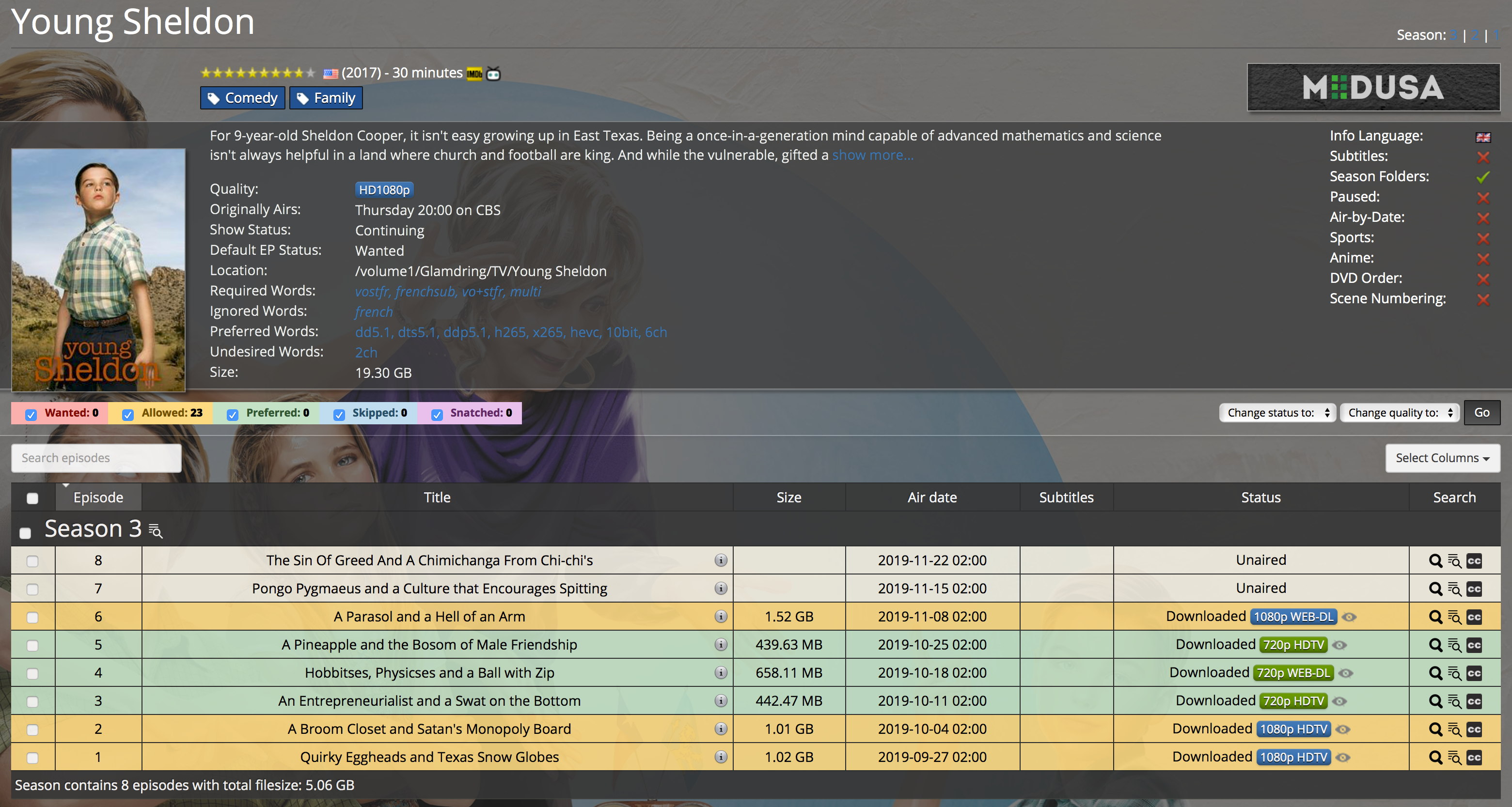
- OS: Synology
- Branch: Master
- Commit: 80b323eefca7c8d3c233ded9f389b0af35725f17
- Python version: 2.7.14 (default, May 28 2018, 14:47:18) [GCC 4.7.3 20130102 (prerelease)]
- Database version: 44.14
Scott
 scott451
All 34 comments
@medariox what do you think?
 p0psicles
on 12 Nov 2019
p0psicles
on 12 Nov 2019
Well... they are just allowed, so it is actually correct.
Easy solution: treat in-built qualities as preferred only in fronted.
Better solution: make in-built qualities preferred instead of allowed.
Archived is always green as the files have been manually removed.
 medariox
on 12 Nov 2019
medariox
on 12 Nov 2019
i'm not sure to understand, if quality for show is HD1080p how is an episode downloaded in 720p HDTV Preferred and an episode 1080p WEB-DL Allowed ?
scott451
on 12 Nov 2019
some more info ... if i set show quality to "custom" and then choose 1080p HDTV, 1080p WEB-DL, and 1080p BluRay episodes go to Preferred.
When I switch back to show quality to HD 1080p then episodes go back to Allowed. Strange behaviour because this did not happen in previous version.
scott451
on 12 Nov 2019
+1 I am seeing this too. I have 7k+ episodes now marked as allowed instead of preferred. Something broke in the latest update.
 GldRush98
on 12 Nov 2019
GldRush98
on 12 Nov 2019
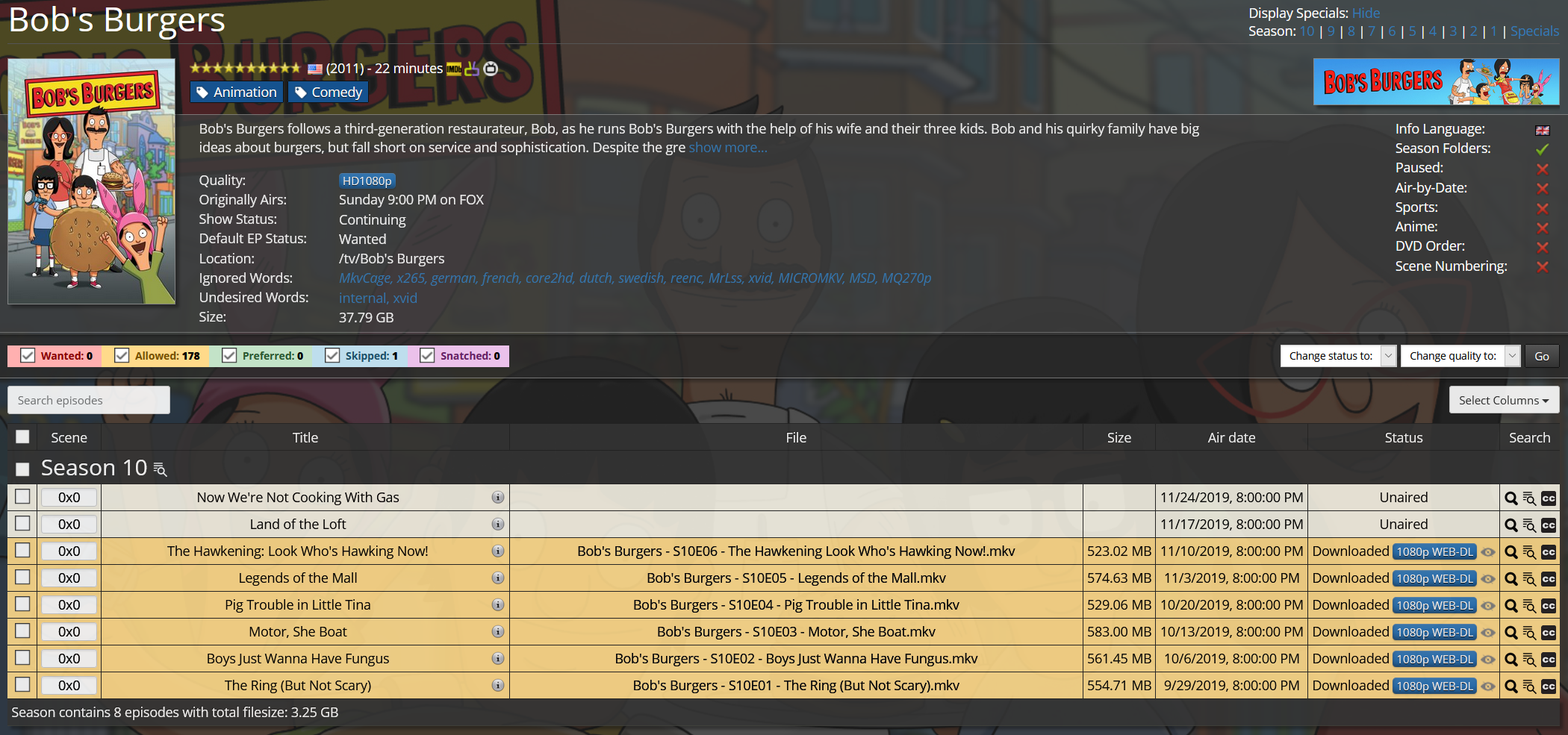
This show is set to 1080p. 100% of my episodes are 1080p. They should be "Preferred" as the episode's quality matches the show's quality. This is how this display has worked since wayyyyy back in the SickBeard days. These episodes shouldn't be marked as allowed, they are preferred. Additionally, "allowed" but not "preferred" episodes are typically ones that go to the Backlog for future searching to get upgraded qualities until it matches the preferred quality. Fortunately this is NOT happening (as I'd have over 7k episodes in my backlog), so the backlog part knows that it doesn't need to search for anything new. It seems to be the episode display in the show that is getting it wrong. You're going to have a lot more people complaining about this as they update their Medusa versions as this is not correct behavior.
GldRush98
on 12 Nov 2019
They were always allowed, you just didn't notice it because they were green. That's it. Nothing changed and nothing will change. We will probably make the default qualities show as green if there are no preferred selected, so people will keep thinking that they are preferred.
medariox
on 12 Nov 2019
I'm unclear as to why a default quality is not considered preferred? I want the show in 1080p, I set the show to 1080p. This _is_ my preferred quality.
GldRush98
on 12 Nov 2019
dario,
i understand the logic. but it does not explain why the 720p episodes show as preferred when show quality is set to hd1080p (see screenshot).
as you say, it is all in the user interface, so nothing critical is broken. :-)
- scott
scott451
on 12 Nov 2019
I think I see what he is saying now. If you set a show to custom quality, it has an allowed and a preferred box. It seems that if you use a built in quality, it sets allowed but not preferred.
_So the issue seems to be that built in qualities need to be setting an allowed AND preferred as the same quality_. Otherwise the only way to get the correct green marked items back is to set _every_ show as a custom quality and select the matching preferred values.
GldRush98
on 12 Nov 2019
I'm unclear as to why a default quality is not considered preferred? I want the show in 1080p, I set the show to 1080p. This _is_ my preferred quality.
Having only allowed qualities or only preferred qualities makes no functional difference (this is bad design from the Sick* times). Qualities presets have always been allowed only! The only thing that changed are the colors (which we are going to change back). Read more about how the qualities work here: https://github.com/pymedusa/Medusa/wiki/Qualities-Changes#here-is-how-it-works
i understand the logic. but it does not explain why the 720p episodes show as preferred when show quality is set to hd1080p (see screenshot).
as you say, it is all in the user interface, so nothing critical is broken. :-)
That will be because they are not in the list of qualities anymore, so it defaults to green. As you can see they are not actually being marked as preferred. I can assure you that nothing is broken and that no functionality has changed at all. The allowed only qualities are just being shown as they really are now!
I think I see what he is saying now. If you set a show to custom quality, it has an allowed and a preferred box. It seems that if you use a built in quality, it sets allowed but not preferred.
_So the issue seems to be that built in qualities need to be setting an allowed AND preferred as the same quality_. Otherwise the only way to get the correct green marked items back is to set _every_ show as a custom quality and select the matching preferred values.
Yes! As I said, quality presets are allowed qualities, they should have been preferred from the beginning. But you are just seeing them now as they really are and nothing changed at all (besides the color)!
medariox
on 12 Nov 2019
Yes! As I said, quality presets are allowed qualities, they should have been preferred from the beginning.
Yeah, that seems to be the underlying issue here, only being exposed by the way the episodes are displayed now. It was just a bit alarming as orange lines have usually indicated backlogged episodes, and I didn't want 7k episodes going in to the backlog!
GldRush98
on 12 Nov 2019
I have noticed the same issues now. on v0.3.5 this was not an problem. Preferred was what you had set and if you had listed SDTV as Allowed it will show as yellow. Everything should be green if you have have 1 or More under Preferred Qualities
 HPMSGEN8
on 14 Nov 2019
HPMSGEN8
on 14 Nov 2019
We know. We are going to improve it
p0psicles
on 14 Nov 2019
See pull request #7415 this should fix your issues.
The solution:
Usecase: The user makes use of the presets. So no "custom" set.
With this change a show quality preset will show green for matching qualities in the preset.
Usecase: The user does not make use of presets. And has configured "custom"
When no preset is used but allowed and preferred are configured, it will show green when quality in preferred and yellow when quality in allowed.
Usecase: For preset users AND non-preset users:
When a quality has been downloaded, but for ex. the shows config has changed after. And the quality does not match quality or preferred (anymore). The row will show yellow.
p0psicles
on 26 Nov 2019
Please test out the branch if possible. Then you'll have your final say on it.
Else I merge in about a week.
p0psicles
on 26 Nov 2019
@p0psicles I have tested Dev and i am still getting the same as prod.
I am using Commit: b03055acefa289fd49c4a504241981f4af42f22d
HPMSGEN8
on 2 Dec 2019
It's not merged yet. So to test you need to checkout the branch from the pull request
p0psicles
on 2 Dec 2019
Sorry for all the Questions but how do i do this in docker ?
HPMSGEN8
on 2 Dec 2019
You don't. Just wait for develop or master
p0psicles
on 2 Dec 2019
@p0psicles I installed this on a spare now without docker.
- If i select 720p HDTV then it is green and SDTV is Yellow = Correct
- If i select 720p HDTV and SDTV under Custom then everything is Yellow = In Correct
HPMSGEN8
on 2 Dec 2019
You have two columns, one for preferred and one for allowed. Set the quality as preferred if you want to have them preferred.
medariox
on 2 Dec 2019
@medariox In the older version this was not required. If you had them under Custom it worked 100%.
When you set it like you stating it goes out and tries to get what you have allowed as preferred
HPMSGEN8
on 2 Dec 2019
~Aah using multiple presets. Ok~
I was mistaken. It's working now like it should. If your not using presets, your using the Allowed and/or Preferred columns. Allowed = Yellow, Preferred = Green.
p0psicles
on 2 Dec 2019
@p0psicles If under Custom it is Allowed SDTV & 720p HDTV it should be Green and not Yellow (If you have SDTV & 720p Files). This is how it was in the Older Releases
Is there an update so i can test again ?
HPMSGEN8
on 3 Dec 2019
@HPMSGEN8 so if you have qualities configured in Custom in Allowed, but not any in preferred. It should be green, if the quality matches. But if you have qualities configured for allowed AND preferred. And it matches a quality in allowed, it should be yellow? Is that it?
p0psicles
on 3 Dec 2019
@p0psicles - Point 1 (so if you have qualities configured in Custom in Allowed, but not any in preferred. It should be green, if the quality matches) = Correct
The other one i cannot comment since i do not use Preferred under Custom.
HPMSGEN8
on 3 Dec 2019
@HPMSGEN8 i've added a commit, can you test?
p0psicles
on 3 Dec 2019
@p0psicles Please see the below:
- SDTV = Green / 720p HDTV = Yellow (Select SD ONLY)
- 720p HDTV = Green / SDTV = Yellow (Select 720p ONLY)
- SDTV + 720p HDTV = Green (Custom - Allowed ONLY)
All of these are 100%
Thanks a lot :)
HPMSGEN8
on 3 Dec 2019
@HPMSGEN8
Please try the now commit and report back.
medariox
on 5 Dec 2019
Last day for testing after this will be merged/closed. We want to move on with this
p0psicles
on 7 Dec 2019
thanks for taking care of this
scott451
on 7 Dec 2019
@medariox & @p0psicles I tested the same as i did before and it is 100% on what i use.
Preferred I tested as well for this one and SDTV & 720p Allowed and 720p Preferred. Results are 720p Green and SDTV Yellow. So i take it that is correct since 720p is what you want and SDTV is ok.
Thanks a lot for helping getting this fixed :)
HPMSGEN8
on 7 Dec 2019
Fixed with https://github.com/pymedusa/Medusa/pull/7415
medariox
on 7 Dec 2019
Related issues
 LoRNiKoN
·
4Comments
LoRNiKoN
·
4Comments
 Rouzax
·
3Comments
Rouzax
·
3Comments
 Hellowlol
·
4Comments
Hellowlol
·
4Comments
 a10kiloham
·
4Comments
a10kiloham
·
4Comments
 lamplis
·
3Comments
lamplis
·
3Comments