Medusa: No NZB/Torrent providers shouldn't be a warning
Hi, I do not use NZB or Torrent providers directly from Medusa. They are transferred from Seedbox and post processed via Medusa. So, I am getting the following warning:
2018-10-30 22:05:20 WARNING SEARCHQUEUE-DAILY-SEARCH :: [0c0a735] No NZB/Torrent providers found or enabled in the application config for daily searches. Please check your settings
&
2018-10-30 14:36:12 WARNING SEARCHQUEUE-BACKLOG-340348 :: [4614efc] No NZB/Torrent providers found or enabled in the application config for backlog searches. Please check your settings
Is it possible that this be changed to a log entry, rather than a warning?
 DrSpaldo
All 42 comments
Maybe it could be an option that it is a log entry rather than a warning? Then you may make everyone happy?
DrSpaldo
on 16 Nov 2018
Ill add an option for this. The warning has a specific purpose, so we cant remove that.
 p0psicles
on 17 Nov 2018
p0psicles
on 17 Nov 2018
That would be perfect. Thank you very much. I’m enjoying Medusa:)
DrSpaldo
on 17 Nov 2018
Ill need you to checkout a branch amd test later
p0psicles
on 17 Nov 2018
Ill need you to checkout a branch amd test later
Hi, any luck with this branch?
DrSpaldo
on 9 Jan 2019
Forgot about it. I'll check it out.
@DrSpaldo thinking this through. Wouldn't it be better to just disable daily and backlog searches all together? It's not possible now, but with some small adjustments you could set the intervals to 0 to disable them? Then it will also not get to the warning. And your installation would be more responsive compared to when it's doing searches?
p0psicles
on 9 Jan 2019
@p0psicles I am happy with what ever option you think would work best for me and the majority of the users. I like to keep an eye on the warnings and there is no need for any with my set up. If you think that is the best way, I am happy 🥇
DrSpaldo
on 9 Jan 2019
I can't think of any scenarios where youd want to run a (daily or backlog) search, without having any providers configured. So I'll go with that solution.
p0psicles
on 9 Jan 2019
Yep, all of my data comes from post processing as the files are dumped into that folder. So as long as it doesn't interfere with that, it sounds good to me :)
DrSpaldo
on 9 Jan 2019
@DrSpaldo mind testing out the branch referenced in the pull request?
p0psicles
on 9 Jan 2019
You should see some additional settings for disabling daily searches and backlog searches in config - search.
p0psicles
on 9 Jan 2019
@p0psicles Thanks for the quick reply. I am semi familiar with Github but not great. Do you mean that I should try the 'develop' branch?
Ie. URL git://github.com/pymedusa/Medusa.git then branch develop instead of master?
DrSpaldo
on 10 Jan 2019
You'll need to checkout feature/start-stop-threads-from-config
p0psicles
on 11 Jan 2019
Sorry, you lost me. I am not sure which branch I have to use so I can test it :(
DrSpaldo
on 11 Jan 2019
This: feature/start-stop-threads-from-config
p0psicles
on 11 Jan 2019
Oh ok. Sorry, I didn't understand that was the actual branch. Thanks
DrSpaldo
on 11 Jan 2019
@p0psicles FYI, I can't install the branch. It is probably because I am installing it on Synology with the custom sickbeard package. It just gets stuck on installing when trying to use that branch :(
DrSpaldo
on 13 Jan 2019
You should login through putty. Sudo to the synology user for your package. And checkout the branch manually. Then a restart of the package should be sufficient.
You could run:
git fetch origin
git checkout -t origin/feature/start-stop-threads-from-config
Hi @p0psicles , thanks for the reply. My linux command line knowledge is limited... I have the git package (syno community) installed, but, if I try any git command in SSH it says the command doesn't exist.
ash-4.3$ git fetch origin
ash: git: command not found
No idea what else I can try :(
DrSpaldo
on 17 Jan 2019
Alright, well I decided to do it a different way. For those that are reading, it may assist in the future if you cannot change your branch in Medusa while using Synology. Here is what I did.
Backup Medusa, Shutdown Medusa, Log on to NAS, Enable SSH.
Use a client to SSH to NAS.
When logged in as admin use: sudo -i command switches you to root user.
Find where Medusa is located. Most likely:
/volume1/@appstore/sickbeard-custom/var/SickBeard/
When inside SickBeard folder run commands:
/volume1/@appstore/git/bin/git remote add upstream git://github.com/pymedusa/Medusa.git
/volume1/@appstore/git/bin/git fetch upstream
/volume1/@appstore/git/bin/git checkout feature/start-stop-threads-from-config
/volume1/@appstore/git/bin/git branch -u upstream/feature/start-stop-threads-from-config
/volume1/@appstore/git/bin/git reset --hard upstream/feature/start-stop-threads-from-config
/volume1/@appstore/git/bin/git pull
After this was all done. I had to manually restart Medusa in the web interface. Now once restarted, I get the following config options:
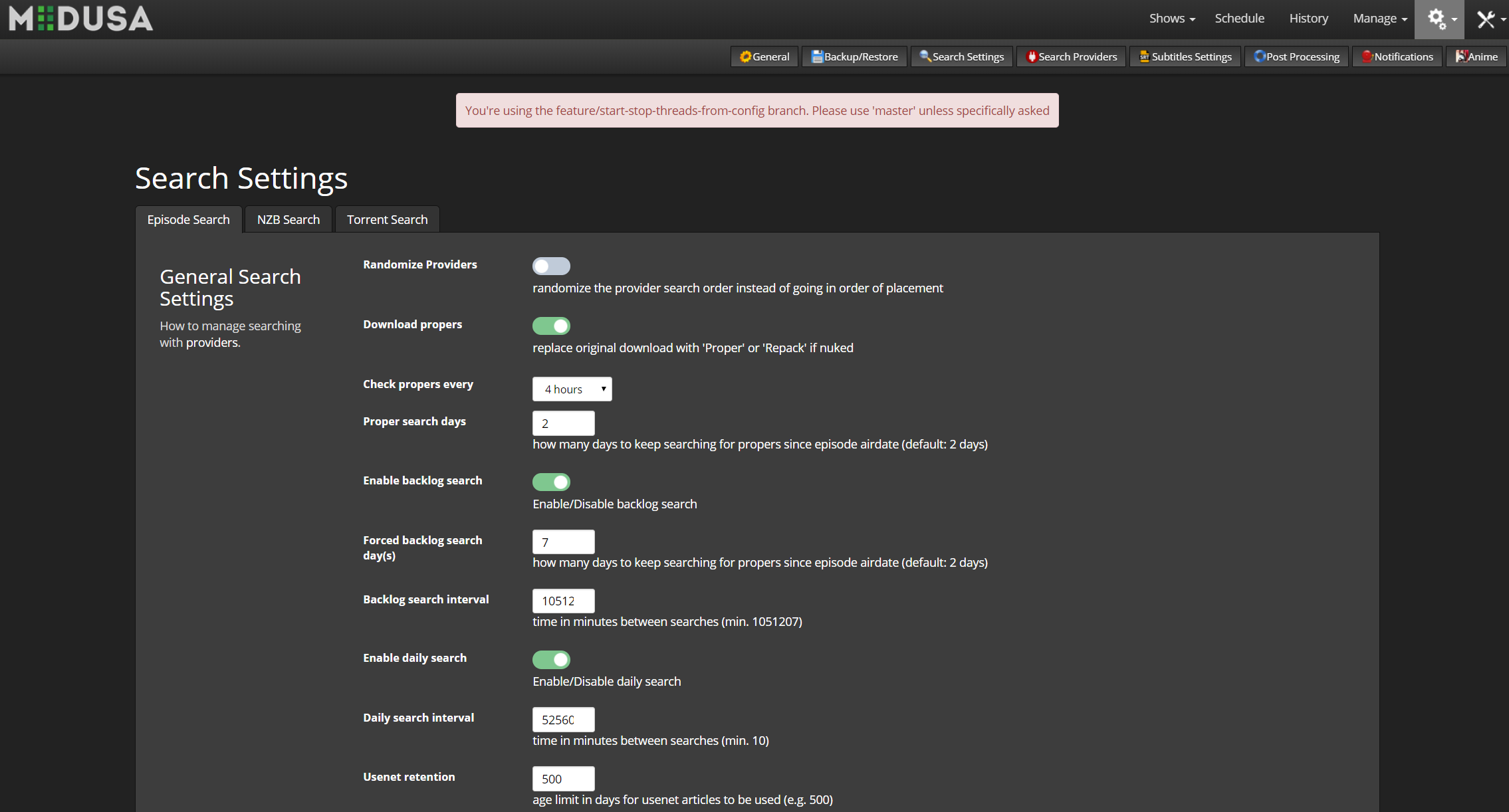
Let's hope it works now @p0psicles :)
DrSpaldo
on 19 Jan 2019
Post processing hasn't worked since the change. I will re-save and see what happens
DrSpaldo
on 19 Jan 2019
Make sure to change back the owner rights after the Git commands. chown -R medusauser:medusagroup *.* run this in Medusa folder of course. Fill in your user:group here of course
p0psicles
on 19 Jan 2019
Which post-processing config do you use?
p0psicles
on 19 Jan 2019
I've run the chmod command as suggested. Here is the post processing config, is that all you want?
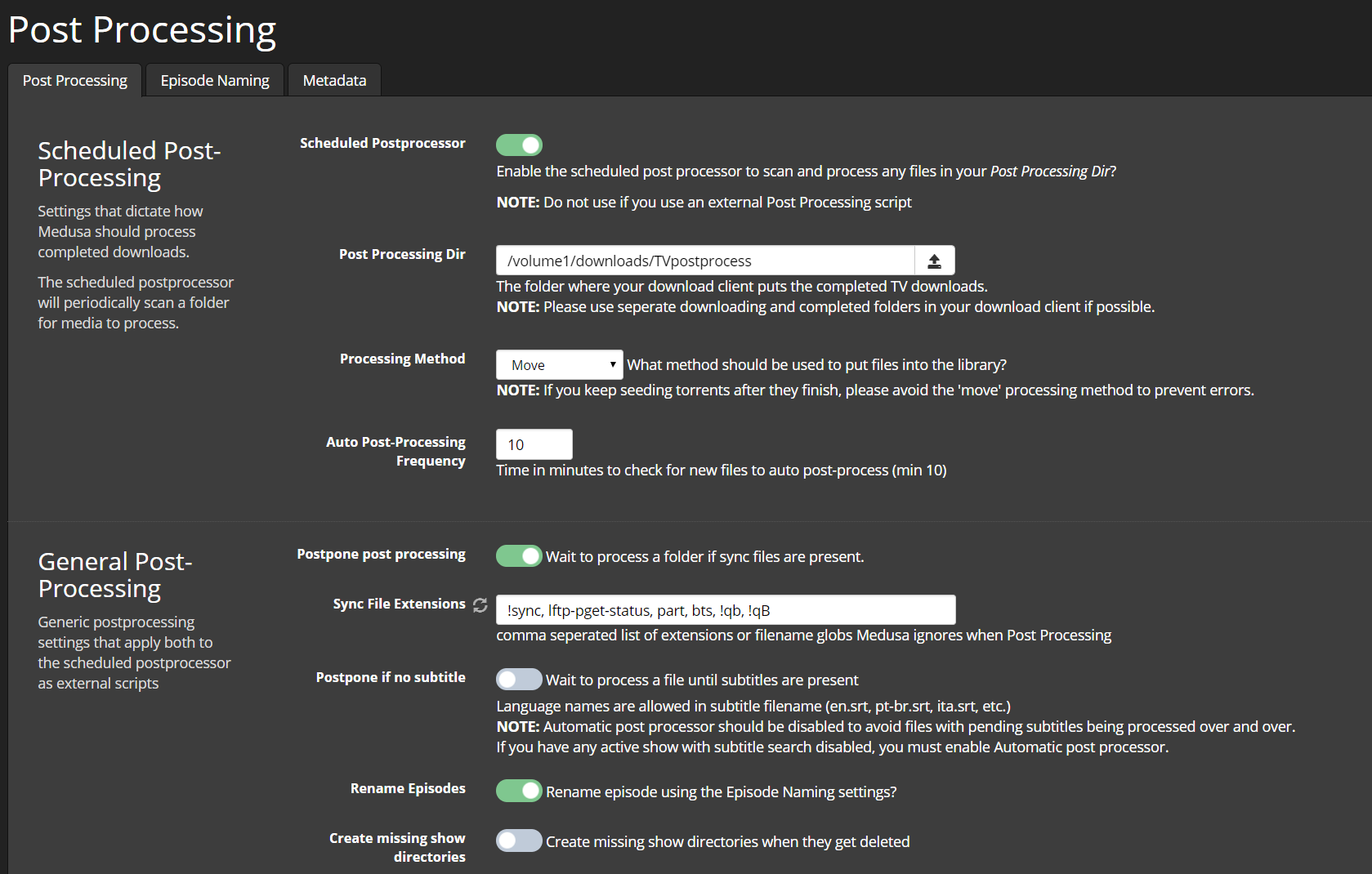

DrSpaldo
on 19 Jan 2019
Unfortunately that didn't fix it. It isn't doing the PP at all...
2019-01-19 19:52:53 INFO     CHECKVERSION :: [135af34] Checking for updates using GIT
2019-01-19 19:52:52 INFO     MAIN :: [135af34] Building internal name cache for all shows
2019-01-19 19:52:52 INFO     MAIN :: [135af34] Finished processing 2920 scene exceptions.
2019-01-19 19:52:51 INFO     MAIN :: [135af34] Updating exception_cache and exception_season_cache
2019-01-19 19:52:51 INFO     TORNADO :: [135af34] Starting Medusa on http://0.0.0.0:8083/
2019-01-19 19:52:51 INFO     MAIN :: [135af34] Starting Medusa [feature/start-stop-threads-from-config] using u'/volume1/@appstore/sickbeard-custom/var/config.ini'
2019-01-19 19:52:51 INFO     MAIN :: [135af34] Writing PID: 6905 to /volume1/@appstore/sickbeard-custom/var/sickbeard-custom.pid
2019-01-19 19:52:49 INFO     MAIN :: [135af34] Broken providers found: [u'torrent9', u'newpct']
Nothing in the logs after that. It has been over 15 minutes since I restarted
DrSpaldo
on 19 Jan 2019
What does the server status page show?
p0psicles
on 19 Jan 2019

So it is saying it is off, but, I am not sure why. It looks to be on in the settings for me
DrSpaldo
on 19 Jan 2019
Can you try. Turn off, save, turn on, save.
And share debug logs for that?
p0psicles
on 19 Jan 2019
Says true now.
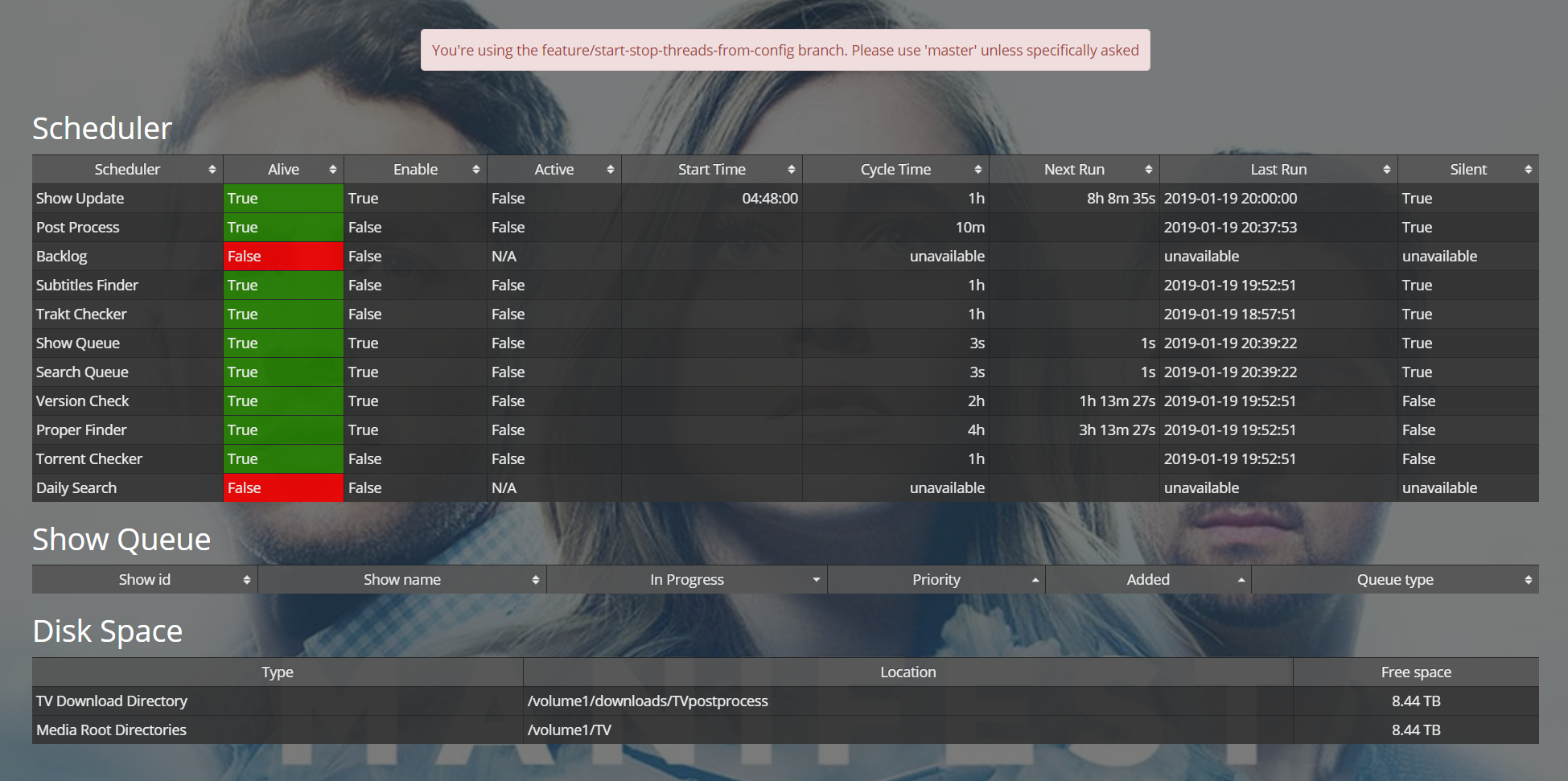
I will let you know in 10 minutes :)
DrSpaldo
on 19 Jan 2019
Unfortunately it didn't run again :(
See how it says Alive is true but Enable is False. Do you know what the difference is?
This is the only thing in the log I can find:
2019-01-19 20:55:50 INFO APIv2-Thread_6 :: [135af34] Auto postprocessor background process stopped
DrSpaldo
on 19 Jan 2019
Unless you have any ideas, I might have to switch back to master
DrSpaldo
on 19 Jan 2019
FYI. The server will no longer reboot. It crashes and I have to manually start it using Synology. Then, when it does start back up, it has forgotten the post processing being turned on.
DrSpaldo
on 19 Jan 2019
What do you mean with "the server will no longer reboot"?
Let me run some tests
p0psicles
on 19 Jan 2019
When you press 'restart' in the web interface, it just crashes it
DrSpaldo
on 19 Jan 2019
For the time being, I have reverted back to master and post processing is working again
DrSpaldo
on 19 Jan 2019
I wouldn't be able to say if it is your build though, or if it is the way I had to install the branch to get it going. It also could have been that...
DrSpaldo
on 19 Jan 2019
I've reproduced it. I'll try a different approach. I'll let your know when it's working on my linux install.
p0psicles
on 19 Jan 2019
I've reproduced it. I'll try a different approach. I'll let your know when it's working on my linux install.
Hi @p0psicles, so it wasn’t how I installed it on Synology?
DrSpaldo
on 19 Jan 2019
You installed it fine. The issue is related to an old bug we have. I'm fixing the bug in this pr. I'll update you when it's really test ready
p0psicles
on 19 Jan 2019
@DrSpaldo willing to help test?
p0psicles
on 3 Oct 2020
@p0psicles I am. Just hope this time it doesn't blow up like last time :) Synology isn't much fun with these installs
DrSpaldo
on 4 Oct 2020
Added to develop
p0psicles
on 11 Oct 2020
Related issues
 skarekrow
·
4Comments
skarekrow
·
4Comments
 wimpyrbx
·
5Comments
wimpyrbx
·
5Comments
 lamplis
·
3Comments
lamplis
·
3Comments
 sebeksd
·
3Comments
sebeksd
·
3Comments
 Shootersss
·
3Comments
Shootersss
·
3Comments
Most helpful comment
That would be perfect. Thank you very much. I’m enjoying Medusa:)