Medium-editor: Toolbar always visible (as shown in the demo)
Hello everyone,
I was wondering (as a non-developer) if there was a way to reproduce the toolbar as it is shown on the demo (https://yabwe.github.io/medium-editor/). I read that we could combine the static option with a visibility:visible class to make it appear, but it would be great to make it move toward the text once it is selected. Does it involve too much extra-coding ?
Thanks !
 adriendlph
All 4 comments
@adriendlph in case you were wondering, you can find all of the code for the landing page just by switching to the gh-pages branch of the medium-editor source code. It's been a while since I helped with making that fancy little animation happen with the toolbar, but I was able to piece through how it works by looking at these files in the gh-pages branch:
In splash.jade:
We create a div#toolbar-placeholder.toolbar-placeholder element directly above the editor element.
In medium-editor-site.js::initEditor():
After instantiating the instance of MediumEditor, we clone the toolbar into another element and make that element visible on the page. This way the toolbar will look and behave exactly like the real toolbar.
We then attach to the 'showToolbar' and 'hideToolbar' events of the editor to handle hiding/showing the cloned toolbar element accordingly.
In toolbar.less:
Here is the less that handles making the placeholder toolbar look zoomed in, and animate as it moves around and appears/disappears.
I might have left something else, but hopefully you can piece together how all of this works and see if it can help you accomplish your use case. Let me know if this didn't answer your question.
 nmielnik
on 28 Jan 2016
nmielnik
on 28 Jan 2016
Thank you for your great help ! Meanwhile, I fixed this problem as I could (by implementing an image placeholder of the toolbox, which is overriden by the static & real one when text is selected) but I looked into gh-pages and found some answers. I still have some issues to figure out, like how to make the placeholder appearing within a specific div. Unfortunately, I am not able to solve the #946 issue yet, but i will let you know if I make any progress ;-)
Thanks @nmielnik !
adriendlph
on 28 Jan 2016
Also very interested in this. I want BOTH a placeholder (when click into editor) AND the stalker effect (when select a word). Our users are NOT understanding that they even have formatting options, so the hidden toolbar is NOT working for us.
Image placeholder is genius. However, we also want it functional - to be able to click Bold so when start typing, bold text actually starts coming out. So we do want the placeholder to be functional as well! (seems that I can use this.execAction('fontSize', { size: size }); and friends)
Right now I need to find a way to CLIP the placeholder toolbar position to the parent div (rather than to the browser window). Right now we have the medium-editor on a scrollable child div, and the toolbar floats up and over other title elements on the page strangely (which looks bad) until it hits the top of the browser window and then sticks there (which is what we want).
my options currently:
     toolbar: {
        static: true,
        sticky: true,
        align: 'center',
        updateOnEmptySelection: true,
        buttons: [... etc ...],
      },
      placeholder: {
          text: 'Enter Text',
          hideOnClick: true
      },
      targetBlank: true
Feature requests:
- Support clipping the placeholder toolbar to parent div, instead of browser window
- Support BOTH at once:
a. "stalker" toolbar follows highlighted words (static: false)
b. "static" toolbar turns on when cursor is inside editor without word highlight (toolbar: {static: true,sticky:true, updateOnEmptySelection:true}), follows top of editor, clipping to browser window (and parent div, see #1)
 subatomicglue
on 5 Nov 2018
subatomicglue
on 5 Nov 2018
Illustrating the problem (from 1st "Feature request" above) how {static: true, sticky: true} does not clip the format bar to the parent scroll area:
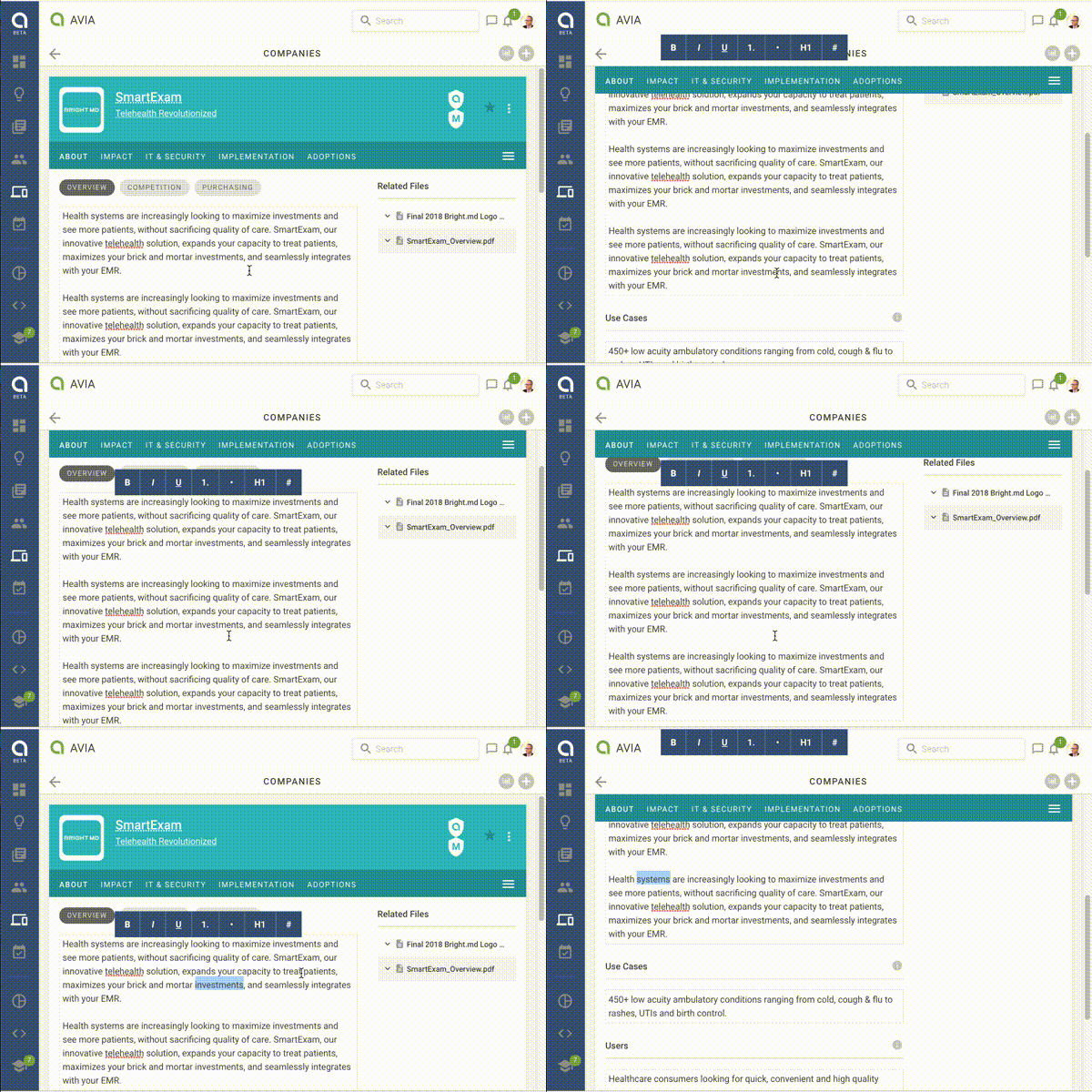
and At the end you can see that when highlighting a word, it would be nice to stalk the cursor (animate the toolbar down to the selection).
subatomicglue
on 9 Nov 2018
Related issues
 vominhtam
·
6Comments
vominhtam
·
6Comments
 jimmyadaro
·
6Comments
jimmyadaro
·
6Comments
 sPaCeMoNk3yIam
·
5Comments
sPaCeMoNk3yIam
·
5Comments
 ankur0890
·
4Comments
ankur0890
·
4Comments
 boesie
·
4Comments
boesie
·
4Comments
Most helpful comment
Illustrating the problem (from 1st "Feature request" above) how
{static: true, sticky: true}does not clip the format bar to the parent scroll area:and At the end you can see that when highlighting a word, it would be nice to stalk the cursor (animate the toolbar down to the selection).