Mediaplugin: Unable to get file location. This most likely means that the file provider information is not set in your Android Manifest file
Version Number of Plugin: 4.01.5
Device Tested On: Samsun Glaxy S5
Simulator Tested On:
Version of VS: 2017 Versión 15.8.0
Version of Xamarin:
I have followed follow up all steps of the tutorial for make a simple application, for select one photo of the some directory or Take one Photo, the metod for select the photo works fine but the metod for Take a photo send the error :
Unable to get file location. This most likely means that the file provider information is not set in your Android Manifest file. Please check documentation on how to set this up in your project.
I noticed that the the code
var file = await Plugin.Media.CrossMedia.Current.PickPhotoAsync(new Plugin.Media.Abstractions.PickMediaOptions
{
PhotoSize = Plugin.Media.Abstractions.PhotoSize.Medium
});
returns the path
"/storage/emulated/0/Android/data/com.companyname.AIAnalizeImage/files/Pictures/temp/images_5.jpeg"
and the code
var file = await Plugin.Media.CrossMedia.Current.TakePhotoAsync(new Plugin.Media.Abstractions.StoreCameraMediaOptions
{
PhotoSize = Plugin.Media.Abstractions.PhotoSize.Medium
});
returs the path
/storage/extSdCard/Android/data/com.companyname.AIAnalizeImage/files/Pictures
I don't know why the second code returns the route of the external storage "extSdCard" in stead off "emulated".
Some one have some Idea about it, thaks in advance.
Regards.
 LeonidasMx
All 15 comments
I have the same issue, this code works fine before. just leave this here for solutions
 apaini
on 24 Aug 2018
apaini
on 24 Aug 2018
lol, it's our fault. just in case if someone have the same issue check AndroidManifest.xml file android:authorities="${applicationId}.fileprovider" and chage to android:authorities="YOUR_APP_PACKAGE_NAME.fileprovider"
apaini
on 24 Aug 2018
@apaini my silly mistake.thanks for guiding me
 Neelampclarion
on 24 Aug 2018
Neelampclarion
on 24 Aug 2018
tried the above fix and I am still getting the issue. Any other ideas?
 natilivni
on 7 Feb 2019
natilivni
on 7 Feb 2019
I'm also getting this issue after the fix above
 KthProg
on 27 Mar 2019
KthProg
on 27 Mar 2019
After adding the provider in the manifest, another exception pops up :
Java.Lang.RuntimeException: Unable to get provider com.companyname.Biomasse.FileProvider: java.lang.ClassNotFoundException: Didn't find class "com.companyname.Biomasse.FileProvider" on path: DexPathList[[zip file "/data/app/com.companyname.Biomasse-1/base.apk"],nativeLibraryDirectories=[/data/app/com.companyname.Biomasse-1/lib/x86, /data/app/com.companyname.Biomasse-1/base.apk!/lib/x86, /system/lib, /vendor/lib]]
This is the manifest :
<?xml version="1.0" encoding="utf-8"?>
<manifest xmlns:android="http://schemas.android.com/apk/res/android" android:versionCode="1" android:versionName="1.0" package="com.companyname.Biomasse" android:installLocation="auto">
    <uses-sdk android:minSdkVersion="21" android:targetSdkVersion="27" />
    <uses-permission android:name="android.permission.CAMERA" />
    <application android:label="Biomasse.Android">
    <provider
      android:name="FileProvider"
      android:authorities="com.companyname.Biomasse.Android.fileprovider">

    </provider>
    </application>
</manifest>
I tried with
android:authorities="com.companyname.fileprovider">
android:authorities="com.companyname.Biomasse.fileprovider">
android:authorities="com.companyname.Biomasse.Android.fileprovider">
with no luck
 ArthurAttout
on 29 Apr 2019
ArthurAttout
on 29 Apr 2019
My bad, this was because I had to add the <meta-data> tag in provider. I used this as a template
ArthurAttout
on 29 Apr 2019
can you post the fixed xml @ArthurAttout please?
 Ciip1996
on 14 May 2019
Ciip1996
on 14 May 2019
I threw it away, Xamarin was giving me headaches. I think it was something like
<?xml version="1.0" encoding="utf-8"?>
<manifest xmlns:android="http://schemas.android.com/apk/res/android" android:versionCode="1" android:versionName="1.0" package="com.companyname.AppQ4evo" android:installLocation="preferExternal">
    <uses-sdk android:minSdkVersion="16" android:targetSdkVersion="27" />
    <uses-permission android:name="android.permission.INSTALL_LOCATION_PROVIDER" />
    <uses-permission android:name="android.permission.WRITE_EXTERNAL_STORAGE" />
    <uses-permission android:name="android.permission.READ_EXTERNAL_STORAGE" />
    <application android:label="AppQ4evo.Android" android:icon="@drawable/baseline_account_circle_black_18dp">
        <provider android:name="android.support.v4.content.FileProvider" android:authorities="com.companyname.AppQ4evo.fileprovider" android:grantUriPermissions="true" android:exported="false">
            <meta-data android:name="android.support.FILE_PROVIDER_PATHS" android:resource="@xml/file_paths" />
        </provider>
    </application>
</manifest>
I am still having that issue:(Media plugin version: 4.3.1-beta)
ERROR:Unable to get file location. This most likely means that the file provider information is not set in your Android Manifest file. Please check documentation on how to set this up in your project.
<application android:icon="@drawable/icon" android:label="Merck">
        <provider android:name="android.support.v4.content.FileProvider" android:authorities="myproject.mypackage.fileprovider" android:exported="false" android:grantUriPermissions="true">
            <meta-data android:name="android.support.FILE_PROVIDER_PATHS" android:resource="@xml/file_paths"></meta-data>
        </provider>
i double checked that the file_paths.xml is present in xml folder under resources directory
 softsan
on 7 Oct 2019
softsan
on 7 Oct 2019
softsan - did you get this figured out?
 HK-AERIAL-VTOL
on 22 Oct 2019
HK-AERIAL-VTOL
on 22 Oct 2019
Yeh in my case the package name is was different (case sensitivity issue)
softsan
on 22 Oct 2019
i still can not get it to work. I have looked this up and followed everyone of the direction with the same results. Can someone please help me ... this is awful.
 ghost
on 24 Dec 2020
ghost
on 24 Dec 2020

ghost
on 24 Dec 2020
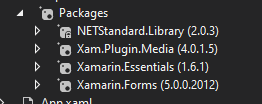
I had same issue, i downgraded Xam.Plugin.Media version to 4.0.1.5
 RavindraJijotia
on 26 Jun 2021
RavindraJijotia
on 26 Jun 2021
Related issues
 mdcso
·
4Comments
mdcso
·
4Comments
 manonaga2188
·
5Comments
manonaga2188
·
5Comments
 ivmazurenko
·
3Comments
ivmazurenko
·
3Comments
 DNF-SaS
·
3Comments
DNF-SaS
·
3Comments
 fadaEntrepidus
·
6Comments
fadaEntrepidus
·
6Comments
Most helpful comment
lol, it's our fault. just in case if someone have the same issue check AndroidManifest.xml file android:authorities="${applicationId}.fileprovider" and chage to android:authorities="YOUR_APP_PACKAGE_NAME.fileprovider"