Mediaelch: Questions / Issues for movies in v2.8.4 | Basename with file extension
Is your feature request related to a problem? Please describe.
Doubts and Facts
If you wish I can issue the item individually.
MOVIES 2.8.4
1 Translation = did not come. It's the same 4 months ago.
2 Channels Audio = does not show how many. (MediaInfo) https://github.com/Komet/MediaElch/issues/1172
3 Kodi v19 = is available at the dropdown on the Kodi tab. I had not seen.
The default was v18. Is it v17 now?
Can I choose v19?
v19 uses the new rules for Collection?
Need to create folder for Collection?
My entire Film Library was made with v17 or v18, I think.
If I adopt v19 now, should I redo all scrapers, all films?
4 advancedsettings = ME has not mapped countries.
Did not recognize .mpcpl video file extension.
He's on advancedsettings. It seems that ME didn't read or respect it.
    <fileFilters>
        <movies>*.avi,*.mkv,*.mp4,*.m4v,*.mov,*.flv,*.mpcpl,*.ifo,*.vob,*.iso,*.disc</movies>
        <concerts>*.avi,*.mkv,*.mp4,*.m4v,*.mov,*.flv</concerts>
        <tvShows>*.avi,*.mkv,*.mp4,*.m4v,*.flv</tvShows>
        <subtitle>*.srt,*.ac3,*.aac,*.dts,*.e-ac3,*.mp3</subtitle>
    </fileFilters>
EDIT
2 Channels Audio
2.8.3 2020-12-20 = OK
2.8.3.2020-12-23 = I haven't tested it. I can install and test.
2.8.3 2020-12-27 = OK
2.8.3 2021-01-02 = OK
2.8.3 2021-01-06 = ERROR
2.8.4 2021-01-09 = ERROR
4 advancedsettings - .mpcpl
2.8.3 2020-12-20 = OK
2.8.3.2020-12-23 = I haven't tested it. I can install and test.
2.8.3 2020-12-27 = ERROR
2.8.3 2021-01-02 = ERROR
2.8.3 2021-01-06 = ERROR
2.8.4 2021-01-09 = ERROR
 ticao2
All 17 comments
Hi,
I'll try my best to answer your questions. :-)
- Could you provide me with one concrete example? That makes debugging easier. :)
- Fixed, see #1178
- Sorry for the confusion. v19 is currently only an alias for v17. There are not differences in the NFOs generated by MediaElch between v17 and v18 and v19. What
Collectiondo you refer to? I may have missed something in the release logs of Kodi... - Tested locally with latest master and it works... :-/
See:
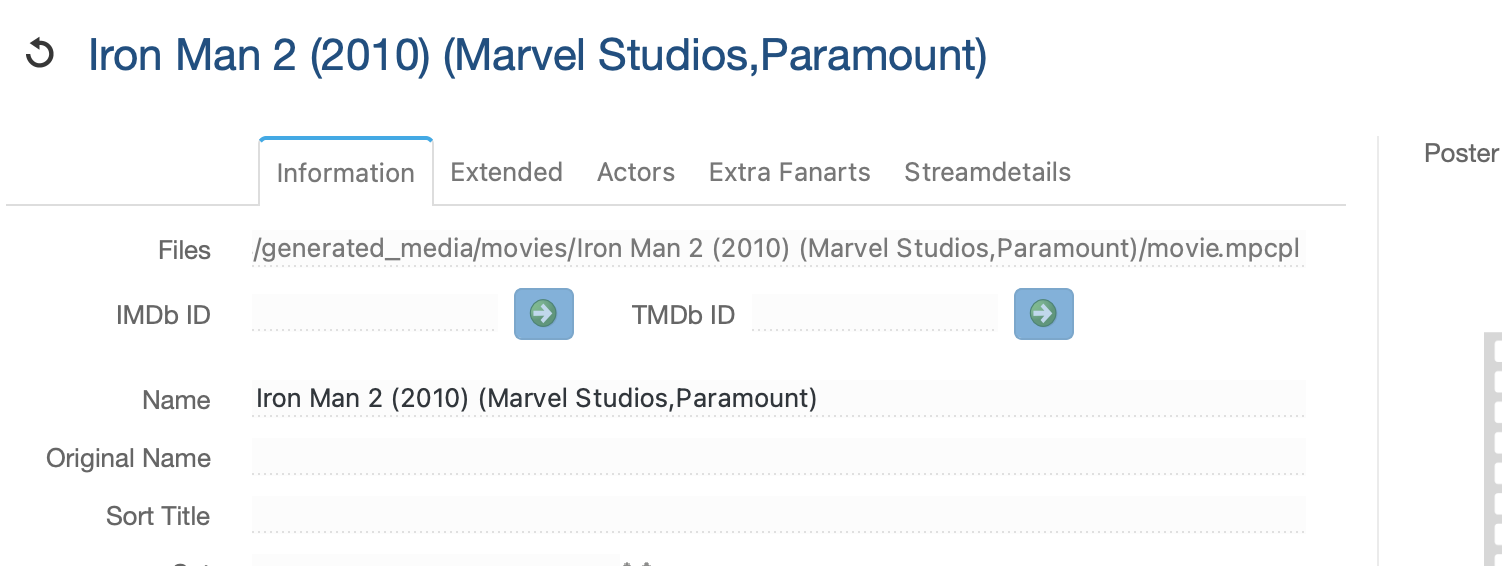
Could you paste your whole XML file? :)
Regards,
Andre
 bugwelle
on 14 Jan 2021
bugwelle
on 14 Jan 2021
1 Translation = I don't know if I understood your request correctly.
For example: About 4 months ago I changed the translation of TV Show or Series.
Before it was in an older form: Series
I changed to a more current form: Series
2 Channels Audio = OK.
3 Kodi v19 = As for the Collection or Set. There are several open topics here:
https://github.com/Komet/MediaElch/issues/642 https://github.com/Komet/MediaElch/issues/800 https://github.com/Komet/MediaElch/issues/822 https://github.com/Komet/MediaElch/issues/1001 https://github.com/Komet/MediaElch/issues/1129 https://github.com/Komet/MediaElch/issues/1158
It seems that the Kdi v19 will change the method a lot.
So when v19 is implemented, Collection or Set will probably be resolved. :-)
4 advancedsettings = If I got it right, you want my advancedsettings.xml file
Github does not accept .xml :-) But it does accept .zip files
Here it is
ticao2_advancedsettings.zip
ticao2
on 14 Jan 2021
4 advancedsettings
I have a strong suspicion for the problem.
I compared two files of my advancedsettings.xml. The Old and the New.
ticao2 OLD advancedsettings OLD.zip
The file I posted is the New one, where TMDb Series Genres were included.
And these genres have the character " & ".
Action & Adventure , Sci-Fi & Fantasy and War & Politic
I don't know if there's any point in escaping; \&
I'll try.
EDIT
No, nothing done. Does not work with \
But without these new Genres everything works normally.
Perhaps you have a solution. :-)
EDIT
And it might be interesting, to see the UI translation problem.
MediaElch_2.8.4_2021-01-09_Torrent.log
ticao2
on 14 Jan 2021
- I'll rephrase it: What string is not translated in MediaElch's UI? :-)
What English word do you see when you open MediaElch? 😃 - -
- Ah, ok. Thanks. :)
- Found the issue: Your XML file is invalid. Please change all lines with an ampersand (
&), for example:
-<map from="Action & Adventure" to="Ação & Aventura" />
+<map from="Action & Adventure" to="Ação & Aventura" />
Ampersands have special meaning in XML (as you noticed by removing those lines) 😄
We lack error reporting... The ampersand has been an issue a lot of times. I opened #1181 for it.
bugwelle
on 15 Jan 2021
For 1), see #1184
bugwelle
on 15 Jan 2021
- OK. I read #1184 .
- OK
- OK
- In your example, only the "to =" is corrected.
Shouldn't "from =" also be corrected?
>
>diff > -<map from="Action & Adventure" to="Ação & Aventura" /> > +<map from="Action & Adventure" to="Ação & Aventura" /> >
ticao2
on 15 Jan 2021
Oh, yes of course. 🤦
bugwelle
on 16 Jan 2021
I think with that all questions are answered, right? :)
I'll close this issue then.
bugwelle
on 16 Jan 2021
My item 4 problem has reappeared. Mapping .mpcpl file extension.
I tested using the same advancedsettings file without the Genres that have & or &
advancedsettings.zip
2.8.5 2021-01-15 Mapping
Movies Genres = OK
Movies Countries = OK
Movies Ext .mpcpl = OK
Series Genre = ERROR
2.8.5 2021-01-19 Mapping
Movies Genres = OK
Movies Countries = OK
Movies Ext .mpcpl = ERROR
Series Genre = OK #1185
Mapped Gender
But stopped mapping .mpcpl file extension
If you want I can test the avancedsettings file already with the correction of the character & > &
ticao2
on 21 Jan 2021
Hi,
I tested with your provided xml file and movie files ending with .mpcpl are recognized. Could you please give me an example filename? e.g. what movie is not recognized and how is the file called? e.g. /Iron Man/movie.mpcpl
I want to make a bugfix release today or tomorrow. But this regression should not happen.
bugwelle
on 21 Jan 2021
Yes. I tested it. He's reading, identifying.
The difference is that: in previous versions, until 2.8.5-01-15, the name of the .nfo file was created with a different rule.
So the few films and .nfo I made in the last few days were no longer recognized.
In the past it incorporated the extension .mpcpl in the name of the .nfo file and also in the archives of the arts.
Now, in version 2.8.5-01-19, it no longer incorporates the extension of the name of the media file in the name of .nfo.
I'll post here the one with the before and after. :-)
 Volume in drive G:\ is Series
 Directory of G:\Torrent_Concluidos A\Fuga à Meia-Noite (1988) mkv@1080p 5.2G (Dual)\Fuga à Meia-Noite Extras (1988)\Fuga à Meia-Noite Entrevistas (1988)\

00 Fuga à Meia-Noite Entrevistas (1988).mpcpl                         2 KB  02/01/2021
00 Fuga à Meia-Noite Entrevistas (1988).mpcpl.nfo                     3 KB  02/01/2021
00 Fuga à Meia-Noite Entrevistas (1988).mpcpl-banner.jpg            208 KB  02/01/2021
00 Fuga à Meia-Noite Entrevistas (1988).mpcpl-clearart.png          623 KB  02/01/2021
00 Fuga à Meia-Noite Entrevistas (1988).mpcpl-clearlogo.png          52 KB  02/01/2021
00 Fuga à Meia-Noite Entrevistas (1988).mpcpl-discart.png           499 KB  02/01/2021
00 Fuga à Meia-Noite Entrevistas (1988).mpcpl-fanart.jpg            401 KB  02/01/2021
00 Fuga à Meia-Noite Entrevistas (1988).mpcpl-landscape.jpg         830 KB  02/01/2021
00 Fuga à Meia-Noite Entrevistas (1988).mpcpl-poster.jpg            172 KB  02/01/2021
00 Fuga à Meia-Noite Entrevistas (1988).nfo                           3 KB  21/01/2021
00 Fuga à Meia-Noite Entrevistas (1988)-banner.jpg                  208 KB  21/01/2021
00 Fuga à Meia-Noite Entrevistas (1988)-clearart.png                623 KB  21/01/2021
00 Fuga à Meia-Noite Entrevistas (1988)-clearlogo.png                52 KB  21/01/2021
00 Fuga à Meia-Noite Entrevistas (1988)-discart.png                 499 KB  21/01/2021
00 Fuga à Meia-Noite Entrevistas (1988)-fanart.jpg                  401 KB  21/01/2021
00 Fuga à Meia-Noite Entrevistas (1988)-landscape.jpg               830 KB  21/01/2021
00 Fuga à Meia-Noite Entrevistas (1988)-poster.jpg                  172 KB  21/01/2021
01 Hey Marvin! - interview with actor John Ashton.mkv            210936 KB  01/01/2021
02 I'm Mosely! - audio interview with actor Yaphet Kotto.mkv      18414 KB  01/01/2021
03 Midnight Writer - interview with screenwriter George Ga..     260648 KB  01/01/2021
04 Moscone Bail Bonds - interview with actor Joe Pantolian..     451480 KB  01/01/2021
05 We Got the Duke - interview with actor Charles Grodin.mkv     130006 KB  01/01/2021


  22 file(s)
  Total filesize 1077050 KB
  107,81 GB free
I believe that this only happens when you have a folder with several media files, but in the settings, separate folders are selected.
And this is the case. The folder with the Featurettes, the extras, is part of the movie directory, which is set as separate folders.
I believe the same is true with any media file extension.
The first file is the chosen one, and the .nfo and all the arts will have the media file extension in the name.
It's been that way for a long time. I think it always has been. As long as I can remember, it’s like that.
I don't know whether on purpose or unintentionally. Maybe @Komet will remember.
I don't know how Kodi handles this. Maybe it's worth checking.
With all the changes you've been making, you must have fixed this behavior. Without noticing. 😀
ticao2
on 21 Jan 2021
Maybe it’s interesting to know. I just did a test.
The old ME, 2.8.5-01-15 or older:
Creates files with the extension included in the name
It only reads, recognizes, if files are like this.
Does not recognize in the new format.
That is: either everything from the old way to the old or everything from the new way to the new.
ticao2
on 22 Jan 2021
Hi,
Directory of G:\Torrent_Concluidos A\Fuga à Meia-Noite (1988) mkv@1080p 5.2G (Dual)\Fuga à Meia-Noite Extras (1988)\Fuga à Meia-Noite Entrevistas (1988)\
Do you really have so many nested folders? 😮
With all the changes you've been making, you must have fixed this behavior. Without noticing.
I think this happes because I fixed https://github.com/Komet/MediaElch/issues/1194
The commit responsible is: dbb02101eeb42dbbc359d104e1d10d181bde590f
We now always remove the file extension. The code that changed is responsible for detecting multiple parts of a movie, e.g. movie-part1.mkv, movie-part2.mk4 are the same movie. To be honest I don't know why the extension isn't removed. But as I don't want to break so many user bases, I'll partially revert the change so that the extension becomes part of the filename again.
THANK YOU for testing this! You make my life a lot easier and developing for MediaElch more fun. 😄
bugwelle
on 22 Jan 2021
Should be fixed with: https://github.com/Komet/MediaElch/commit/5b45af37a6d6260b5cbd2a68d319f4f0ffab89d3
I reverted to the old behavior. :)
bugwelle
on 22 Jan 2021
Do you really have so many nested folders? 😮
In this case the featurettes have one more folder. The author of the torrent did so. And I confess that in this program that I use, Deluge, I don't know how to redirect to the files. So I keep it as it came.
But don't be alarmed. I have worse cases. 😄
To be honest I don't know why the extension isn't removed. But as I don't want to break so many user bases, I'll partially revert the change so that the extension becomes part of the filename again.
I think the new way is cleaner, I prefer it. I never understood why it was like that. It is not the style of ME. I thought it must be because of some need for Kodi. I do not know.
But without a doubt there must be other users who have folders with different films but marked as separated by folder. I must not be the only one. Many blurays have extras and the extras are better left in a subfolder of the movie. I think.
So yes, they are going to have some work to correct the film library. I have time and patience. They sometimes don't. 😄
THANK YOU for testing this! You make my life a lot easier and developing for MediaElch more fun. 😄
When you need. I believe it is the only way I can contribute.
ticao2
on 22 Jan 2021
I may change MediaElch's behavior in a major version change. But I don't want to change it in a bugfix release.
The file extension isn't removed if there are multiple video files in one movie directory. Otherwise it is removed... :-/
When you need. I believe it is the only way I can contribute.
And I very much appreciate it. :-)
bugwelle
on 22 Jan 2021
Related issues
bugwelle
·
6Comments
 psonnosp
·
6Comments
ticao2
·
7Comments
psonnosp
·
6Comments
ticao2
·
7Comments
 dfarin
·
5Comments
dfarin
·
5Comments
 txtsd
·
3Comments
txtsd
·
3Comments