Mbed-os: wait function cause hang on STM32L451CEU6 (ticker_read_us loops forever)
Description
The target is STM32L451CEU6 (custom target), mbed version is 2 (RTOS disabled), imported from CLI (last version), custom target specific files have been gathered from a STM32CubeMx project (last version).
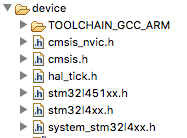
Compilation is fine, peripherals are working (GPIO, UART etc) but the wait function is hanging forever with no error (NDEBUG preprocessor define is disabled to ensure i get debug messages).
When a LED toggle is added in mbed_ticker_api/ticker_read_us we can see this function is looping forever. I also tried to step debug and watch ticker->queue->present_time value, it seems to stay at 0, stepping loops forever between timer functions.
In hal_tick.h the timer used is TIM2, 32bit mode, TIM2 is the only 32bit timer on this platform. For good sake i tried it in 16bit mode and i tried TIM3 in 16bit, same result (hang forever on wait, no error). The project used for tests is the blinky example, imported from mbed CLI..

I am out of ideas on what to try next. If i replace the wait function in main by a simple counter delay everything works normally, and anyway debug has shown the problem is really related to the mbed_wait_api_no_rtos and mbed_ticker_api/ticker_read_us. By the way i wonder why wait function is using the TIM2 peripheral rather than systick for a 100ms delay.
The IDE is SW4STM32 + GCC 6.3.1, i also tried with the CLI (last version) + GCC 6.3.1.
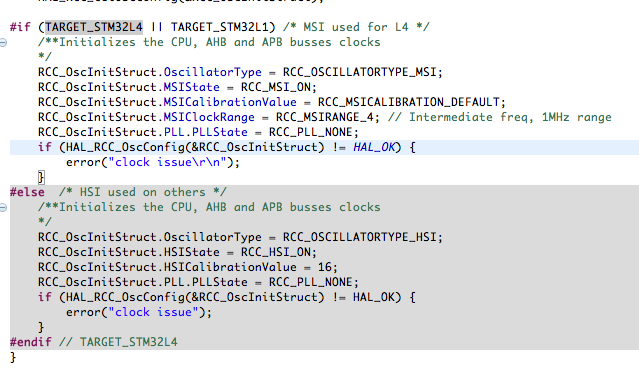
As a side note i noticed that in the SW4STM32 project sleep.c had all STM32L4 sections disabled, when they should be enabled. I added a define in mbed_config.h to correct this, but it is conerning that a project exported from CLI (for SW4STM32) has such defines not set right.
Screenshot below show sleep.c before and after the define was added in mbed_config.h.


I made a STM32CubeMx project to verify that the systick was working fine and it is, this problem only shows up on mbed.
The project is attached below (DEBUG folder cleared to reduce weight).
mbed-os-example-blinky2.zip
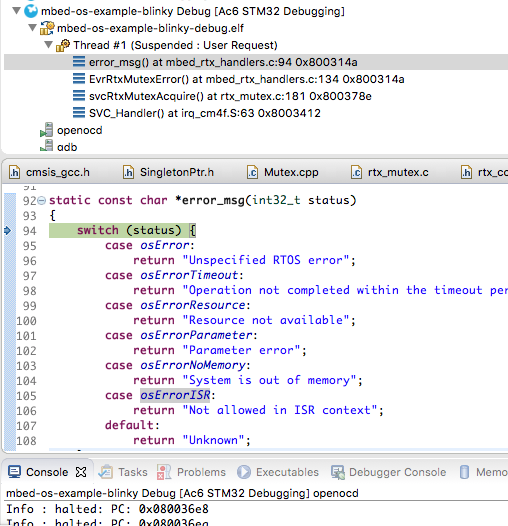
EDIT: for test purposes made a clone project with RTOS enabled (MBED 5), strangely enought on this project the wait function is working fine, however, as soon as the UART port is declared (even if not used), everything fails right after boot with the error https://armmbed.github.io/mbedos-error/?error=0x80010133
(i had to use the UART function from the HAL to get debug message since the MBED serial was the cause of failure and thus not working). I painfully stepped from the start of serial port initialisation, it took half an hour (why mbed think its a good idea to spend hundreds of instructions to check for pinmap at runtime is out of my understanding), here is where the failure is occuring (error status is -8 which is osRtxErrorKernelNotRunning).
Issue request type
[ ] Question
[ ] Enhancement
[x] Bug
 Hoel
Hoel
All 15 comments
Internal Jira reference: https://jira.arm.com/browse/MBOCUSTRIA-135
 ciarmcom
on 5 Nov 2018
ciarmcom
on 5 Nov 2018
Hi
Can you post your development branch ? We need to see all the files to have a full picture. Thanks.
 bcostm
on 5 Nov 2018
bcostm
on 5 Nov 2018
Hello,
The whole project is included in the first post (mbed-os-example-blinky2.zip) it contains all the sources. As of now my concern is the MBED 2 issue because that is what we work with, i will upload the version with MBED 5 later once the first issue is solved.
Hoel
on 5 Nov 2018
I didn't see anything in particular in your project that could impact the timer2 to work correctly.
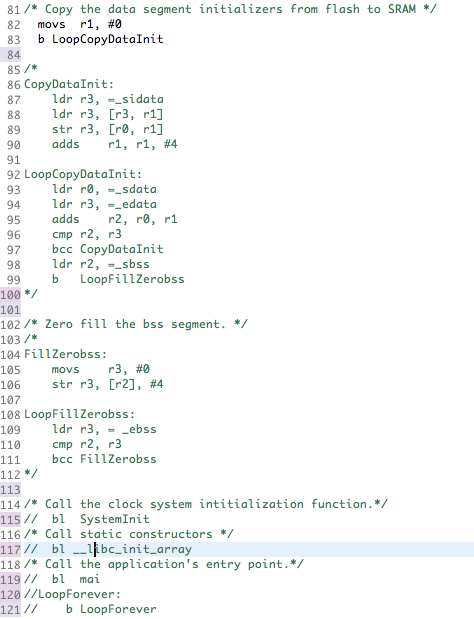
I see something different in the GCC assembler file at the start point.
We have this in other L4 boards:
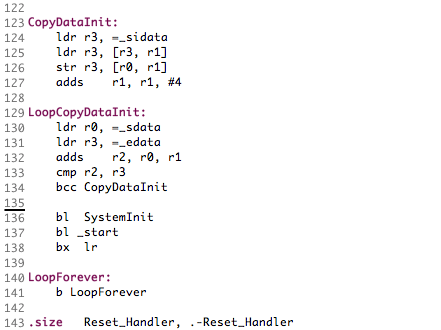
  bl _start
  bx  lr
and you have this:
  bl __libc_init_array
  bl    main
LoopForever:
b LoopForever
Can you try by changing this start sequence ?
bcostm
on 5 Nov 2018
Oh, very interresting, it is in startup_stm32l451xx.s right?
EDIT: i tried it, sadly it didnt fixed the problem
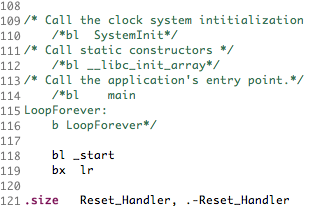
EDIT2: i checked the Nucleo L476RG startup, actually the sequence is
bl SystemInit
  bl _start
  bx  lr
So i changed mine according to this, but the problem persist, the only difference is : before, LED was lid after bootup and then delay function hangs, now LED stays off after bootup.
Hoel
on 5 Nov 2018
I am not sure which platform do you use ? Is it the L4680 or the L4680_L451 in the targets.json ?
Because for the L4680_L451, the value for the clock source is USE_PLL_XTAL and it should be USE_PLL_HSE_XTAL.
I saw also in the SetSysClock_PLL_HSE() function a call to HAL_Init() at the beginning. Try to remove it.
bcostm
on 5 Nov 2018
Is it the L4680 or the L4680_L451 in the targets.json ?
sorry for that, the L4680 was the intial version of our modules (with STM32L462CEU6), what i use now and which exhibits the problem is L4680_L451 based on STM32L451CEU6.
i will change to USE_PLL_HSE_XTAL
I saw also in the SetSysClock_PLL_HSE() function a call to HAL_Init() at the beginning. Try to remove it.
Yes it was here because i used the HAL UART_transmit in order to get an output on error at some point, i tried with and without it. Anyway as you may have noticed this function is not used, instead i used SystemClock_Config from the working HAL project
I modified the beginning of startup file according to the Nucleo L432, but same result
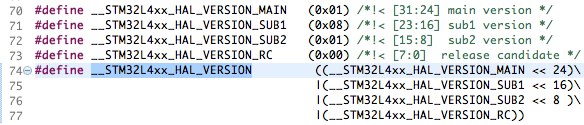
Finally i noticed a difference in the HAL version, MBED is based on 01.08.02.00
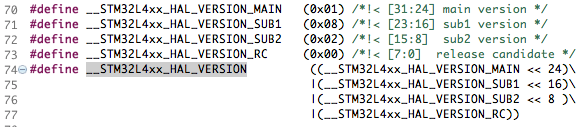
but the files i used for my target (from STM32CubeMX) are 01.08.01.00
Now, i dont know how to get the files in the same version as MBED, since STM32CubeMX has the latest revision, can you provide these files for my target in the corect version?
EDIT : i corrected USE_PLL_HSE_XTAL in the JSON, however SW4STM32 doesnt use the JSON file it uses mbed_config.h and the CLOCK_SOURCE was correctly defined in it.

Hoel
on 5 Nov 2018
Now, i dont know how to get the files in the same version as MBED, since STM32CubeMX has the latest revision, can you provide these files for my target in the corect version?
It is not an easy task to update the CubeL4 HAL files in mbed. We have to re-test all STM32L4 platforms to ensure there are no regression and it is not in our short-term plan. But I don't think your problem comes from an older HAL version, because the STM32L451xx devices are well supported in the actual mbed HAL files.
bcostm
on 5 Nov 2018
yes i dont think the problem comes from here either, the version are very close.
What i asked is only : do you have the files for my target (STM32L451) in the same version as the one used in MBED (01.08.02.00) so i can try with these?
I modified the delay to 0.09s in main loop and something occurs, i can see the LED extremely dim but blinking fast, not sure what conclusion to make of this... Maybe at 0.09S TIM2 is used and at 0.1S the systick is used, that would mean the systick is the problem here.
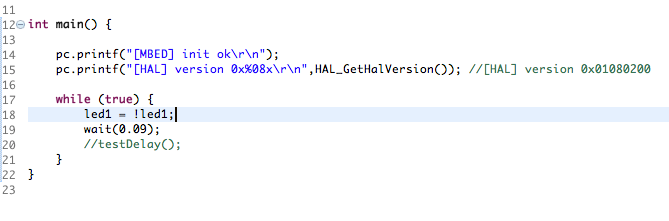
EDIT:
If i enable my counter delay too, the LED is blinking normally, that mean when set to 0.09S the wait function is working.
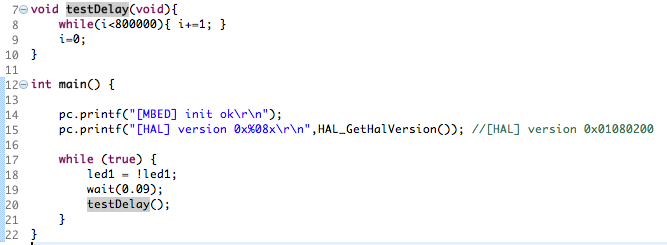
EDIT2:
Well, the blinking pattern was dubious so i doubled the value of the counter delay to make sure, now the LED blinks but it is ON most of the time, the OFF section is very short, there is really something going on here.
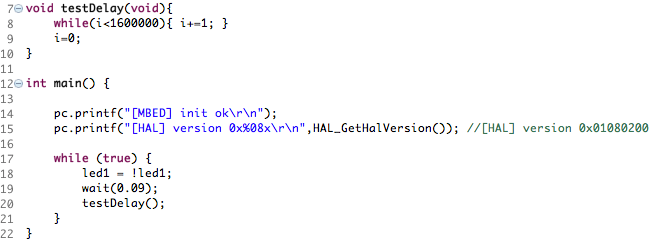
EDIT3:
i set wait to 0.1S and let the counter delay, it blinks with the same dubious pattern. If i remove the counter delay and let only wait to 0.1S then it gets stuck in the wait function and the LED stays OFF. All that doesnt make any sense.
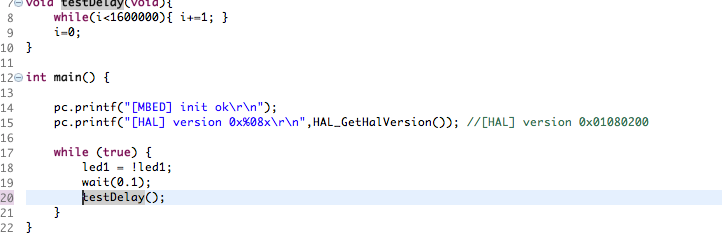
Hoel
on 5 Nov 2018
OK I misunderstood your request. Here the full CMSIS files that we use in mbed:
CMSIS_STM32L4xx_1.4.2.zip
bcostm
on 5 Nov 2018
Thank you i will try with these files just in case.
I really dont understand the behavior of last tests. The target doesnt reset so how the counter delay time can be shortened by the wait function malfunction, and only during the OFF cycle.
By the code ON and OFF cycles should be stricly of identical duration, something very wrong is occuring here.
Hoel
on 5 Nov 2018
as expected, the CMSIS file update didnt change anything, same weird behavior when the counter delay is added, same hang on wait when the counter delay is removed.
Hoel
on 5 Nov 2018
just to illustrate what is going on with PA15:
counter delay alone :

counter delay + wait(0.1) :

wait(0.09) alone :

wait(0.1) alone :

the ratio is 100mS - 1.5uS

The only explanation i can think of is : somehow the wait function works one time on two, first call 100mS, second call 1.5uS.
EDIT:
OK the problem is now solved, the reason for the weird behavior of PA15 was HAL_GPIO_TogglePin that was set inside wait_us function previously for debug purpose and not removed.
Now the delay function is working as it should, so one of the changes mades from yesterday solved the probem, either modifications of startup_stm32l451xx.s or update of CMSIS files (or both), finally.
Big thanks @bcostm !
Hoel
on 5 Nov 2018
Just a few comments / questions to look for possible reasons:
- another possible explanation is that the timer works fine as there is actually activity every 100ms.
- maybe GPIO state is not maintained or programmed properly - PA15 is sometimes used for JTAG, can you check if this is the case here ? Also can you check if the same happens with another pin ?
- another possibility is that deep sleep mode would be entered, do you have a debugger to check whether hal_deepsleep function is entered at all ?
hope this could help ....
I sent this while you were closing so forget it :-) it is finally much simpler than we thought ...
 LMESTM
on 5 Nov 2018
LMESTM
on 5 Nov 2018
another possible explanation is that the timer works fine as there is actually activity every 100ms.
maybe GPIO state is not maintained or programmed properly - PA15 is sometimes used for JTAG, can you check if this is the case here ? Also can you check if the same happens with another pin ?
Yes indeed, in the end the timer worked fine and the problem was a HAL_GPIO_TogglePin set yesterday on PA15 inside wait_us for debugging purpose.
However i confirm that when the problem occured yesterday this HAL_GPIO_TogglePin was not in the delay function, it has been added later to try understanding the issue. I also stepped debug at the time.
another possibility is that deep sleep mode would be entered, do you have a debugger to check whether hal_deepsleep function is entered at all ?
hope this could help ....
Yes maybe, however as pointed by bcostm the startup file was stock from STM32CubeMx and not modified as other MBED startup file and, even if it shouldnt matter, there was a descrepency between MBED HAL files and the CMSIS files i added for the custom target.
Anyway, everything is now working as it should, i will update and check the MDEB 5 project to ensure that it is also working fine and doesnt throw this mutex error anymore.
EDIT: tested with MBED 5, problem solved as well, so i can now confirm the problem was startup file in both cases, MBED modification was needed.
  bl _start
  bx  lr
instead of
  bl __libc_init_array
  bl    main
Related issues
 ashok-rao
·
4Comments
ashok-rao
·
4Comments
 1domen1
·
3Comments
1domen1
·
3Comments
 ccchang12
·
4Comments
bcostm
·
4Comments
ccchang12
·
4Comments
bcostm
·
4Comments
 MarceloSalazar
·
3Comments
MarceloSalazar
·
3Comments
Most helpful comment
Yes indeed, in the end the timer worked fine and the problem was a HAL_GPIO_TogglePin set yesterday on PA15 inside wait_us for debugging purpose.
However i confirm that when the problem occured yesterday this HAL_GPIO_TogglePin was not in the delay function, it has been added later to try understanding the issue. I also stepped debug at the time.
Yes maybe, however as pointed by bcostm the startup file was stock from STM32CubeMx and not modified as other MBED startup file and, even if it shouldnt matter, there was a descrepency between MBED HAL files and the CMSIS files i added for the custom target.
Anyway, everything is now working as it should, i will update and check the MDEB 5 project to ensure that it is also working fine and doesnt throw this mutex error anymore.
EDIT: tested with MBED 5, problem solved as well, so i can now confirm the problem was startup file in both cases, MBED modification was needed.
instead of