mbed-cli Manual installation with python3
mbed-cli Manual installation with python3
I follwed manual installation of mbed - cli on windows
Here's my env
windows 10
python 3.6.6 (same for pip)
mbed cli 1.8.3
gcc compiler 8 2018-q4-major
mbed os - more than 5.9 (actually don't know -- was my first time)
TARGET "DISCO_L475VG_IOT01A"
Just followed manual && got some troubles && shoot them
Actually, I modified python source code a little, For mbed users with python3, I'll leave my footprints
I don't know whether such problem is just for me. Anyway, for sbd who likes me, let's start ;)
1. install problem
if you imported example and type
$ mbed compile -cit starts to install python libraries automatically and maybe it consider dependencies(maybe... I'm just stranger about this) So, I got some errors like egg~~ something (I forgot to capture that just remember egg 👍 )
If you open mbed-os file, there's list of require things (requirement.txt)
I tried stupid, but definite way
$ pip install "name of library one-by-one"&& No such commands like need ~~ library occurs 👍
So much Heuristic, Anyway, && typed such commands in my example folder
$ mbed config -G GCC_ARM_PATH "(folder that my ones - toolchain exist )~\bin"
$ mbed config -G TOOLCHAIN "GCC_ARM"
than, typed compile again. && Got this Error
[mbed] WARNING: If you're using Python 3 with Mbed OS 5.8 and earlier versions, Python errors will occur when compiling, testing and exporting
---
[mbed] Working path "C:\Users\tge13\workshop\mbed-os-example-blinky" (program)
Traceback (most recent call last):
  File "C:\Users\tge13\workshop\mbed-os-example-blinky\mbed-os\tools\make.py", line 40, in
    from tools.options import get_default_options_parser
  File "C:\Users\tge13\workshop\mbed-os-example-blinky\mbed-os\tools\options.py", line 24, in
    from .toolchains import TOOLCHAINS
  File "C:\Users\tge13\workshop\mbed-os-example-blinky\mbed-os\tools\toolchains\__init__.py", line 43, in
    from ..config import (ConfigException, RAM_ALL_MEMORIES, ROM_ALL_MEMORIES)
  File "C:\Users\tge13\workshop\mbed-os-example-blinky\mbed-os\tools\config\__init__.py", line 37, in
    from ..arm_pack_manager import Cache
  File "C:\Users\tge13\workshop\mbed-os-example-blinky\mbed-os\tools\arm_pack_manager\__init__.py", line 2, in
    from urllib2 import urlopen, URLError
  File "c:\program files (x86)\microsoft visual studio\shared\python36_64\lib\site-packages\urllib2.py", line 220
    raise AttributeError, attr
                        ^
SyntaxError: invalid syntax
[mbed] ERROR: "c:\program files (x86)\microsoft visual studio\shared\python36_64\python.exe" returned error.
       Code: 1
       Path: "C:\Users\tge13\workshop\mbed-os-example-blinky"
       Command: "c:\program files (x86)\microsoft visual studio\shared\python36_64\python.exe -u C:\Users\tge13\workshop\mbed-os-example-blinky\mbed-os\tools\make.py -t GCC_ARM -m DISCO_L475VG_IOT01A --source . --build .\BUILD\DISCO_L475VG_IOT01A\GCC_ARM -c"
       Tip: You could retry the last command with "-v" flag for verbose output
---
[mbed] WARNING: Using Python 3 with Mbed OS 5.8 and earlier can cause errors with compiling, testing and exporting
---
2. SyntaxError!! And, opened __init__.py. It starts like
try:
    from urllib2 import urlopen, URLError
except ImportError:
    from urllib.request import urlopen, URLError
urllib2 && raise AttributeError, attr... such syntax are for python2, So I swapped two lines,
try:
    from urllib.request import urlopen, URLError
except ImportError:
    from urllib2 import urlopen, URLError
Then I succeed in doing compile
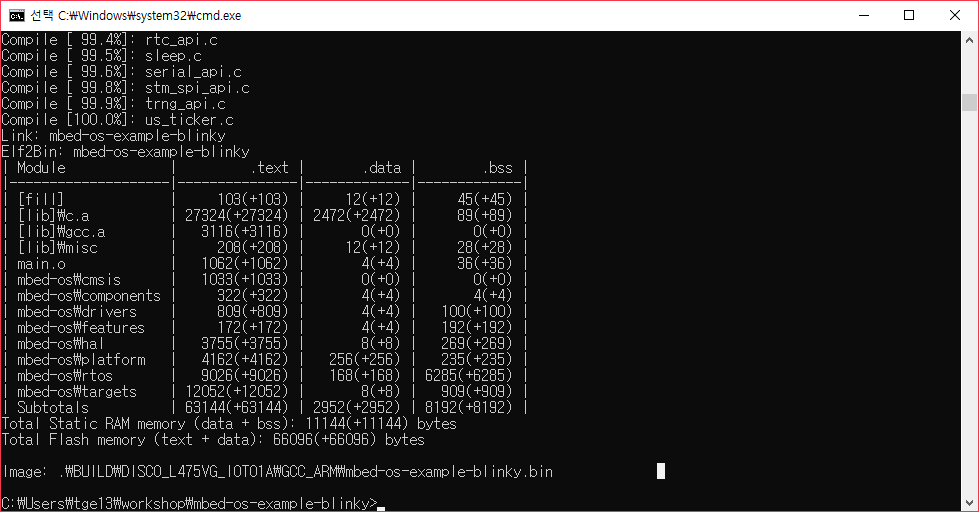
mbed-cli users with python3, If you got such problem, try this, I wonder It's just for me or not.
 kimsooyoung
All 11 comments
Internal Jira reference: https://jira.arm.com/browse/MBOCUSTRIA-774
 ciarmcom
on 21 Jan 2019
ciarmcom
on 21 Jan 2019
@cmonr FYI. Please investigate.
 screamerbg
on 31 Jan 2019
screamerbg
on 31 Jan 2019
@kimsooyoung A couple of things:
1) Could you provide the output for what you get when you run pip list?
2) _mbed os - more than 5.9 (actually don't know -- was my first time)_
Please provide the vesrion of mbed-os you're using, as this is where the requirements.txt for the tools lives (to this day, I still find it a bit odd)
3) _gcc compiler 8 2018-q4-major_
GCC 8 isn't supported as of yet, even in the latest Mbed OS. As of right now, we support GCC 6, and have heard of successful usage with GCC 7 (we're working on updating our compilers)
 cmonr
on 31 Jan 2019
cmonr
on 31 Jan 2019
@kimsooyoung A couple of things:
- Could you provide the output for what you get when you run
pip list?- _mbed os - more than 5.9 (actually don't know -- was my first time)_
Please provide the vesrion of mbed-os you're using, as this is where the requirements.txt for the tools lives (to this day, I still find it a bit odd)- _gcc compiler 8 2018-q4-major_
GCC 8 isn't supported as of yet, even in the latest Mbed OS. As of right now, we support GCC 6, and have heard of successful usage with GCC 7 (we're working on updating our compilers)
1. package lists
$ pip list
Package Version
------------------------ ----------
absl-py 0.6.1
appdirs 1.4.3
asn1ate 0.6.0
asn1crypto 0.24.0
astor 0.7.1
astroid 2.1.0
backcall 0.1.0
beautifulsoup4 4.7.1
bleach 3.0.2
bs4 0.0.1
cachetools 3.0.0
certifi 2018.11.29
cffi 1.11.5
chardet 3.0.4
colorama 0.3.9
cryptography 2.4.2
cycler 0.10.0
decorator 4.3.0
defusedxml 0.5.0
ecdsa 0.13
entrypoints 0.2.3
fasteners 0.14.1
future 0.17.1
fuzzywuzzy 0.17.0
gast 0.2.0
google-api-core 1.7.0
google-auth 1.6.2
google-cloud-speech 0.36.2
googleapis-common-protos 1.5.6
grader 1.2
grpcio 1.17.0
h5py 2.8.0
httpsproxy-urllib2 1.0
icetea 1.0.2
idna 2.8
intelhex 2.2.1
intervaltree 3.0.2
ipykernel 5.1.0
ipython 7.2.0
ipython-genutils 0.2.0
ipywidgets 7.4.2
isort 4.3.4
jedi 0.13.2
Jinja2 2.10
JPype1 0.6.3
jsonmerge 1.5.2
jsonschema 2.6.0
junit-xml 1.8
jupyter 1.0.0
jupyter-client 5.2.4
jupyter-console 6.0.0
jupyter-core 4.4.0
Keras-Applications 1.0.6
Keras-Preprocessing 1.0.5
kiwisolver 1.0.1
konlpy 0.5.1
lazy-object-proxy 1.3.1
lockfile 0.12.2
Logbook 1.4.3
lxml 4.3.0
manifest-tool 1.4.6
Markdown 3.0.1
MarkupSafe 1.1.0
matplotlib 3.0.2
mbed-cli 1.8.3
mbed-cloud-sdk 2.0.1
mbed-flasher 0.9.2
mbed-greentea 1.6.0
mbed-host-tests 1.5.0
mbed-ls 1.7.0
mbed-os-tools 0.0.1
mccabe 0.6.1
mistune 0.8.4
monotonic 1.5
nbconvert 5.4.0
nbformat 4.4.0
notebook 5.7.4
numpy 1.15.4
pandas 0.23.4
pandocfilters 1.4.2
parso 0.3.1
pickleshare 0.7.5
pip 18.1
plotly 3.5.0
prettytable 0.7.2
prometheus-client 0.5.0
prompt-toolkit 2.0.7
protobuf 3.6.1
py 1.7.0
pyasn1 0.4.5
pyasn1-modules 0.2.3
PyAudio 0.2.11
pycparser 2.19
pyelftools 0.25
Pygments 2.3.1
pylint 2.2.2
pyocd 0.15.0
pyparsing 2.3.0
pyserial 3.4
pyshark 0.4.2.2
python-dateutil 2.7.5
python-dotenv 0.10.1
pytz 2018.7
pyusb 1.0.2
pywinpty 0.5.5
pywinusb 0.4.2
PyYAML 3.13
pyzmq 17.1.2
qtconsole 4.4.3
requests 2.21.0
retrying 1.3.3
rsa 4.0
scikit-learn 0.20.1
scipy 1.1.0
selenium 3.141.0
semver 2.8.1
Send2Trash 1.5.0
setuptools 40.0.0
six 1.11.0
sklearn 0.0
sortedcontainers 2.1.0
soupsieve 1.7.2
tensorboard 1.12.0
tensorflow 1.12.0
termcolor 1.1.0
terminado 0.8.1
testpath 0.4.2
tornado 5.1.1
traitlets 4.3.2
typed-ast 1.1.0
urllib3 1.24.1
wcwidth 0.1.7
webencodings 0.5.1
websocket-client 0.54.0
Werkzeug 0.14.1
wheel 0.32.3
widgetsnbextension 3.4.2
wrapt 1.10.11
yattag 1.10.1
2. mbed os version
$ mbed --version 1.8.3
when I'm doing that, I typed
$ mbed import https://github.com/ARMmbed/mbed-os-example-blinky
and that page says this examle uses mbed os 5.11.3
Updating mbed-os to mbed-os-5.11.3
So... In fact my problem wasn't just about mbed cli... When I start my install, My progress was,
- I followed cli install manual
- Got some problems about pip
- Solved that, By install everything one-by-one, Not using requirement.txt.
- And then, I tested by blinky-example in order to confirm it installed successfully
- But got another problem - python syntax
- I modified init.py file that located in > mbed-os/tools/arm package manager/
3. compiler works but got some warning
$ mbed config --list
[mbed] Global config:
GCC_ARM_PATH=C:\Program Files (x86)\GNU Tools ARM Embedded\8 2018-q4-major\bin
TOOLCHAIN=GCC_ARM[mbed] WARNING: If you're using Python 3 with Mbed OS 5.8 and earlier versions, Python errors will occur when compiling, testing and exporting
---
[mbed] Working path "C:\Users\tge13\workshop\mbed-os-example-blinky" (program)
[Warning] @,: Compiler version mismatch: Have 8.2.1; expected version >= 6.0.0 and < 7.0.0
Building project mbed-os-example-blinky (DISCO_L475VG_IOT01A, GCC_ARM)
Scan: mbed-os-example-blinky
Compile [ 0.5%]: HTS221_driver.c
Compile [ 0.6%]: mbed_tz_context.c
Compile [ 0.7%]: mbed_fault_handler.c
Compile [ 0.9%]: at24mac.cpp
Anyway, My environment works well, (Compile well, target works well...)
When I make project, I usually follow such progress
- import blinky-example
- add libraries about sensors, communication, etc.
- modify mbed-app.json file and recompile
But whenever I do that, I need to modifyinit.pyfile
kimsooyoung
on 2 Feb 2019
@kimsooyoung Thanks for the outputs. A couple of things.
- Got some problems about pip
- Solved that, By install everything one-by-one, Not using requirement.txt.
I still don't understand why you're installing everything manually instead of using pip install -r requirements.txt.
Part of the reason we provide the file to begin with is that because of the large number of modules that we use with Mbed OS tools, numerous interdependent bugs can and have appeared, and we use requirements.txt to retain a known working set of versions with Mbed OS. We try to be as lax as we cam when it comes to version restriction, but at the same time trying to support all versions of all modules would be incredibly manigable.
In this particular issue, you're coming across a specific bug that I don't think anyone has seen this far, and are using modules that don't match what we test with. Truth be told, I'm not surprised you were hitting problems earlier.
I would be interested in seeing what happens if you downgrade both urllib3 and requests to the versions specified in requiremets.txt, and seeing if you still need to modify init.py.
Another thing you could try is instead of swapping the two lines, you might look into modifying the except line as such:
except ImportError, AttributeError:
The intention with that block of code was to attempt the import if Py2 was installed, and if Py3 was instead being used, catch the error we knew would be thrown, and do the import for Py3.
Finally, the list of modules that you have installed is _really_ long. You could use a tool called pipenv to create and manage a virtual environment just for Mbed OS. This could help keep your system modules (and their specific versions) seperate from the ones needed and tested against Mbed OS.
cmonr
on 4 Feb 2019
I made venv and typed pip install -r requirements.txt in mbed-os file.
But, I got such error when install pyocd. In fact, I participated in Mbed-OS workshop in South Korea.
During workshop, some people got same error as me. That's the reason why I didn't use requirements.
  Using cached https://files.pythonhosted.org/packages/6c/ae/0baea35a5d061315af00b4b461efa9f1f0c897017230442939f18e9e6885/pyocd-0.14.3.tar.gz
    Complete output from command python setup.py egg_info:
    Traceback (most recent call last):
      File "", line 1, in
      File "C:\Users\tge13\AppData\Local\Temp\pip-install-6o_eqev8\pyocd\setup.py", line 31, in
        long_description=open('README.md', 'r').read(),
    UnicodeDecodeError: 'cp949' codec can't decode byte 0xe2 in position 6073: illegal multibyte sequence

    ----------------------------------------
Command "python setup.py egg_info" failed with error code 1 in C:\Users\tge13\AppData\Local\Temp\pip-install-6o_eqev8\pyocd\

(venv3) C:\Users\tge13\source\venv3\mbed-os-example-blinky\mbed-os>pip list
Package    Version
---------- -------
mbed-cli   1.8.3
pip        19.0.1
setuptools 40.7.3
Basically, If pip install -r requirements.txt works well, I don't need to modify init.py code and install by myself. But, I coudn't solve that problem even searched from google... This was the fundamental reason.
kimsooyoung
on 4 Feb 2019
Hi @kimsooyoung, thanks for posting that issue regarding the pyocd install issue, I believe I've found and fixed the root cause of that issue here: https://github.com/mbedmicro/pyOCD/pull/528. I think that particular error may be dependent on what character set your terminal is using, so that might explain why I don't see that issue when installing pyocd.
Sounds like you are able to now use mbed-cli after using pip install -r requirements.txt. We're looking to make the installation of these dependencies easier in the future as other people are have similar issues. But for the time being, are you able to use Mbed CLI?
 bridadan
on 4 Feb 2019
bridadan
on 4 Feb 2019
I saw the issue about pyOCD's readme.md problem,Thx so much to fix that.
In Eclipse, select the "Help -> Install New Software…" menu item. Then either click the "Add…"
In Eclipse, select the "Help -> Install New Software..." menu item. Then either click the "Add..."
And I understand about why cannot install pyOCD v0.14 I'm Korean(So sorry for my POOR English :/) and Korean character encoding type is cp949 - extension of EUC-KR
I learned about encoding type and From now Don't need to modify init python file
But, In order to use pip install -r requirements.txt I modified that text file
pyocd==0.16
And... got this message
pyocd 0.16.0 has requirement intervaltree<4.0,>=3.0.2, but you'll have intervaltree 2.1.0 which is incompatible.
And output of pip list
Package          Version
---------------- -----------
appdirs          1.4.3
asn1ate          0.6.0
asn1crypto       0.24.0
beautifulsoup4   4.6.3
certifi          2018.11.29
cffi             1.11.5
chardet          3.0.4
colorama         0.3.9
cryptography     2.5
ecdsa            0.13
fasteners        0.14.1
future           0.16.0
fuzzywuzzy       0.17.0
icetea           1.0.2
idna             2.7
intelhex         2.2.1
intervaltree     2.1.0
Jinja2           2.10
jsonmerge        1.5.2
jsonschema       2.6.0
junit-xml        1.8
lockfile         0.12.2
Logbook          1.4.3
lxml             4.3.0
manifest-tool    1.4.6
MarkupSafe       1.1.0
mbed-cli         1.8.3
mbed-cloud-sdk   2.0.1
mbed-flasher     0.9.2
mbed-greentea    1.5.0
mbed-host-tests  1.5.0
mbed-ls          1.6.2
mbed-os-tools    0.0.1
mock             2.0.0
monotonic        1.5
pbr              5.1.2
pip              19.0.1
prettytable      0.7.2
protobuf         3.5.2.post1
py               1.7.0
pyasn1           0.2.3
pycparser        2.19
pyelftools       0.25
pyocd            0.16.0
pyparsing        2.3.1
pyserial         3.4
pyshark          0.4.2.2
python-dateutil  2.7.5
python-dotenv    0.10.1
pyusb            1.0.2
pywinusb         0.4.2
PyYAML           4.2b1
requests         2.20.1
semver           2.8.1
setuptools       40.7.3
six              1.11.0
sortedcontainers 2.1.0
urllib3          1.23
websocket-client 0.54.0
yattag           1.10.1
Anyway, Had no problem during compile && I'll use this venv from now, Thx so much!!
I'll tell about this for other Korean mbed-os developers 👍
kimsooyoung
on 5 Feb 2019
Thanks very much! Sorry about the pip issues, its kind of the nature of the tool. We'd like to improve this process in the future though!
bridadan
on 5 Feb 2019
@kimsooyoung I'm glad you and @bridadan were able to resolve this while I was out.
But, I got such error when install pyocd. In fact, I participated in Mbed-OS workshop in South Korea.
During workshop, some people got same error as me. That's the reason why I didn't use requirements.
That makes a lot of sense. There was a recent window of time where we had a bout of module incompatabilities that caused installations to fail which has been clamped on.
Imo, the best that we can do right now is guarantee that installation always works within a set of module versions, not necessarily _all_ versions of _all_ modules.
Glad you were able to get it sorted out, and I appologize if my last response sounded a bit tense.
cmonr
on 11 Feb 2019
No problem. That's okay :) Thx for your answer, I could solve my problem thx to your advise.
And thank you for respect my opinion.
kimsooyoung
on 13 Feb 2019
Related issues
 teetak01
·
10Comments
teetak01
·
10Comments
 masoudr
·
3Comments
masoudr
·
3Comments
 bremoran
·
4Comments
bremoran
·
4Comments
 wdwalker
·
10Comments
wdwalker
·
10Comments
 AlessandroA
·
6Comments
AlessandroA
·
6Comments
Most helpful comment
I made venv and typed
pip install -r requirements.txtin mbed-os file.But, I got such error when install pyocd. In fact, I participated in Mbed-OS workshop in South Korea.
During workshop, some people got same error as me. That's the reason why I didn't use requirements.
Basically, If
pip install -r requirements.txtworks well, I don't need to modify init.py code and install by myself. But, I coudn't solve that problem even searched from google... This was the fundamental reason.