Materialize: "select" control inside "modal" makes the scroll
The "select" control inside modal window at open state makes the scroll and not all values of select are visible. I exprect no scroll and all values of dropdowned list are visible.

 acheshkov
All 39 comments
this is duplicated in #1713
 jsduffy
on 21 Jul 2015
jsduffy
on 21 Jul 2015
This issue has been discussed already in https://github.com/Dogfalo/materialize/issues/1385
 carlosperate
on 25 Jul 2015
carlosperate
on 25 Jul 2015
I think this issue now fixed. Could you please verify ?
 Tim-arts
on 18 Jan 2016
Tim-arts
on 18 Jan 2016
This issue still is present in the current version.
 JoostvdB94
on 13 May 2016
JoostvdB94
on 13 May 2016
Commit above is still not a perfect solution, but suits my problem. It limits any dropdown height if placed inside .modal to height of .modal-content.
As you can see below there're two possible issues left:
- [ ] when you switch from one select to another they will still get 'full-height'
- [ ] when select is placed at bottom of modal and it will not fit upwards, it will be rendered as usual with default
max-height

 SPodjasek
on 16 Sep 2016
SPodjasek
on 16 Sep 2016
+1, Tried making the position:fixed for select-dropdown, the options now render above modal, but I can't place the dropdown under the select input.
 justinjoyn
on 31 Jan 2017
justinjoyn
on 31 Jan 2017
This is still an issue. I have the same problem but in my case the dropdown drops up and cuts of in a .bottom-sheet modal. I cant even select the items thats listed over the top of the modal.

.modal {
overflow: visible;
}
Shows the whole select but then i will lose overflow: scroll of the .bottom-sheet.
 yoieh
on 7 Mar 2017
yoieh
on 7 Mar 2017
I'm also affected by this issue. : /
 imaia
on 20 Jul 2017
imaia
on 20 Jul 2017
If I use .modal { overflow:visible; } in case of content overflow the modal not scroll
 arredgroup
on 3 Aug 2017
arredgroup
on 3 Aug 2017
Fixed in v1-dev
 Dogfalo
on 10 Oct 2017
Dogfalo
on 10 Oct 2017
@Dogfalo can you tell me where I have to apply the fix. Because I don't want to upgrade the api. I am using version v0.98.1
 VicJohn
on 6 Nov 2017
VicJohn
on 6 Nov 2017
This issue still is present in the current version.
 adhenrique
on 9 Feb 2018
adhenrique
on 9 Feb 2018
Yup. this bug is still present in v0.100.2
 benNek
on 11 Feb 2018
benNek
on 11 Feb 2018
@adhenrique when you say current version, do you mean in the v1 branch @Dogfalo referenced, or in one of the v0.X releases? The former means this should issue be reopened.
 carusology
on 12 Feb 2018
carusology
on 12 Feb 2018
@carusology yeah. I refer to v1-dev, which the dogfalo commented and also master branch.
adhenrique
on 14 Feb 2018
If you are on the latest build, use the container option added in 0c703faa0fd60c96d5232ba7e33d36309b943698
Dogfalo
on 14 Feb 2018
@Dogfalo hmm. Like this?
$('select').select({
dropdownOptions: {
container: '.modal-content',
}
});
adhenrique
on 14 Feb 2018
instead of the selector in the container, you should pass in the element directly
Dogfalo
on 14 Feb 2018
@Dogfalo I did not understand. Can u provide a simple code pls? I reviewed the docs from v1.0, but there is not instructions about this...
adhenrique
on 14 Feb 2018
This is what we do for the Select inside the Datepicker
M.Select.init(yearSelect, {classes: 'select-year', dropdownOptions: {container: document.body, constrainWidth: false}});
Thanks @Dogfalo.
I did some testing, and it looks like the dropdown does not get the options sent by Select.init. Look:

And forcing the option directly into the Select plugin (in _setupDropdown), Dropdown gets the option, but the problem seems to persist. Look:
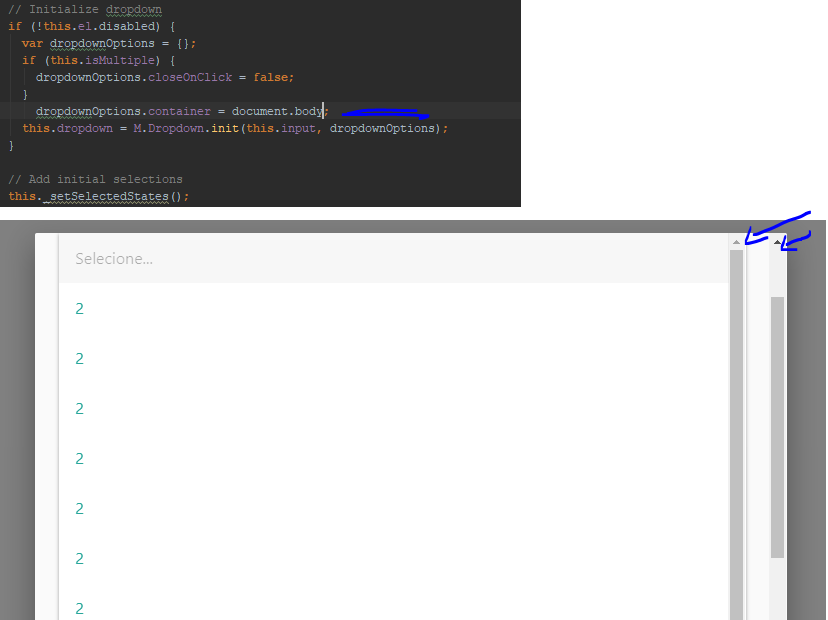
Did I make a mistake?
adhenrique
on 14 Feb 2018
You are probably not using the latest build from the v1-dev branch
Dogfalo
on 14 Feb 2018
I downloaded from the tree/v1-dev.
That's its?
adhenrique
on 14 Feb 2018
You are not on the latest, because the container option is not shown in your screenshot. Please redownload it from github
Dogfalo
on 14 Feb 2018
So...
I removed all files from assets, re-downloaded, tested them and the problem persists.
The container option only shown when this is setted (like i do in second screenshot).
adhenrique
on 14 Feb 2018
if you are using the precompiled files from dist/ those only update on version bumps, you need to compile from the source to test out this change or wait till the next version
Dogfalo
on 14 Feb 2018
Found a solution for my above problem.
Replace the following lines of code in materialize.js file
activates.css(
{
position: 'absolute',
top: origin.position().top + verticalOffset + scrollYOffset,
left: leftPosition + scrollXOffset
});
if (activates.css("position") == "fixed" && activates.parent().hasClass("select-wrapper")) {
activates.css({
position: 'absolute',
top: origin.offset().top + verticalOffset + scrollYOffset,
left: origin.offset().left
});
}
else {
activates.css({
position: 'absolute',
top: origin.position().top + verticalOffset + scrollYOffset,
left: leftPosition + scrollXOffset
});
}
In materialize.css
.dropdown-content
{
//position: absolute;
position: fixed !important;
}
VicJohn
on 15 Feb 2018
@VicJohn thank you, the fix did not work for me in modals though: the CSS 'top' property for an absolutely-positioned element applies relative to the nearest fixed-positioned ancestor (so the modal window), but offset() returns values relative to the document.
Here a derived fix for v0.100.2 which should work in all cases:
updated on 2018-04-19: we do not want 'fixed' always, positioning must be set depending on whether there are fixed ancestors or not:
        var fixedParents = activates.parents().filter(function() {
          return $(this).css('position') === 'fixed';
        });
        if (fixedParents.length > 0) {
          var fixedOffset = fixedParents.get().reduce(function(acc, ancestor) {
            acc.top += $(ancestor).offset().top;
            acc.left += $(ancestor).offset().left;
            return acc;
          }, {
            top: 0,
            left: 0
          });
          activates.css({
            top: origin.offset().top - fixedOffset.top + verticalOffset + scrollYOffset,
            left: origin.offset().left - fixedOffset.left + scrollXOffset
          });
        } else {
          activates.css({
            position: 'absolute',
            top: origin.position().top + verticalOffset + scrollYOffset,
            left: leftPosition + scrollXOffset
          });
        }
 geonanorch
on 8 Mar 2018
geonanorch
on 8 Mar 2018
Was that issue still open even after applying the above CSS changes?
VicJohn
on 8 Mar 2018
Yes. I did not forget to add the CSS rule, and because of important ! the activates.css(...) call cannot change position anymore (which is good, we want fixed).
Note that I only tested with my own code and with materialize v0.100.2, your mileage may vary.
_Update:_ I believe our comments crossed, I already answered your next comment.
geonanorch
on 8 Mar 2018
@geonanorch did you apply the below CSS change?
.dropdown-content
{
     //position: absolute;
     position: fixed !important;
}
VicJohn
on 8 Mar 2018
@geonanorch , yes exactly
VicJohn
on 8 Mar 2018
I just realized (the hard way) that while my suggested patch works when there is a fixed-positioned ancestor, it completely breaks in the case when there is not.
See previous comment for an updated patch.
geonanorch
on 19 Apr 2018
@geonanorch
This solution worked perfectly for me. tnx man you just saved a human life.
 yassinevic
on 2 Aug 2018
yassinevic
on 2 Aug 2018
@geonanorch where should i put the fix? in my js or in the js file of materialize??? i cant seem to make it work... thanks in advance
 Lennuj420
on 1 Sep 2018
Lennuj420
on 1 Sep 2018
@Lennuj420 I have this in the materialize dropdown.js code, look for the // Position dropdown comment around line 165:
        // Position dropdown
        /* patch inspired from: https://github.com/Dogfalo/materialize/issues/1527#issuecomment-365829158
        activates.css({
          position: 'absolute',
          top: origin.position().top + verticalOffset + scrollYOffset,
          left: leftPosition + scrollXOffset
        });
        */
        var fixedParents = activates.parents().filter(function () {
          return $(this).css('position') === 'fixed';
        });
        var msie = window.navigator.userAgent.indexOf("MSIE ") !== -1 ||
          !!navigator.userAgent.match(/Trident.*rv\:11\./);
        if (fixedParents.length > 0 && !msie) {
          var fixedOffset = fixedParents.get().reduce(function (acc, ancestor) {
            acc.top += $(ancestor).offset().top;
            acc.left += $(ancestor).offset().left;
            return acc;
          }, {
            top: 0,
            left: 0
          });
          activates.css({
            position: 'fixed',
            top: origin.offset().top - fixedOffset.top + verticalOffset + scrollYOffset,
            left: origin.offset().left - fixedOffset.left + scrollXOffset
          });
        } else {
          activates.css({
            position: 'absolute',
            top: origin.position().top + verticalOffset + scrollYOffset,
            left: leftPosition + scrollXOffset
          });
        }

        // Show dropdown
If it still does not work and you have verified that your browser is loading the correct code, then probably you have a setup which is not addresses by the patch. I can have a look if you can provide a standalone minimal HTML document, either here of on jsbin or fiddle.
geonanorch
on 2 Sep 2018
@geonanorch thanks for the reply. i got it working now :smiley:
Lennuj420
on 2 Sep 2018
Not working on my end. Is the update suppose to take care of it or do I need to override the dropdown-content class?

 simkessy
on 19 Sep 2018
simkessy
on 19 Sep 2018
@simkessy the patch above is meant for v0.100.2, which is no longer receiving updates (I assume that v1 has this issue fixed, never checked). And yes, you need to modify the code in dropdown.js.
geonanorch
on 20 Sep 2018
Related issues
 SoproniOli713
·
3Comments
SoproniOli713
·
3Comments
 PhillippOhlandt
·
3Comments
PhillippOhlandt
·
3Comments
 MickaelH974
·
3Comments
MickaelH974
·
3Comments
 ReiiYuki
·
3Comments
ReiiYuki
·
3Comments
 ericlormul
·
3Comments
ericlormul
·
3Comments
Most helpful comment
@VicJohn thank you, the fix did not work for me in modals though: the CSS 'top' property for an absolutely-positioned element applies relative to the nearest fixed-positioned ancestor (so the modal window), but
offset()returns values relative to the document.Here a derived fix for v0.100.2 which should work in all cases:
updated on 2018-04-19: we do not want 'fixed' always, positioning must be set depending on whether there are fixed ancestors or not: