The dropdown feature should try to adjust it's width with the largest text inside:
Current Release:
http://i.gyazo.com/5a651b4140790f6870a6dc26a3996609.png
What it should look like:
http://i.gyazo.com/f9918f592fff2cd421223f16d3d7dc5c.png
 ConsoleTVs
All 6 comments
Please note that I've alredy found a solution:
style='width: auto !important;'
ConsoleTVs
on 15 Dec 2014
I'll make this into an option, but leave the other as default I think. Since Material design likes to have their dropdown matching width a lot of the times.
 Dogfalo
on 17 Dec 2014
Dogfalo
on 17 Dec 2014
Added in 91985119ac10cce516ce5f28f10006748ebf17da
Dogfalo
on 27 Dec 2014
2017: constrainWidth is now passed as an object option/property upon jquery initialization of the dropdown. Check http://materializecss.com/dropdown.html !
sample (with hover, lol):
$(".dropdown-button").dropdown({ hover: true, constrainWidth: false });
 clusteratlas
on 6 Jul 2017
clusteratlas
on 6 Jul 2017
Still not working in march 2018
 adhavalboy
on 3 Mar 2018
adhavalboy
on 3 Mar 2018
@adhavalboy
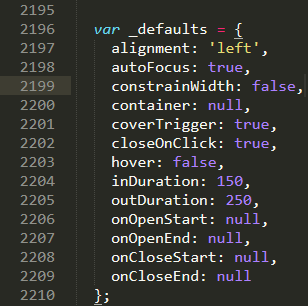
If you go into materializecss.js and go to line 2199 you can change the default from true.
 CodeNeedsCoffee
on 29 May 2018
CodeNeedsCoffee
on 29 May 2018
Related issues
 onigetoc
·
3Comments
onigetoc
·
3Comments
 ericlormul
·
3Comments
ericlormul
·
3Comments
 cope
·
3Comments
cope
·
3Comments
 alexknipfer
·
3Comments
alexknipfer
·
3Comments
 ruslandzhumaev
·
3Comments
ruslandzhumaev
·
3Comments
Most helpful comment
Still not working in march 2018