Materialize: iOS13 Select Seems Broken
5819 Expected Behavior
When using select dropdowns in Materialize 1.0.0, the correct selected option is selected and value of the selected option is set properly $('select').val(). This seems to ONLY be broken in iOS 13 beta. There may be something with the beta on mobile, but I wanted to report this in case others see it. Try to get ahead of it.
Current Behavior
When I select an item on iOS13 beta mobile Safari, the value that is set and passed back on form submit is the wrong ID of the item selected. So if I had <option value="1">1</option> and <option value="2">2</option> and <option value="3">3</option> and I click on Option 1, Option 3 might show as selected and would pass that value on form submit.
Possible Solution
This one boggles me but I've seen it on 3 different pages (staging / prod and sub pages with Materialize selects)
Steps to Reproduce (for bugs)
- Go to https://materializecss.com/select.html
- Select options in the dropdown and check values set.
- See that its not selecting the right option?
Context
Toggling between items to edit things is not working as its redirecting to the wrong item. We can't get to proper item via a select with a value. We aren't sure what the pattern is, though.
Your Environment
- Version used: iOS13 Beta
- Browser Name and version: Safari Mobile
- Operating System and version (desktop or mobile): Mobile
 rylanb
All 27 comments
I fixed it by change version to 0.97.6 and change formSelect() to material_select()
 minhhieu08
on 19 Sep 2019
minhhieu08
on 19 Sep 2019
@rylanb Hope it works
minhhieu08
on 19 Sep 2019
@minhhieu08 👍
I got the same issue.
https://github.com/Dogfalo/materialize/tree/v0.97.6/dist/js
It's worked for me. Thanks
 HoangQuan
on 19 Sep 2019
HoangQuan
on 19 Sep 2019
Thanks for the replies! I was hoping not to roll back the versions if I didn't have to.
Even 0.99 has this, too?
rylanb
on 23 Sep 2019
For anyone still struggling with this - you can fix this issue without rolling back to an earlier version if you use the solution mentioned in this comment:
https://github.com/Dogfalo/materialize/issues/4983#issuecomment-325308216
Keep in mind you'll need to change the function calls of material_select() to formSelect() for v1.0.0 but it still works.
It makes the select use the native dropdown list but still uses the materialize style. It's an easy and effective fix although some may not prefer it.
 JayRadical
on 26 Sep 2019
JayRadical
on 26 Sep 2019
Yeah that works great, actually. The materialize select is nice, but I do like using native things, especially on mobile as they are more accessible. Thanks!
rylanb
on 28 Sep 2019
Hello,
Unfortunately, under IOS13, many methods no longer work.
With the "DropDown": When you select a value and retrieve it with jQuery (via an event trigger) the wrong element is selected.
(I use the last version: 1.0.0)
 Davidvanni
on 29 Sep 2019
Davidvanni
on 29 Sep 2019
Will look into this today.
On Sun, Sep 29, 2019 at 8:12 AM Davidvanni notifications@github.com wrote:
Hello,
Unfortunately, under IOS13, many methods no longer work.
With the "DropDown": When you select a value and retrieve it with jQuery
(via an event trigger) the wrong element is selected.—
You are receiving this because you are subscribed to this thread.
Reply to this email directly, view it on GitHub
https://github.com/Dogfalo/materialize/issues/6444?email_source=notifications&email_token=AAVFVR4P7J7XQPCF24EU46LQMDAXRA5CNFSM4IYCCNHKYY3PNVWWK3TUL52HS4DFVREXG43VMVBW63LNMVXHJKTDN5WW2ZLOORPWSZGOD73XNSQ#issuecomment-536311498,
or mute the thread
https://github.com/notifications/unsubscribe-auth/AAVFVR3E2O33GK5ZHZA5533QMDAXRANCNFSM4IYCCNHA
.>
Doggy sends his greetings from Mars.
 Dogfalo
on 29 Sep 2019
Dogfalo
on 29 Sep 2019
Thank you very much for your speed, I hope the bug will be fixed as soon as possible.
Davidvanni
on 29 Sep 2019
fixed in c0da34049deec36efbd4681f73b3446e92918ca8
Dogfalo
on 29 Sep 2019
How can I bring in this change without rebuilding the source? Are there any plans to do another release soon?
We're up around 60% adoption of the new OS so if other people haven't ran into this yet they will soon.
 ratstache
on 19 Oct 2019
ratstache
on 19 Oct 2019
@ratstache you could manually apply the change in your node_modules/materializecss directory and then use the patch-package module to build a patch and ensure it gets applied properly going forward.
(Though it will likely require at least one manual build of the source to get the _built_ JS files for use in a distributed app.)
 joshualyon
on 22 Oct 2019
joshualyon
on 22 Oct 2019
When will 1.0.1 be released with this fix? This behavior breaks some enterprise applications of us...
 spyro2000
on 23 Oct 2019
spyro2000
on 23 Oct 2019
The fix for this is on the v1-dev branch, but not in an official release yet. Normally I would just point my gemfile at the branch, but I'm actually using the materialize-sass gem, which is still using the 1.0.0 release code and have no easy way of incorporating the fix without forking the sass gem and manually pulling in the changes. Mo dependencies, mo problems.
 jclemans
on 13 Dec 2019
jclemans
on 13 Dec 2019
@Dogfalo should we expect any release with that fix? Or do you plan to switch ownership of that project? A lot of people are using this library and are dependent on it and I don't see anything happening with all commits on V1-dev of PR.
 geosigno
on 21 Jan 2020
geosigno
on 21 Jan 2020
@Dogfalo any update? Are you planning next release?
 krzSobin
on 3 Feb 2020
krzSobin
on 3 Feb 2020
Echoing the hope for a fix. I'm building all my stuff with MCSS, because I love it, and it's gotta work on iOS mobile browsers!
 ydax
on 4 Mar 2020
ydax
on 4 Mar 2020
Also, very interested in a fix for this... a key reason we selected MaterializeCSS was its responsiveness on mobile devices. As it stands, it's not usable on iOS 13. The select and datepicker controls are both broken: they select the wrong items even though the control renders correctly.
 imaginecodedragon
on 24 Jun 2020
imaginecodedragon
on 24 Jun 2020
@imaginecodedragon are you using the patched select.js as a temporary solution?
 doughballs
on 25 Jun 2020
doughballs
on 25 Jun 2020
@imaginecodedragon are you using the patched select.js as a temporary solution?
Hi dougballs, we did not attempt to use the revised select.js file. Our solution was to use bowser to detect iOS 13 and then use the default select and native mobile date picker:
$('select').addClass('browser-default');
            $('.your-date-picker').attr('type', 'date'); // changes <input type="text"... to <input type="date"...
The date picker solution works well since iOS 13 / Safari has great native support for selecting dates when an input field is set to date type. However, the styles for the select box are now inconsistent from a UI perspective on iOS 13 and that's definitely not ideal.
It's really too bad this project wasn't active as it's a great vanilla solution for Material UI design where progressive React / Angular applications aren't realistic (e.g. freshening up legacy web applications and dodging a complete rebuild).
imaginecodedragon
on 25 Jun 2020
@imaginecodedragon there are plans underway to move things forward with Materialize, bug fixes being the primary concern. I totally agree the inactiveness is an issue, but despite that, there are fixes for the browser bugs that have sprung up in time.
All my projects get the patched select.js served by default, so I don't have to worry about it. Not sure how you work but in Wordpress it is as simple as enqueing:
materialize.min.js
select.js
custom.js
In that order. Problem solved, never have to think about it again.
doughballs
on 25 Jun 2020
@doughballs how can I do that?, I bought a script called "QuickDate" and is created with materialize, I didn't specialize in development in the past so many things are quite new for me so I wonder how to que those files...
 lzucca86
on 16 Jul 2020
lzucca86
on 16 Jul 2020
@doughballs how can I do that?, I bought a script called "QuickDate" and is created with materialize, I didn't specialize in development in the past so many things are quite new for me so I wonder how to que those files...
Download these files:
https://github.com/Dogfalo/materialize/blob/v1-dev/dist/js/materialize.min.js
https://github.com/Dogfalo/materialize/blob/v1-dev/js/select.js
Then include them in your source:
<script type="text/javascript" src="materialize.min.js"></script>
<script type="text/javascript" src="select.js"></script>
FYI: I haven't tested the select.js fix that @doughballs suggested -- as noted above, we just ended up relying on the native iOS 13 controls for date selection and general select boxes. Our solution was not aesthetically consistent, but it definitely works 100% of the time by ignoring the Materialize library on iOS13 in the affected circumstances.
imaginecodedragon
on 16 Jul 2020
@imaginecodedragon I really appreciate the really fast answer...
like I explained before I'm very stupid at the code... so, couple questions...
1)Most of the php webpage files of the site are in: public_htmlthemesdefault
the current materialize.min.js file is in: public_htmlthemesdefaultassetsjs ...should I put both files materialize.min.js and select.js here? -> public_htmlthemesdefaultassetsjs... ??
2)The other question is, should I put the code you provided below in the same php file that is affected?, i.e. I have an affected page that has issues with the select called "find-matches" (public_htmlthemesdefaultfind-matches.php) should I put it anywhere there?
if not... where should I put the code?, in case is not a generic file, how can I trace the file or find out the proper file to put the code?, I could use notepad++ to find a text inside some file... thanks again.
lzucca86
on 16 Jul 2020
1)Most of the php webpage files of the site are in: public_htmlthemesdefault
the current materialize.min.js file is in: public_htmlthemesdefaultassetsjs ...should I put both files materialize.min.js and select.js here? -> public_htmlthemesdefaultassetsjs...?
Yes.
2)The other question is, should I put the code you provided below in the same php file that is affected?
Yes, just make sure the select.js entry comes after the materialize.min.js. The code contents of each file are executed sequentially in the order they appear in that file. In this case, the fixes that @doughballs noted in the select.js file need to get executed after the materialize.min.js file.
imaginecodedragon
on 16 Jul 2020
Thanks again @imaginecodedragon!
sadly I haven't been able to make it work, I copied the files to the folder please see attached image, and also put the code in several parts in the file "settings.php" but is not working- this file is one of the many pages that has several selects with trouble in IOS, is a page where one would put several information from text fields and selects, just the selects have trouble...
could you please let me know where should I add
in the code below?, I pasted the code below, also, since the github code preview showed not all the code properly formatted I'm attaching the file in zip format too. Sorry again, I know this maybe very simple for you guys but I'm a newbie in web code. code bellow 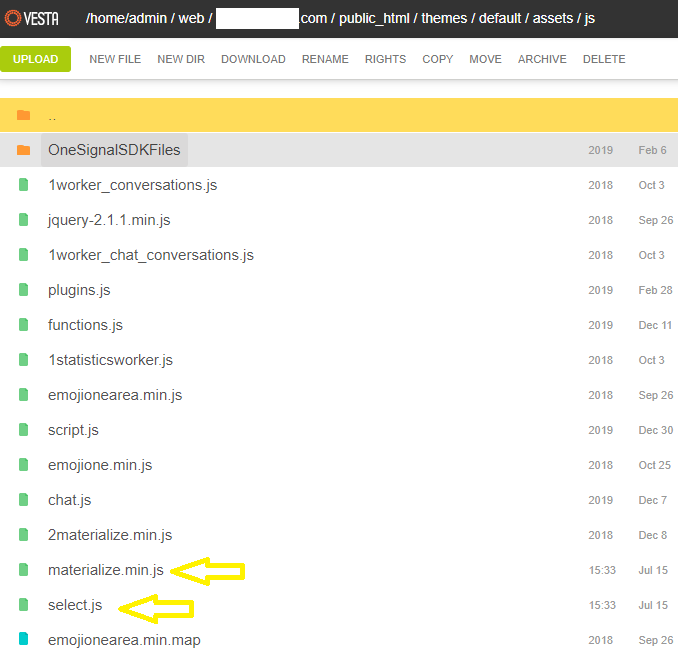 [settings.zip](https://github.com/Dogfalo/materialize/files/4934863/settings.zip) thanks `admin == '1' || CheckPermission($profile->permission, "manage-users") ){ $target_user = route(2); $_user = LoadEndPointResource('users'); if( $_user ){ if( $target_user !== '' ){ $profile = $_user->get_user_profile(Secure($target_user)); if( !$profile ){ echo ''; exit(); }else{ if( $profile->admin == '1' ){ $admin_mode = true; } } } } } ?>`
lzucca86
on 17 Jul 2020
sadly I haven't been able to make it work
could you please let me know where should I add
This question has more to do with the stack and platform (Vesta + Wordpress) you're using than actual code changes. I'm not familiar Vesta or Wordpress (at a code level). However, if you head over to stackoverflow.com, create an account, and post your question there you're likely to connect up with software developers more familiar with these stacks who can help.
imaginecodedragon
on 17 Jul 2020
Related issues
 Robouste
·
3Comments
Robouste
·
3Comments
 SoproniOli713
·
3Comments
SoproniOli713
·
3Comments
 acierpinski
·
3Comments
acierpinski
·
3Comments
 artur99
·
3Comments
artur99
·
3Comments
 heshamelmasry77
·
3Comments
heshamelmasry77
·
3Comments
Most helpful comment
When will 1.0.1 be released with this fix? This behavior breaks some enterprise applications of us...