Materialize: Global declaration 'M' not supported by Typescript
Typescript doesn't seem to support global declarations of variables with a single capital letter.
Reproduction
Declare the materialize variable in your typescript file as follows
declare const M: any;
Expected result
Linters and editors see declaration as valid.
Actual result
Linters and editors see declaration as invalid.
Linter error
Cannot find namespace 'M'.
Imports compared on Atom Editor using Typescript Language
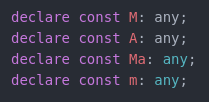
_As you can see from the screenshot, a single letter declaration seems to be unsupported._
Other information
- Using Typescript v2.5.3
- Maybe it would be a better idea to use more than one letter such as
Mat,Materializeetc.
 andyrichardson
All 10 comments
We don't use typescript.
 Dogfalo
on 24 Nov 2017
Dogfalo
on 24 Nov 2017
No interest in supporting it?
Most Angular projects will be using typescript.
andyrichardson
on 24 Nov 2017
Is this something that we fix in the library or something that can only be fixed in the client code?
Dogfalo
on 24 Nov 2017
@Dogfalo I suspect the way to fix this would be to use any global naming scheme that isn't a single capital letter (such as Mat, Materialize etc.).
This would also reduce the likelihood of conflicts with other packages.
andyrichardson
on 27 Nov 2017
I have successfully added typescript support for M.
typings/materialize-css/index.d.ts (not completed):
````ts
export as namespace M;
export class Sidenav{
public constructor(elem: Element, options?: SidenavOptions);
public static getInstance(elem: Element): Sidenav;
public open(): void;
public close(): void;
public destroy(): void;
}
export interface SidenavOptions {
edge: string
}
````
Then add the following things to your tsconfig.json:
json
{
  "compilerOptions": {
    "baseUrl": ".",
    "paths": {
      "*": ["typings/*", "*"]
    },
    "typeRoots": [
      "./node_modules/@types",
      "./typings"
    ]
  }
}
Now you should able to use M in any way you like. e.g. as a global variable, or import * as M from 'materialize-css'
 huww98
on 27 Nov 2017
huww98
on 27 Nov 2017
I believe @huww98 has the correct solution for integrating Materialize with Typescript.
Dogfalo
on 30 Nov 2017
You can also use the Materialize Typings npm package:
npm install --save @types/materialize-css
 ademidun
on 26 Aug 2018
ademidun
on 26 Aug 2018
Include "types": ["materialize-css"] in your tsconfig.app.json file
 AlisonVilela
on 19 Mar 2019
AlisonVilela
on 19 Mar 2019
Include
"types": ["materialize-css"]in yourtsconfig.app.jsonfile
I Have add for u solution but not work variable line export = M in @types/materialize-css/index.d.ts
What can i do? TypeScript not see this variable M but how? I have use dropdown but no know to use or add my app.component for now working. Did u know to make?
I install @types/materialize-css and materialize-css but dropdown not working. I add materialize.min.js and css to header and again not work this script. Very hard problem starting on this framework. How?
 deser1
on 30 Jun 2019
deser1
on 30 Jun 2019
You need to install @types/materialize-css and then
import * from "materialize-css";
M.AutoInit();
works.....
I also included "types": ["materialize-css"] in my tsconfig.app.json file as suggested by @deser1
 basudebpalfreelancer
on 13 Jul 2019
basudebpalfreelancer
on 13 Jul 2019
Related issues
 bradley-varol
·
3Comments
bradley-varol
·
3Comments
 hartwork
·
3Comments
hartwork
·
3Comments
 PhillippOhlandt
·
3Comments
PhillippOhlandt
·
3Comments
 lpgeiger
·
3Comments
lpgeiger
·
3Comments
 ReiiYuki
·
3Comments
ReiiYuki
·
3Comments
Most helpful comment
You can also use the Materialize Typings npm package:
npm install --save @types/materialize-css