Materialize: Cannot update to 0.100.1
Expected Behavior
Update to 0.100.1 should work properly
Current Behavior
Receiving following bug when trying to update:
meteor update materialize:materialize
=> Errors while upgrading packages:
While checking for materialize:[email protected]:
error: No compatible binary build found for this package. Contact the package author and ask them to publish it for your platform.
Your Environment
Using following OS
Distributor ID: Ubuntu
Description: Ubuntu 16.04.2 LTS
Release: 16.04
Codename: xenial
Using Meteor 1.4.4.2
 JanZ1503
All 31 comments
I am having the same issue using mint os 18
meteor 1.5
 fligen
on 23 Jul 2017
fligen
on 23 Jul 2017
I'm having the same problem. Any idea what's causing it?
 csellis
on 25 Jul 2017
csellis
on 25 Jul 2017
I have the same problem 👎
 udacitystudents
on 25 Jul 2017
udacitystudents
on 25 Jul 2017
I have the same problem on Windows 10
 trajano
on 26 Jul 2017
trajano
on 26 Jul 2017
Same issue here OSX 10.12.4
Last version I can use without error - meteor add materialize:materialize@=0.99.0
meteor add materialize:materialize
meteor add materialize:materialize
=> Errors while adding packages:While checking for materialize:[email protected]:
error: No compatible binary build found for this package. Contact the package author and ask them to publish it for your platform.
 asiftyro
on 26 Jul 2017
asiftyro
on 26 Jul 2017
- It makes no sense if everyone writes: "I have the same problem". Just upvote the actual issue. :)
- We are investigating this
 tomscholz
on 26 Jul 2017
tomscholz
on 26 Jul 2017
@tomscholz yes sir ;)
asiftyro
on 26 Jul 2017
fourseven:[email protected] was causing this problem for me. I downgraded to 3.11.0 and materialize could install again. Only to 0.99.0 though...
 kartboy16
on 29 Jul 2017
kartboy16
on 29 Jul 2017
Since meteor 1.4.1+ (fourseven:scss 3.9.0+), we do not have prebuild binaries anymore. You are required to set up the required toolchain yourselves.
You may have to build the binary yourself. Give that a try and see if it works.
https://github.com/fourseven/meteor-scss#compatibility
 Dogfalo
on 2 Aug 2017
Dogfalo
on 2 Aug 2017
@Dogfalo K, wish me luck.
kartboy16
on 2 Aug 2017
@Dogfalo Never done this before so please excuse my stupidity...
Trying to build with node-gyp and it's asking for a binding.gyp file. node-gyp shows a basic binding.gyp file but have you created one before for materialize? Anything I need to include?
Basic structure of binding.gyp:
{
"targets": [
{
"target_name": "binding",
"sources": [ "src/binding.cc" ]
}
]
}
Following the guide above and node-gyp, I updated command line tools xcode-select --install and made sure i'm on python 2.7. Since i'm trying to get the atmosphere package working, I git clone https://github.com/Dogfalo/materialize.git and then published it to atmosphere as kartboy16:materialize. I then meteor add kartboy16:materialize to build and bring it in to my project.
Ran my project and got this error:

kartboy16
on 3 Aug 2017
This seems to be a blocker to many people, also as there seems a lack of documentation how to install the latest version now.
I think the overall expectation for any meteor user is that meteor add materialize:materialize works, or that clear documentation is provided how to install it. So do we also need to set up our own toolchain and nothing is provided anymore.
I do NOT have fourseven:scss installed, so I think @kartboy16 's problem is unrelated to this. Those fourseven:scss issues should be discussed in their repo, not here. @kartboy16 , Installing materialize 0.99 works for everyone, this was not the point
EDIT: Had to update my post a few times, as I initially understood that a toolchain needs to be built to install the latest materialize version, but I realized that this was referring to the README.md of fourseven:scss. Please let us not have more fourseven:Scss discussions here @kartboy16 and move that to their repo. Thanks
JanZ1503
on 3 Aug 2017
@JanZ1503 Am I missing something? Looking at package.js file, it says api.use('fourseven:[email protected]');
kartboy16
on 3 Aug 2017
Ah, I see - scss comes with materialize - I did not see it in my packages list, but now I understand what you meant.
Yea, it looks like in [email protected] fourseven:[email protected] was used and the latest materialize version now requires 4.5.4, which does not come with pre-built binaries anymore, which breaks the standard meteor add materialize:materialize
But interestingly, scss says that their 3.9 version already has no pre-built binaries, however materialize 0.99 with scss 3.10 could be installed without building the binaries manually. @Dogfalo , do you happen to know why?
JanZ1503
on 3 Aug 2017
@JanZ1503 @kartboy16 @Dogfalo
Hi,
Here are results of some my tests. Hope they could help us.
A). meteor remove materialize:materialize
B). Then I add materialize:materialize as a local package:
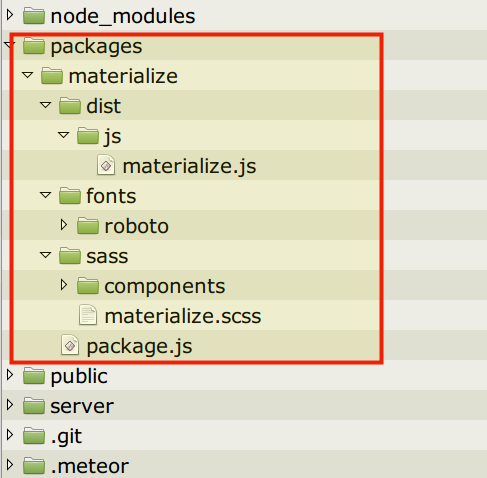
All files in the directory packages/materialize are taken from the materialize:materialize distribution ZIP file.
To understand that this is a local package, just change a line in the package.js file:
Package.describe({
name: 'materialize:materialize', // http://atmospherejs.com/materialize/materialize
summary: 'Materialize - LOCAL VERSION',
version: '0.100.1',
git: 'https://github.com/Dogfalo/materialize.git'
});
...
C). To make sure that everything is clean, I remove the node_modules directory and make
meteor reset
D). Add packages:
meteor add fourseven:scss
meteor add materialize:materialize
meteor npm install
meteor run
Note: I add fourseven:scss directly and _before_ materialize:materialize.
At that stage I have my app ready to work. But the system informs that it can't find the package materialize:materialize, and I see in the console that the object
Packages['materialize:materialize']
undefined
E). OK, I checked the code in the materialize.js file and then replaced
window.Materialize.
with
Materialize.
-- such assignments are used in the new part of code (this is the Modal function).
Note: there is a period at the end of window.Materialize. because I change only those places where properties of the object window.Materialize are modified, and not the window.Materialize is introduced.
After these changes Meteor can uses materialize:materialize correctly and my app starts working.
Conclusions
1). It looks like there are some problems in the Atmosphere package for the version 0.100.1.
2). To work correctly with Meteor the materialize.js should be fixed a little to export a correct Materialize object.
 seabrus
on 3 Aug 2017
seabrus
on 3 Aug 2017
@seabrus Awesome detective work!!!
Since Meteor's moving away from Atmosphere anyway, I decided to go down the NPM route instead.
meteor npm install [email protected] --save
meteor npm install hammerjs --save
created client/stylesheets/style.scss and added:
@import '{}/node_modules/materialize-css/sass/materialize.scss';
In my main.jsx:
import _Hammer from "hammerjs"
import "/node_modules/materialize-css/dist/js/materialize";
// made global
Hammer = _Hammer;
Materialize = window.Materialize;
Copied fonts and placed them in /public/fonts/roboto
WORKS!!!
kartboy16
on 3 Aug 2017
@kartboy16 Followed religiously your instructions and it works indeed!
I also believe NPM is the right way to go.
 jfhenon
on 4 Aug 2017
jfhenon
on 4 Aug 2017
@kartboy16 i'm wondering what version of fourseven:scss are you using? Mine seems to report
   While processing files with fourseven:scss (for target web.browser):
   /client/main.scss: Scss compiler error: File to import:
   {}/node_modules/materialize-css/sass/materialize.scss not found in file:
   /Users/afifsohaili/Projects/sports-arena/{}/client/main.scss
 afifsohaili
on 12 Aug 2017
afifsohaili
on 12 Aug 2017
fourseven:[email protected]
Double check the location of materialize.scss in your node_modules.
kartboy16
on 12 Aug 2017
- It is easier to use the npm package instead of the atmosphere package.
- Here you can find a little demo repo, that shows how that could look like.
Those fourseven:scss issues should be discussed in their repo, not here.
I agree with @JanZ1503. Any discussion around fourseven:scssshould take place at their repo. Not ours.
tomscholz
on 12 Aug 2017
@jfhenon and @kartboy16 I'm trying to emulate your suggested changes, and I used the repo created by jfhenon, but my styles (after removing materialize:materialize from .meteor/packages) are not being respected at all.
Any thoughts on what I might be doing improperly, or other hints for using npm?
 bmcgonag
on 21 Aug 2017
bmcgonag
on 21 Aug 2017
@bmcgonag Any errors?
kartboy16
on 21 Aug 2017
@kartboy16 No sir. Just doesn't render any of the pages using Materialize styling.
I'm using Meteor 1.5.0.
I have added materialize to the
section for now, but would really prefer to be able to use it through NPM so others can easily get it setup when the pull the repo. I hate to see atmosphere going away, it was a lot easier to just get things working from my end.
bmcgonag
on 21 Aug 2017
@bmcgonag Can you share code or do you have a public repo?
tomscholz
on 21 Aug 2017
I can't share that repo as it's for my work, but let me modify one of my other repos that's on github, and I'll post a link. Might take me the night to get to it.
bmcgonag
on 21 Aug 2017
I've just published an atmosphere package appworkshop:[email protected] , having forked the official materialize package and then made the ( changes suggested ) by @seabrus .
meteor remove materialize:materialize
meteor add fourseven:scss
meteor add appworkshop:materialize
It's working nicely for me. YMMV.
 cunneen
on 23 Aug 2017
cunneen
on 23 Aug 2017
@cunneen I just set it up and it's working. I didn't install fourseven:scss first, so initially it completely locked up my terminal, and left meteor running as a process, but after a quick reboot I added the fourseven:[email protected] to my packages, ran meteor, then ran your package, and it's working. It did warn me, however about experimental versions.
bmcgonag
on 23 Aug 2017
@bmcgonag That's great it's working for you, thanks for letting me know. Yes the experimental version warning is deliberate; it's because I versioned my package with a hyphenation at the end (0.100.1-appworkshop). People should use the official package if (or when) it works for them.
cunneen
on 24 Aug 2017
We're releasing a bug fix update (v.0.100.2) with the changes suggested by @seabrus and updating the meteor instructions to
meteor add fourseven:scss
meteor add materialize:materialize
Related issues
 ruslandzhumaev
·
3Comments
ruslandzhumaev
·
3Comments
 ericlormul
·
3Comments
ericlormul
·
3Comments
 MickaelH974
·
3Comments
MickaelH974
·
3Comments
 heshamelmasry77
·
3Comments
heshamelmasry77
·
3Comments
 onigetoc
·
3Comments
onigetoc
·
3Comments
Most helpful comment
@seabrus Awesome detective work!!!
Since Meteor's moving away from Atmosphere anyway, I decided to go down the NPM route instead.
created client/stylesheets/style.scss and added:
@import '{}/node_modules/materialize-css/sass/materialize.scss';In my main.jsx:
Copied fonts and placed them in
/public/fonts/robotoWORKS!!!