Materialize: Side Navigator not fixed on small devices
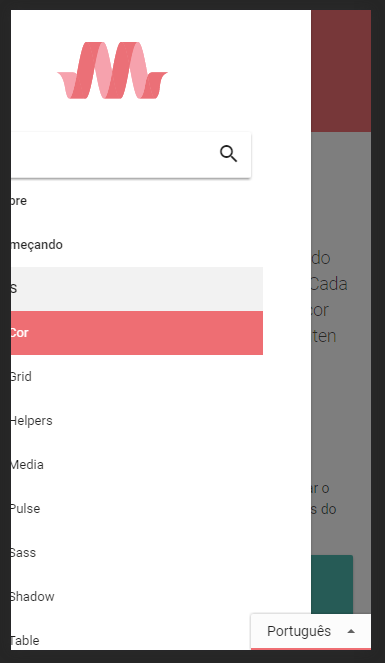
On small devices, when i open the side navigation and open a collapse menu that overflows the height, I can make small move on X-axis,
I found an inline-style on ul.side-nav element.
overflow: auto;
But not found when/where it's applied, i thing that's applied from some external JS.
I resolved the problem changing the inline-property from overflow: auto to overflow-y: auto
 alexisdiel
All 6 comments
The inline style is from the sidenav component https://github.com/Dogfalo/materialize/blob/master/js/sideNav.js
 DanielRuf
on 14 Jun 2017
DanielRuf
on 14 Jun 2017
Seems we need a fix like https://github.com/Dogfalo/materialize/commit/d9d0028e55d5477d66761fe53231e8750c22b5ba.
DanielRuf
on 14 Jun 2017
I guess you mean overflow and not override.
DanielRuf
on 14 Jun 2017
See my pull request, i've fixed changing the css override on nav-mobile initialize
alexisdiel
on 14 Jun 2017
Changing the overflow might just be a bandaid fix. If the layout is done correctly then you shouldn't be able to scroll horizontally. This might mean there is some css error that is causing some element to have extra width giving the sidenav horizontal scrollability.
I think its a good principle to try first to really diagnose the problem before proposing a fix that may just be fixing the symptoms instead of the root cause.
 acburst
on 16 Jun 2017
acburst
on 16 Jun 2017
@alexisdiel it is just in the docs as far as I can see it.
DanielRuf
on 16 Jun 2017
Related issues
 bradley-varol
·
3Comments
bradley-varol
·
3Comments
 djensen47
·
3Comments
djensen47
·
3Comments
 SoproniOli713
·
3Comments
SoproniOli713
·
3Comments
 samybob1
·
3Comments
samybob1
·
3Comments
 alexknipfer
·
3Comments
alexknipfer
·
3Comments