Materialize: Dropdown Menu is not positioned correctly on the first drop (It slowly fixes itself over following drops).
Description
I have 2 drop downs next to one another in the nav-bar. The right-most one is not correctly positioned the first time it is dropped down. The second time, the position is closer to where it is expected to be. The third time the drop down renders as expected.
Repro Steps
- Create a nav-bar
- Create 2 drop downs next to one another on the nav-bar's right content
ul - Hover over either drop down (it should be a bit off the screen to the right)
- Move your mouse away from the dropdown trigger. Once the dropdown goes away, hover over it again. (This time, the dropdown should be a bit closer to the expected location.
The dropdown continues to get closer to the expected location. In the example below, the "left" dropdown takes 2 drops to render and expected and the "right" dropdown takes 3.
Codepen
 ghost
ghost
All 26 comments
This happened to me too.... it appears to happen only on small and/or medium devices.
I fixed it by removing the material-icons on small devices that is add a hide-on-small-only class to the material icons...
 david-saint
on 13 Jun 2017
david-saint
on 13 Jun 2017
I'm using a desktop. Unfortunately my native resolution is 1280 X 1024, but still. That should be considered a large device right?
-UPDATE
I'm getting the same behavior on all of my devices. Even when I stretch the browser window across both of my monitors. I also tried my laptop at 1080P
ghost
on 13 Jun 2017
@Native-Coder I have the same issue and training/waiting for a solution. Please mention me if ever you find the fix.
 q2amarket
on 15 Jun 2017
q2amarket
on 15 Jun 2017
@Native-Coder @q2amarket The only way I figured to fix it is to remove material icons from the drop-down.... I know it's terrible but that's the only way I've found
david-saint
on 15 Jun 2017
@q2amarket Will do. I'm waiting on a fix now. and @Dsaint109 that's not a fix. At best a workaround, but I agree with you, it's terrible.
ghost
on 15 Jun 2017
Fixed in 2746dae
let me know if this fixes your issues
 acburst
on 16 Jun 2017
acburst
on 16 Jun 2017
@acburst Thanks for the fix, I will check and confirm here. @Native-Coder could you please check and confirm from your side?
q2amarket
on 16 Jun 2017
@acburst The issue is not solved yet. I have updated all source but it is still the same. Please have a look the image.
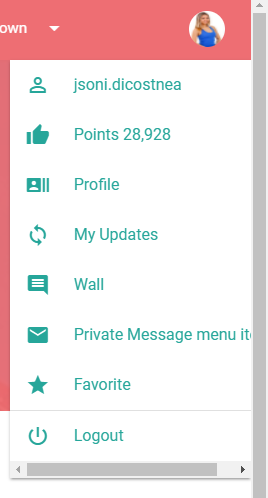
q2amarket
on 16 Jun 2017
@q2amarket did you clone the repository, run npm install and grunt monitor afterwards?
But it looks like another issue. You have a very long menu item and the width of the dropdown is constrained to a max-width or similar. Please test it again with the prebuilt files from https://gist.github.com/DanielRuf/ce13f9fb75c54bd4a5931a9dbbd1813f
 DanielRuf
on 16 Jun 2017
DanielRuf
on 16 Jun 2017
@DanielRuf I just downloaded the master branch and used the minified files from the dist folder. I can't see a change. What is it I'm SUPPOSED to do exactly? Pull from a certain branch?
ghost
on 16 Jun 2017
@DanielRuf I just downloaded the master branch and used the minified files from the dist folder. I can't see a change. What is it I'm SUPPOSED to do exactly? Pull from a certain branch?
You have to recompile the files either with grunt js_compile or grunt release or another task like grunt monitor. Keep an eye on the date and time of the files. They should be in bin (and dist when using the release task).
The dist folder does not contain the latest minified files, just the minified files of the last release.
DanielRuf
on 16 Jun 2017
yeeeeeaaaaah. Sorry but that's not an option for me. I wouldn't even know where to begin.("where do I run the command? The root directory of the project? Do I need any dependencies, etc") I guess I'll just have to wait until the next release.....
Plus, what would I even pull? How can I compile the source if I don't know where the source is?
ghost
on 16 Jun 2017
The source files are almost all files in the root directory and the subdirs.
Clone / download master, cd into the materialize dir, run npm install and then one of the Grunt tasks (Grunt should be globally installed).
Or use freshly built files from https://gist.github.com/DanielRuf/ce13f9fb75c54bd4a5931a9dbbd1813f
DanielRuf
on 16 Jun 2017
omg you are a lifesaver! I do have a question, and maybe this isn't the place for it. If I clone the master branch, how will that get your latest commit? I don't understand, if you haven't pushed your commit to the master branch?
ghost
on 16 Jun 2017
OK, I used those files that you compiled (thank you for that!) And the issue is indeed fixed. Thanks again!
ghost
on 16 Jun 2017
omg you are a lifesaver! I do have a question, and maybe this isn't the place for it. If I clone the master branch, how will that get your latest commit? I don't understand, if you haven't pushed your commit to the master branch?
On https://github.com/Dogfalo/materialize, there is a green "Clone or download" button.
Copy the SSH git@... URL, paste it in your shell and run git clone [email protected]:Dogfalo/materialize.git, this will create a new directory named materialize at the current location and pull all commits/changes. The patch is already in there (as commit in the master branch). You can pull any new commits with git pull origin master. After this run npm install and grunt release|monitor|js_compile.
DanielRuf
on 16 Jun 2017
@DanielRuf I'm a _novice_ with git. I can do the basics (Clone, add a remote origin, pull a branch, create a branch, merge a branch) I'm actually running my own gitlab at home for my personal projects; What I don't know is how to clone that branch or commit or whatever it is that fixed the issue. I was under the impression that the master branch was the current stable release of the framework.
- Does that mean it's safe for me to assume that when an issue is resolved, I can pull the mater branch to get that particular commit?
- Do I need to run
npm installandgruntif all I'm doing is using the minified js and css files? - Lastly, what is the difference between
releasemonitorandjs_compile?
Your link is exactly what I needed, and that fixed the issue. I'm just not sure how I would have achieved that without you directly linking to it?
ghost
on 21 Jun 2017
That's not really a novice if you have this experience.
Does that mean it's safe for me to assume that when an issue is resolved, I can pull the mater branch to get that particular commit?
Yes, if the PR was merged / the commit added to the branch. You can check that with git pull && git log.
Do I need to run npm install and grunt if all I'm doing is using the minified js and css files?
Yes. It should be grunt monitor or grunt release.
Lastly, what is the difference between release monitor and js_compile?
release compiles and creates all files (zip, dist, bin, docs - should run all tasks). monitor compiles sass and js (running js_compile and sass_compile and the other smaller tasks) and recompiles if there are changes (file watcher / monitoring). And js_compile just combines the components to a single js file. You can check these tasks in the Gruntfile.
DanielRuf
on 21 Jun 2017
Lastly, what is the difference between release monitor and js_compile?
release compiles and creates all files (zip, dist, bin, docs - should run all tasks). monitor compiles sass and js and recompiles if there are changes (file watcher / monitoring). And js_compile just combines the components to a single js file. You can check these tasks in the Gruntfile.
grunt release and grunt monitor runs js_compile. You dont have to run it every single time. Both of the tasks to that for you
 tomscholz
on 21 Jun 2017
tomscholz
on 21 Jun 2017
What I don't know is how to clone that branch or commit or whatever it is that fixed the issue.
The master branch? This is the default branch after a git clone [email protected]:Dogfalo/materialize.git. git checkout master would do the same.
I was under the impression that the master branch was the current stable release of the framework.
It is the development branch.
Releases are tagged commits and they get an automatic release on the releases page.
DanielRuf
on 21 Jun 2017
Right, both execute the smaller tasks like js_compile, sass_compile and so on.
DanielRuf
on 21 Jun 2017
OOOOOOH! So those were unix pipes, not binary OR. That makes SO much more sense. thanks for all of that. Now that I know the changes were on the master branch everything else kind of cleared itself up.
For some reason I thought the changes were made on some branch I didn't know about. So I'm essentially just using NPM to install the modules. Then run grunt release | monitor | js_compile which just pipes each grunt task to the next one.
That's definately simple enough.
ghost
on 22 Jun 2017
Well, npm just pulls the latest release by default if you do not explicitely tell it to pull from master.
No, I meant to either use the release, monitor or js_compile task in the grunt <taskname> form
DanielRuf
on 22 Jun 2017
This has become more of a conversation. Would you mind to take your conversation to gitter instead ;)
tomscholz
on 22 Jun 2017
I did not want to show you the piping approach, would be the wrong command in this case as release already runs the js_compile task.
DanielRuf
on 22 Jun 2017
@q2amarket is it really fixed? If so I think we can lock the conversation.
DanielRuf
on 22 Jun 2017
Related issues
 ruslandzhumaev
·
3Comments
ruslandzhumaev
·
3Comments
 heshamelmasry77
·
3Comments
heshamelmasry77
·
3Comments
 alexknipfer
·
3Comments
alexknipfer
·
3Comments
 djensen47
·
3Comments
djensen47
·
3Comments
 locomain
·
3Comments
locomain
·
3Comments