Materialize: Dynamically created textarea is not resizing
Description
When textarea control is created dynamically, auto-resize is not fired.
$('.materialize-textarea').trigger('autoresize'); won't help, as textarea does not have autoresize event bound to it. The only time it is set - is $(document).ready.
Maybe you can add some initialization for dynamically created controls, similar to what we can use for selectelements -$('select').material_select(); ?
 TetianaP
All 27 comments
https://github.com/Dogfalo/materialize/blob/master/js/forms.js#L179-L181
When a
selectoris provided, the event handler is referred to as delegated. The handler is not called when the event occurs directly on the bound element, but only for descendants (inner elements) that match the selector. jQuery bubbles the event from the event target up to the element where the handler is attached (i.e., innermost to outermost element) and runs the handler for any elements along that path matching the selector.
For me it seems to work as it should: http://codepen.io/anon/pen/xdgjzr
 DanielRuf
on 27 Apr 2017
DanielRuf
on 27 Apr 2017
It is working fine for the version 0.98.1 (the one you used in your example), but it does not work for the latest one - 0.98.2.
TetianaP
on 28 Apr 2017
@TetianaP you are right, seems we have another regression bug here.
http://codepen.io/anon/pen/QvpdNM
https://www.diffchecker.com/RqQVQKHI
Would have to compare the compiled components and triage this bug.
DanielRuf
on 28 Apr 2017
Seems we have to add a check for data('original-height') === undefined or similar.
Workaround (set data-original-height=0)
http://codepen.io/anon/pen/QvpdvO
DanielRuf
on 28 Apr 2017
@fega @tomscholz please add a label like needs-pr so I know that I plan to create a PR.
DanielRuf
on 28 Apr 2017
@DanielRuf I don't think that we need a needs-pr label. I mean, pull request are always welcome and such a label would would make things more complicated than necessary
 tomscholz
on 28 Apr 2017
tomscholz
on 28 Apr 2017
@tomscholz ok. Will add the issue number to my personal todo list.
DanielRuf
on 28 Apr 2017
@TetianaP please test the change and if this breaks anything
Applied here
DanielRuf
on 28 Apr 2017
Fixed in 4a3c15c
 acburst
on 1 May 2017
acburst
on 1 May 2017
@DanielRuf that works, thanks everyone!
How soon could we expect it to be released?
TetianaP
on 1 May 2017
@TetianaP you could also use one of the solutions
http://stackoverflow.com/a/16951315/753676
http://stackoverflow.com/a/18049685/753676
should also work with the update command
DanielRuf
on 1 May 2017
@DanielRuf Thanks, it will work, but in this case need to bundle all js together, as materialize-css/dist/js/materialize.min.js was not updated and it contains old implementation from forms.js.
TetianaP
on 4 May 2017
@TetianaP just clone and run Grunt in the directory of Materialize to build a new file using the js_compile task.
DanielRuf
on 4 May 2017
set data-original-height=0
worked for me with the version 0.98.2
 eduardoalvara2
on 23 May 2017
eduardoalvara2
on 23 May 2017
Exactly ;-) https://github.com/Dogfalo/materialize/issues/4613#issuecomment-297950328
DanielRuf
on 23 May 2017
Hi same problem here on version v0.99.0
- I add a textarea dynamically to the DOM
- I set its value with
$('#myTextArea').val($('#myTextArea').attr('data-original-value')); - I trigger the autoresize event
$('#myTextArea').trigger('autoresize');
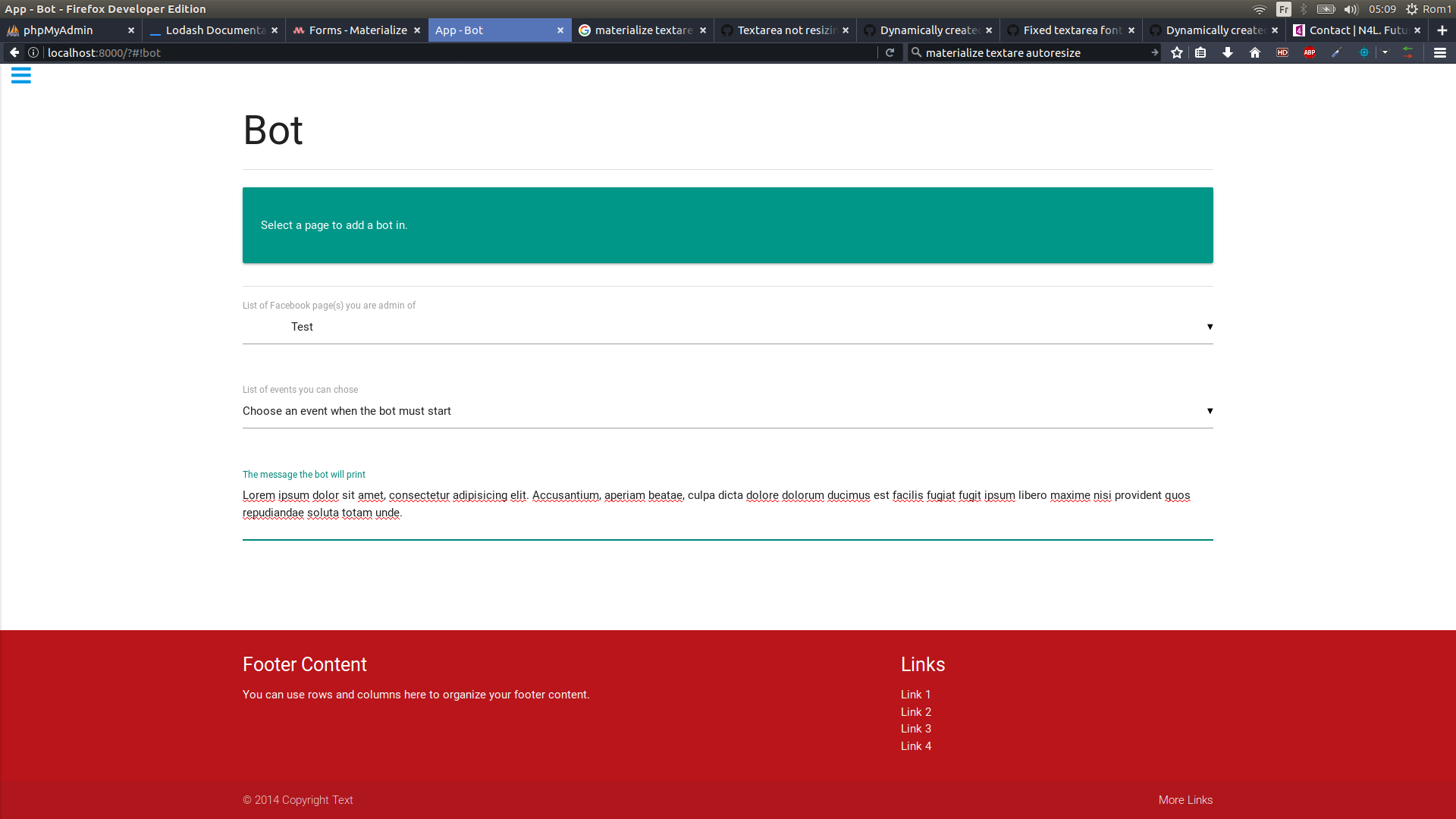
The data-label overlapped the text, if I click on the textarea the label goes correctly on top the text and all goes fine then.
The HTML
<div class="row">
    <div class="input-field col s12">
        <textarea id="bot-message-input"
                  class="materialize-textarea"
                  data-original-value="<%= text %>"
                  data-original-height="0"></textarea>
        <label for="bot-message-input">The message the bot will print</label>
    </div>
</div>
The bug state at the page load

The ok state after clicking on the textarea
 ZiperRom1
on 5 Jul 2017
ZiperRom1
on 5 Jul 2017
@DanielRuf I have a same problem on 0.99.0
 knight7024
on 8 Sep 2017
knight7024
on 8 Sep 2017
@knight7024 did you try 0.100.0 or newer?
DanielRuf
on 8 Sep 2017
@DanielRuf yes i did it but nothing changed
and modal cannot be loaded well on 0.100.2
sry i fixed it by adding this in
tag
knight7024
on 8 Sep 2017
Is anyone else still having this problem? I just upgraded from .98 to .100.2 and this is an issue. It wasn't an issue in the .98 version.
Any help would be appreciated.
 SmboBeast
on 10 Oct 2017
SmboBeast
on 10 Oct 2017
@SmboBeast I'm using .100.1 version materialize javascript because of this issue. Have you imported js in body tag?
knight7024
on 10 Oct 2017
@knight7024
Thank you for this! I will try using .100.1 right now and see if this is a temporary fix.
I have imported the JS in the body tag also. Give me a few minutes. Will update this thread.
SmboBeast
on 10 Oct 2017
@knight7024 Even on .100.1, it still doesn't work for me on page load. However, when text is entered into the textarea, it works just fine. Weird...
SmboBeast
on 10 Oct 2017
Well... idk about that issue. We need to wait newer version which is fixed
knight7024
on 10 Oct 2017
Agreed. Thanks @knight7024
SmboBeast
on 10 Oct 2017
:) @SmboBeast
knight7024
on 10 Oct 2017
M.textareaAutoResize(document.querySelector('.materialize-textarea'))
 yanyeAbbr
on 25 Apr 2018
yanyeAbbr
on 25 Apr 2018
Related issues
 cope
·
3Comments
cope
·
3Comments
 bradley-varol
·
3Comments
bradley-varol
·
3Comments
 PhillippOhlandt
·
3Comments
PhillippOhlandt
·
3Comments
 ReiiYuki
·
3Comments
ReiiYuki
·
3Comments
 lpgeiger
·
3Comments
lpgeiger
·
3Comments
Most helpful comment
Seems we have to add a check for
data('original-height') === undefinedor similar.Workaround (set
data-original-height=0)http://codepen.io/anon/pen/QvpdvO