Materialize: chips-autocomplete & chips-placeholder don't work together
If .chips-autocomplete and .chips-placeholder were both set on a .chip the placeholder javascript code does not do anything visible. When you remove the .chips-autocomplete it starts working again.
 ahmetb
All 4 comments
You are calling chips twice on the same element. When you init the chips autocomplete you are overriding your previous options. You can combine the options into one call.
 acburst
on 25 Feb 2017
acburst
on 25 Feb 2017
@acburst can you show us how?
 kartikchauhan
on 21 Mar 2017
kartikchauhan
on 21 Mar 2017
I think he try to say something like this:
$('.chips-autocomplete').chips({
placeholder: "Escribenos tus sintomas aqui",
and then the autocomplete...
 DulcePC
on 30 Mar 2018
DulcePC
on 30 Mar 2018
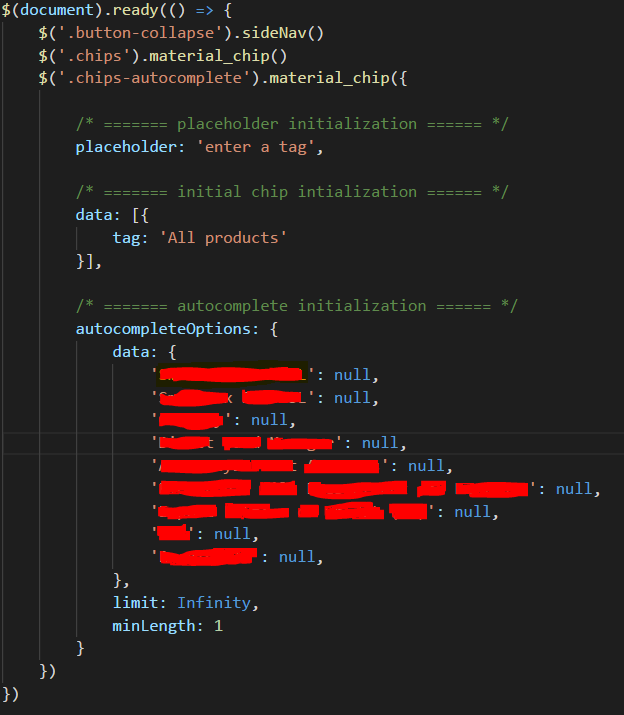
@kartikchauhan @ahmetb
i have managed to do it with the code above, the class used to initialize can be anything i suppose as long as it matches the class used in your chips div element.
note the code above sets a placeholder, initial tag and auto completion all at once. (_sensitive information blurred out ;)_)
 Excellente
on 18 Apr 2018
Excellente
on 18 Apr 2018
Related issues
 Robouste
·
3Comments
Robouste
·
3Comments
 SoproniOli713
·
3Comments
SoproniOli713
·
3Comments
 serkandurusoy
·
3Comments
serkandurusoy
·
3Comments
 PhillippOhlandt
·
3Comments
PhillippOhlandt
·
3Comments
 bradley-varol
·
3Comments
bradley-varol
·
3Comments
Most helpful comment
You are calling chips twice on the same element. When you init the chips autocomplete you are overriding your previous options. You can combine the options into one call.