Materialize: Use material icons in Select option
I would like to put icons in the options for select elements.
Not next to the entire select, but one for each option (just left to the text).
When I do this, the icon does not render.
Is this possible yet? If not, are you planning to add it?
 iONinja
All 13 comments
You should read the documentation... it clearly explains that you can add an image to the left of a select option. Based on your explanation above, this is _exactly_ what you're asking for. http://materializecss.com/forms.html
You can add icons to your options in any type of select. In the option you add the image source with the data-icon attribute. You can add the left or right class to align your icon.
<div class="input-field col s12 m6">
    <select class="icons">
      <option value="" disabled selected>Choose your option</option>
      <option value="" data-icon="images/sample-1.jpg" class="left circle">example 1</option>
      <option value="" data-icon="images/office.jpg" class="left circle">example 2</option>
      <option value="" data-icon="images/yuna.jpg" class="left circle">example 3</option>
    </select>
    <label>Images in select</label>
  </div>
 ben-sykes
on 4 Jan 2017
ben-sykes
on 4 Jan 2017
Two issues with that:
- I want the "data-icon" to be just to the left of the option, not on the right.
- The main issue: I want a Material font icon, not an image.
iONinja
on 4 Jan 2017
related: #2709 (HTML in select), #3299 (class name in select), #3981 (fontawesome icons in select)
HTML in select would also allow tags for sprites
 uok
on 11 Apr 2017
uok
on 11 Apr 2017
Assuming this was never added?
 timothymarois
on 6 Oct 2018
timothymarois
on 6 Oct 2018
This can be done with Select2, why can't Materialize handle this addition?
timothymarois
on 6 Oct 2018
Hey so i found a small workaround for this. Im Using Angular 6.
Essentially what i did was grab the URL for the Google Material Icons, and found that if i place the name of the icon I want, in the url i can have a sort of mini API for the svg icons google provides. then in the HTML i add [attr.data-icon] with a function that return image link of that icon.
Component:
public iconsParse(icon): string {
    return `https://material.io/tools/icons/static/icons/baseline-${ /* icon-name goes here */}-24px.svg`
}
html:
<select class="icons"  materialize="material_select" [materializeSelectOptions]="things_list" >
    <option disabled [value]="null">- Select a Team -</option>

    <option *ngFor="let stuff of things" [value]="stuff.id"  [attr.data-icon]="iconsParse( 'account_circle' )"> {{ stuff.name }} </option>

</select>
 dbarroso1
on 15 Mar 2019
dbarroso1
on 15 Mar 2019
There is an easy fix that works for showing ONLY the material icons in the dropdown;
.dropdown-content li > span {
  font-family: 'Material Icons';
}
This assumes you have the value of the icons (e.g. 3d_rotation) as options.
 lafeber
on 26 Jun 2019
lafeber
on 26 Jun 2019
can this be reopened ?
 equivalent
on 1 Jun 2020
equivalent
on 1 Jun 2020
can this be reopened ?
This should be very easy to do - just looking through select.js, we already have this functionality with the standard dropdown (which select uses) and with option group - that is, an icon or checkbox prepended to the option.
 doughballs
on 1 Jun 2020
doughballs
on 1 Jun 2020
Agree it can done (everything is possible)
I'm just saying It would be just nice to be built in the framework itself for lazy developers like myself. But fair enough
if anyone is interested in another solution, here is my super lazy solution with Font awesome:
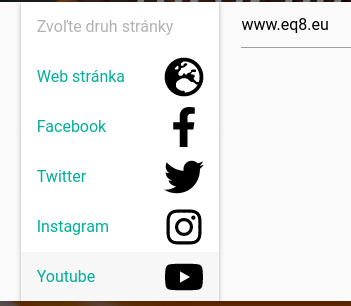
           select.icons name="website_type"
              option disabled="" value="website"  Zvoľte druh stránky
              option.left data-icon="/fa-icon-images/globe-europe-solid.svg" value="website" Web stránka
              option.left data-icon="/fa-icon-images/facebook-f-brands.svg"  value="facebook" Facebook
              option.left data-icon="/fa-icon-images/twitter-brands.svg"   value="twitter" Twitter
I'm taking advantage of built in select with icon image https://materializecss.com/select.html and I've downloaded the "svg" from Font Awesome and saved it as image to the project. I'm linking the "data-image" to the svg image
equivalent
on 1 Jun 2020
Agree it can done (everything is possible)
I'm just saying It would be just nice to be built in the framework itself for lazy developers like myself. But fair enough
if anyone is interested in another solution, here is my super lazy solution with Font awesome:
           select.icons name="website_type"
              option disabled="" value="website"  Zvoľte druh stránky
              option.left data-icon="/fa-icon-images/globe-europe-solid.svg" value="website" Web stránka
              option.left data-icon="/fa-icon-images/facebook-f-brands.svg"  value="facebook" Facebook
              option.left data-icon="/fa-icon-images/twitter-brands.svg"   value="twitter" Twitter
I'm taking advantage of built in select with icon image https://materializecss.com/select.html and I've downloaded the "svg" from Font Awesome and saved it as image to the project. I'm linking the "data-image" to the svg image
Sorry, maybe it wasn't clear - I meant that from looking at select.js, it should be easy for the devs to add icons in a future release! Not meaning do it yourself :)
Nice workaround!
doughballs
on 1 Jun 2020
There was also the suggestion of making HTML possible in select - see https://github.com/Dogfalo/materialize/issues/2305 - this way you could add sprites, font awesome, etc.
uok
on 3 Jun 2020
I used the direct SVG links from the Material Design site ( https://material.io/resources/icons/?style=baseline ) in the data-icon attribute. The direct URL looks something like this:
https://fonts.gstatic.com/s/i/materialicons/6_ft_apart/v2/24px.svg (after you remove the ?download=true from the link)
 jasonbrookins
on 5 Oct 2020
jasonbrookins
on 5 Oct 2020
Related issues
 acierpinski
·
3Comments
acierpinski
·
3Comments
 hartwork
·
3Comments
hartwork
·
3Comments
 alexknipfer
·
3Comments
alexknipfer
·
3Comments
 Robouste
·
3Comments
Robouste
·
3Comments
 bradley-varol
·
3Comments
bradley-varol
·
3Comments
Most helpful comment
Two issues with that: