Materialize: Uncaught TypeError: $indicator.velocity is not a function
I installed the plugins using npm and bundled it using webpack. The plugin was required as following:
export default class App extends React.Component {
   ...
  componentDidMount() {
    require('materialize-css/dist/js/materialize');
  }

  render() {
    return (
        <div className='row'>
          <div className='col s12'>
            <ul className='tabs'>
              <li className='tab col s3'><a href='#test1'>Test 1</a></li>
              <li className='tab col s3'><a className='active' href='#test2'>Test 2</a></li>
              <li className='tab col s3 disabled'><a href='#test3'>Disabled Tab</a></li>
              <li className='tab col s3'><a href='#test4'>Test 4</a></li>
            </ul>
          </div>
          <div id='test1' className='col s12'>Test 1</div>
          <div id='test2' className='col s12'>Test 2</div>
          <div id='test3' className='col s12'>Test 3</div>
          <div id='test4' className='col s12'>Test 4</div>
      </div>
    );
  }
}
I always got the Uncaught TypeError: $indicator.velocity is not a function error when clicking on Tab . However, if I required the plugin in HTML instead, it worked just fine. I'm not quite sure what's going wrong.
 lvarayut
All 26 comments
I ran into the same issue. You just need to make sure you attach jQuery to the window when you require it:
window.jQuery = window.$ = require('jquery');
This should be imported before materialize.
 benelliott
on 13 Apr 2016
benelliott
on 13 Apr 2016
Looks like there have to be velocity-animate package installed and exported as following:
window.$.velocity = require('velocity-animate/velocity.js')
only then i get it work
 linuxenko
on 27 Apr 2016
linuxenko
on 27 Apr 2016
Thanks @benelliott. So many hours of head banging...
 enmanuelr
on 25 Jun 2016
enmanuelr
on 25 Jun 2016
Adding
window.jQuery = window.$ = require('jquery');
window.$.velocity = require('velocity-animate/velocity.js')
doesn't fix the velocity bug anymore on v0.97.7 :-1:
 Wifsimster
on 28 Jul 2016
Wifsimster
on 28 Jul 2016
@Wifsimster agreed, this is no longer a viable fix.
 CharlieGreenman
on 8 Aug 2016
CharlieGreenman
on 8 Aug 2016
I use it on v0.97.7
// Check for jQuery.
// TODO: Fix $(dom).velocity is not function bug
if (typeof(jQuery) === 'undefined') {
  // var jQuery;
  // Check if require is a defined function.
  if (typeof(require) === 'function') {
    window.jQuery = window.$ = require('jquery');
  // Else use the dollar sign alias.
  } else {
    window.jQuery = $;
  }
}
;
import 'materialize-css/dist/js/materialize.js'
 Akimyou
on 30 Aug 2016
Akimyou
on 30 Aug 2016
Guys!! Just delete the JQuery dependency in materialize folder in node_modules/materialize_css/node_modules/JQuery ! :D
this problem is because materialize have a JQuery dependency obsolete
 ArtistNeverStop
on 1 Nov 2016
ArtistNeverStop
on 1 Nov 2016
The problem with this approach is that this changes the downloaded dependency, so anyone to re-build the project would have to run the same step (extremely error-prone). I found that this trick fixes the build for me too, but I can't include it into the final build.
I think that jQuery is not really a "dependency" (in NPMs sense) of Materialize.css. Materialize expects global jQuery object and "private" dependency that it is relying on is not imported anywhere.
To me it looks like Materialize CSS is falls into a category of "peer dependencies": https://nodejs.org/en/blog/npm/peer-dependencies/
 Juriy
on 2 Jan 2017
Juriy
on 2 Jan 2017
The only solution I got to work was the @ArtistNeverStop one.
But modify the source code of materialize.js for just this stupid jQuery check break all the automation by using bower / gulp in project release process.
Do I have to fork materialize to fit my build process or a "proper" fix is going to be released ?
Here is the fork fix for NPM
"materialize-css": "https://github.com/ZiperRom1/materialize/tarball/884b152cac7da763fd11bb4e8a8c4d3eedb2475e"
https://github.com/ZiperRom1/materialize/tarball/884b152cac7da763fd11bb4e8a8c4d3eedb2475e
 ZiperRom1
on 7 Jan 2017
ZiperRom1
on 7 Jan 2017
I'm experiencing a very similar problem that seems to be fixed by the solution submitted by @ArtistNeverStop. When trying to open a modal box I get this in the Chrome console:
Uncaught TypeError: k.velocity is not a function
I'm using Meteor 1.4.2.6 with Blaze templating and the "materialize-css" NPM package at version 0.98.0. If I delete the jquery folder under the "node_modules" directory inside the "materialize-css" package, everything works. Otherwise, I get the above error. Any updates on this issue? I can certainly take the time to fork it and use my own patched version, but that does not seem good long term.
Thanks!
 Meloncon
on 14 Feb 2017
Meloncon
on 14 Feb 2017
I have managed to get this working by using webpack 2 and explose-loader. In my vendor.ts I have:
import 'jquery'; // ^2.2.4
import 'materialize-css/dist/js/materialize.js' // ^0.98.1
In my webpack.config.js I have the following:
module = {
  rules: [
    // jQuery & plugins
    {
        test: require.resolve('jquery'),
        use: [
            {
                loader: 'expose-loader',
                options: 'jQuery'
            },
            {
                loader: 'expose-loader',
                options: '$'
            },
            {
                loader: 'expose-loader',
                options: 'window.jQuery'
            }
        ]
    },
    {
        test: require.resolve('velocity-animate/velocity.js'),
        use: [
            {
                loader: 'expose-loader',
                options: 'window.$.velocity'
            }
        ]
    }
  ]
}
This did the trick for me and it has been successfully working in an Angular 4 project.
NOTE: I haven't deleted the node_modules/jQuery folder inside materialize-css as @ArtistNeverStop suggested.
 steve-todorov
on 1 Apr 2017
steve-todorov
on 1 Apr 2017
I'm running into the same error here with key functionalities such as closing a modal tab not working. Here's the error message I get:
core.es5.js:1084 ERROR TypeError: k.velocity is not a function
    at h (materialize.js:3)
    at HTMLAnchorElement.<anonymous> (materialize.js:3)
    at HTMLDocument.dispatch (jquery.js:4737)
    at HTMLDocument.elemData.handle (jquery.js:4549)
    at ZoneDelegate.invokeTask (zone.js:398)
    at Object.onInvokeTask (core.es5.js:4116)
    at ZoneDelegate.invokeTask (zone.js:397)
    at Zone.runTask (zone.js:165)
    at HTMLDocument.ZoneTask.invoke (zone.js:460)
 mikkeld
on 2 Apr 2017
mikkeld
on 2 Apr 2017
The problem for me was because of jQuery 3 and import, when I changed to jQuery 2.2.4 and imported materialize like:
window.$ = window.jQuery = require('jquery');
var Materialize = require('materialize-css');
it seems to work.
 eklundkristoffer
on 5 Apr 2017
eklundkristoffer
on 5 Apr 2017
I'm having a similar issue: Uncaught TypeError: tooltipEl.velocity is not a function
I am using webpack and do the following:
import 'materialize-css/dist/css/materialize.css';
import 'materialize-css/dist/js/materialize';
I have not found a solution to this and I am using "materialize-css": "^0.98.1"
 ghost
on 15 Apr 2017
ghost
on 15 Apr 2017
Hi everyone,
today i haved the same problem and i solved using it in my javascript entry point
'use strict'
window.$ = window.jQuery = $
require('materialize-css/bin/materialize.css')
require('font-awesome/css/font-awesome.css')
require('styles/app.css')
require('materialize-css/bin/materialize')
I used webpack 2 with this configuration
'use strict'

const webpack = require('webpack')
const ExtractTextPlugin = require('extract-text-webpack-plugin')
const CopyWebpackPlugin = require('copy-webpack-plugin')
const path = require('path')
const merge = require('webpack-merge')

const webpackCommon = {
  entry: {
    app: ['./client/initialize']
  },
  module: {
    rules: [
      {
        test: /\.js?$/,
        exclude: /node_modules/,
        use: [
          {
            loader: 'babel-loader?presets[]=es2015&presets[]=es2016&presets[]=es2017'
          }
        ]
      },
      {
        test: /\.ejs$/,
        use: {
          loader: 'underscore-template-loader'
        }
      },
      {
        test: /\.css$/,
        //exclude: /node_modules/,
        use: ExtractTextPlugin.extract({
          fallback: 'style-loader',
          use: 'css-loader'
        })
      },
      {
        test: /\.woff(2)?(\?v=[0-9]\.[0-9]\.[0-9])?$/,
        use : {
          loader: "url-loader?limit=80000&minetype=application/font-woff"
        }
      },
            {
         test: /\.(ttf|eot|svg)(\?v=[0-9]\.[0-9]\.[0-9])?$/,
         loader: "file-loader"
      }
    ]
  },
  output: {
    filename: 'app.js',
    path: path.join(__dirname, 'server/public'),
    publicPath: 'server/public/'
  },
  plugins: [
    new ExtractTextPlugin('app.css'),
    new CopyWebpackPlugin([{
      from: './client/assets/views',
      to: path.join(__dirname, 'server/views')
    }]),
    new CopyWebpackPlugin([{
      from: './client/assets/favicon.ico',
      to: path.join(__dirname, 'server/public')
    }]),
    new CopyWebpackPlugin([{
        from: './client/assets/images',
        to: path.join(__dirname, 'server/public/images')
    }]),
    new webpack.ProvidePlugin({
      $: 'jquery',
      _: 'underscore'
    })
  ],
  resolve: {
    modules: [
      path.join(__dirname, './node_modules'),
      path.join(__dirname, './client')
    ]
  },
  resolveLoader: {
    modules: [
      path.join(__dirname, './node_modules')
    ]
  }
};

const env = process.env.NODE_ENV || 'development'
switch (env) {
  case 'development':
    module.exports = merge(webpackCommon, {
      devtool: '#inline-source-map',
      watch: true,
       watchOptions: {
        aggregateTimeout: 3000,
        ignored: /node_modules/,
        poll: 1000
      }
    });
    break;
  default:
    module.exports = merge(webpackCommon, {
      devtool: 'source-map',
      watch: false
    });
    break;
}
The version of materialize-css is 0.98.2 and jQuery is 3.2.1 all seems to work now.
Hope to be helpul to someone.
 NickNaso
on 26 Apr 2017
NickNaso
on 26 Apr 2017
Really want to use this project, but it's pretty much bricked until this is addressed. It's been an issue off and on since 2015...
 Bengejd
on 30 Apr 2017
Bengejd
on 30 Apr 2017
Forked updated for version 0.98.2, you can add in package.json dependencies
"materialize-css": "https://github.com/ZiperRom1/materialize/tarball/7a0f549d461f2f512078ca52a19d97445351bf06"
Is Materialize team planned to make this framework natively compatible with webpack2 and jQuery3 without this dirty hack ?
ZiperRom1
on 6 May 2017
@ZiperRom1
jQuery 3: https://github.com/Dogfalo/materialize/pull/4587
Webpack: https://github.com/Dogfalo/materialize/pull/3782
 tomscholz
on 10 May 2017
tomscholz
on 10 May 2017
To solve this is used the jquery version that is located in the materialize folder
window.$ = window.jQuery = require('materialize-css/node_modules/jquery/dist/jquery.js');
require('materialize-css');
 patombugua
on 27 Jun 2017
patombugua
on 27 Jun 2017
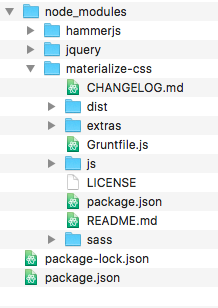
@patombugua Wrong. Since #4774 materialize shouldn't use the it's own bundled version of jQuery anymore. Are you using the latest version (0.99.0)? Can anyone check if the problem is resolved in the latest version?
tomscholz
on 27 Jun 2017
I'm using the latest version (0.99.0), and having the same error. (electron 1.6.11 and jQuery 3.2.1)
Uncaught TypeError: tooltipEl.velocity is not a function
 sergiorighi
on 3 Jul 2017
sergiorighi
on 3 Jul 2017
@sergiorighi Can you share your code?
tomscholz
on 3 Jul 2017
Just this on index.html, whith some tooltips, of course, but just like in the tooltip examples page:
<script>
    window.$ = window.jQuery = require('./node_modules/jquery/dist/jquery.min.js');
    require('./node_modules/hammerjs/hammer.min.js');
    require('./node_modules/materialize-css/dist/js/materialize.js');
    require('./js/init.js');
</script>
And this is the init.js:
$(document).ready(function () {
    $('.tooltipped').tooltip();
});
@tomscholz, just as an information, I have an application that had an object that was declared as:
var ap = {};
and was working on regular brwosers, but in electron was giving an "undefined variable" error, so I set the object just as:
ap = {};
without the var declaration, and it worked.
sergiorighi
on 4 Jul 2017
I changed the first line of the
Related issues
 serkandurusoy
·
3Comments
serkandurusoy
·
3Comments
 bradley-varol
·
3Comments
bradley-varol
·
3Comments
 onigetoc
·
3Comments
onigetoc
·
3Comments
 acierpinski
·
3Comments
acierpinski
·
3Comments
 PhillippOhlandt
·
3Comments
PhillippOhlandt
·
3Comments
Most helpful comment
Adding
doesn't fix the velocity bug anymore on v0.97.7 :-1: