Materialdrawer: AccountHeader profile background
Details
[6.0.2] Used library version
[26.1.0] Used support library version
[27.0.3] Used gradle build tools version
[3.0.1] Used tooling / Android Studio version
Problem
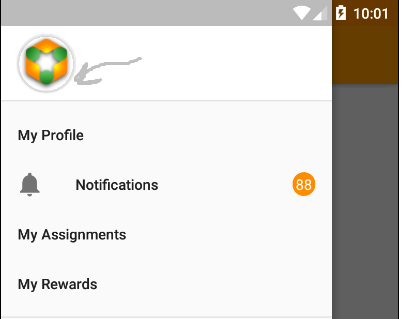
When I try to set icon with png extention to ProfileDrawerItem() I have incorrect background and I don't understand what is it. I suppose it's shadow or something else. I didn't find any methods to resolve this problem or it's not a problem? Help me pls
 ivanessence
All 11 comments
@ivanessence you can disable the shadow via a theme: https://github.com/mikepenz/MaterialDrawer/blob/develop/app/src/main/res/values/styles.xml#L31
 mikepenz
on 4 Jan 2018
mikepenz
on 4 Jan 2018
@mikepenz thx, it's resolve my problem :) also tell me pls can I do it programmatically?
ivanessence
on 4 Jan 2018
@ivanessence sadly there is no option to do this programatically
mikepenz
on 4 Jan 2018
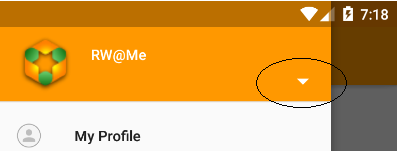
@mikepenz I have another one question. Can I change this arrow programmatically when I click on header? By default realization I know that it change automatically
ivanessence
on 4 Jan 2018
@ivanessence you want to toggle the selection list? or what do you want to do with this arrow?
mikepenz
on 4 Jan 2018
@mikepenz for example I set to header withOnAccountHeaderSelectionViewClickListener() and I don't want to go to account list, when I click on header, I want create Drawer with another menu, but I want change arrow state or arrow icon
ivanessence
on 4 Jan 2018
@mikepenz ?
ivanessence
on 5 Jan 2018
The second list is meant for profiles not really for anything else. as you also use profiles in addition you will have to adjust and overwrite some core logics of the drawer, and I am not sure if that is a very good idea.
The AccountHeader provides you with the option to provide listeners for the clicks, you can consume them, adjust the list on the bottom in the drawer to your needs.
To adjust the arrow then I guess it is the easiest ot get the view of the header, find the ImageView containing that arrow, and then change the Drawable
mikepenz
on 5 Jan 2018
@mikepenz I tried to use headerResult.getView().findViewById(R.id.material_drawer_arrow).setVisibility(View.INVISIBLE);
but I had NullPointerException, however if I used headerResult.getView().findViewById(R.id.material_drawer_account_header_name).setVisibility(View.INVISIBLE); it work fine. What I did wrong?
ivanessence
on 8 Jan 2018
Well the id is a different one:
https://github.com/mikepenz/MaterialDrawer/blob/develop/library/src/main/res/layout/material_drawer_header.xml#L103
mikepenz
on 9 Jan 2018
@mikepenz big thx for help!
ivanessence
on 10 Jan 2018
Related issues
 armoun
·
3Comments
armoun
·
3Comments
 singhalavi
·
4Comments
singhalavi
·
4Comments
 pranjal-joshi
·
3Comments
pranjal-joshi
·
3Comments
 sonh
·
3Comments
sonh
·
3Comments
 HanderWei
·
3Comments
HanderWei
·
3Comments