Materialdesigninxamltoolkit: MaterialDesignOutlinedButton Style Bug
Using the button style MaterialDesignOutlinedButton causes the following error:

I believe this is caused by an incorrect resource reference in the style:
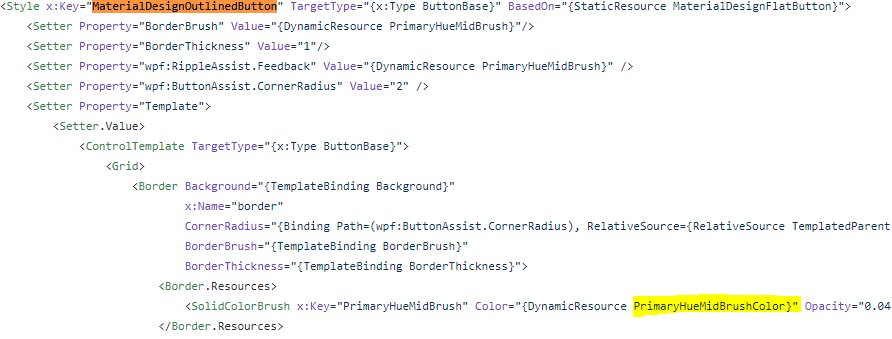
To reproduce, add a button using the MaterialDesignOutlinedButton style.
 mipen
mipen
All 7 comments
Be sure to follow one of the guides:
https://github.com/MaterialDesignInXAML/MaterialDesignInXamlToolkit/wiki/Super-Quick-Start
The line that adds that brush is: <ResourceDictionary Source="pack://application:,,,/MaterialDesignColors;component/Themes/Recommended/Primary/MaterialDesignColor.DeepPurple.xaml" />
See https://github.com/MaterialDesignInXAML/MaterialDesignInXamlToolkit/tree/master/MaterialDesignColors.Wpf/Themes/Recommended/Primary for other choices of color
 jespersh
on 6 Feb 2020
jespersh
on 6 Feb 2020
I have added the colour swatches in my app.xaml, and am overwriting them to my own palette.
I think the problem is that there is no resource 'PrimaryHueMidBrushColor', only 'PrimaryHueMidBrush'. If you search the repository, there is only one reference to 'PrimaryHueMidBrushColor' and it is the above highlighted line.
mipen
on 11 Feb 2020
I have the same issue. It seems that the Color-Resource is created here:
I do have
<ResourceDictionary.MergedDictionaries>
  <ResourceDictionary Source="pack://application:,,,/Commons.Gui;component/Commons.xaml" />
  <ResourceDictionary Source="pack://application:,,,/MaterialDesignColors;component/Themes/recommended/primary/materialdesigncolor.red.xaml" />
</ResourceDictionary.MergedDictionaries>
and in Commons.xaml
<ResourceDictionary.MergedDictionaries>
  <ResourceDictionary Source="pack://application:,,,/MaterialDesignThemes.Wpf;component/Themes/materialdesigntheme.light.xaml" />
  <ResourceDictionary Source="pack://application:,,,/MaterialDesignThemes.Wpf;component/Themes/materialdesigntheme.defaults.xaml" />
  <ResourceDictionary Source="pack://application:,,,/MaterialDesignThemes.Wpf;component/Themes/materialdesigntheme.popupbox.xaml" />
  <ResourceDictionary Source="pack://application:,,,/MaterialDesignColors;component/themes/recommended/accent/materialdesigncolor.red.xaml" />
</ResourceDictionary.MergedDictionaries>
But ResourceDictionaryExtensions.SetSolidColorBrush seems not to be called.
 greuelpirat
on 20 Mar 2020
greuelpirat
on 20 Mar 2020
I tried
<ResourceDictionary.MergedDictionaries>
  <ResourceDictionary Source="pack://application:,,,/Commons.Gui;component/Commons.xaml" />
  <materialDesign:BundledTheme BaseTheme="Light" PrimaryColor="Red" SecondaryColor="Red" />
</ResourceDictionary.MergedDictionaries>
and ResourceDictionaryExtensions.SetSolidColorBrush is being called now. But the exceptions still occurs.
greuelpirat
on 20 Mar 2020
PrimaryHueMidBrushColor is not the problem here. I can set it manually, but nothing changes.
when I set BorderBrush explicit for the button, the exception is gone.
greuelpirat
on 20 Mar 2020
I made some research and found that with #1610 the line
https://github.com/MaterialDesignInXAML/MaterialDesignInXamlToolkit/blob/f96a1d6902cbbfaf5d18ce15fc707bd1f4926610/MaterialDesignThemes.Wpf/Themes/MaterialDesignTheme.Button.xaml#L210
was change. Previous it was {StaticResource MaterialDesignDivider} and that is the current line in version 3.0.1. This static resource lead to the exception, when the resource dictionaries are loaded in MainWindow.xaml (this seems to be to late for static resources). When loaded in the App.xaml it worked.
So this exception should be done when 3.1.0 with #1610 is released.
greuelpirat
on 28 Mar 2020
This appears to be fixed in the latest 3.1.0 preview NuGets.
 Keboo
on 30 Mar 2020
Keboo
on 30 Mar 2020
Related issues
 gitjsdr26
·
3Comments
gitjsdr26
·
3Comments
 Xaalek
·
3Comments
Xaalek
·
3Comments
 bebenins
·
3Comments
bebenins
·
3Comments
 svjansen
·
4Comments
svjansen
·
4Comments
 soi013
·
3Comments
soi013
·
3Comments