Materialdesigninxamltoolkit: PopupBox is closed after being opened
I have a problem with the PopupBox control where it opens and then closes right away.
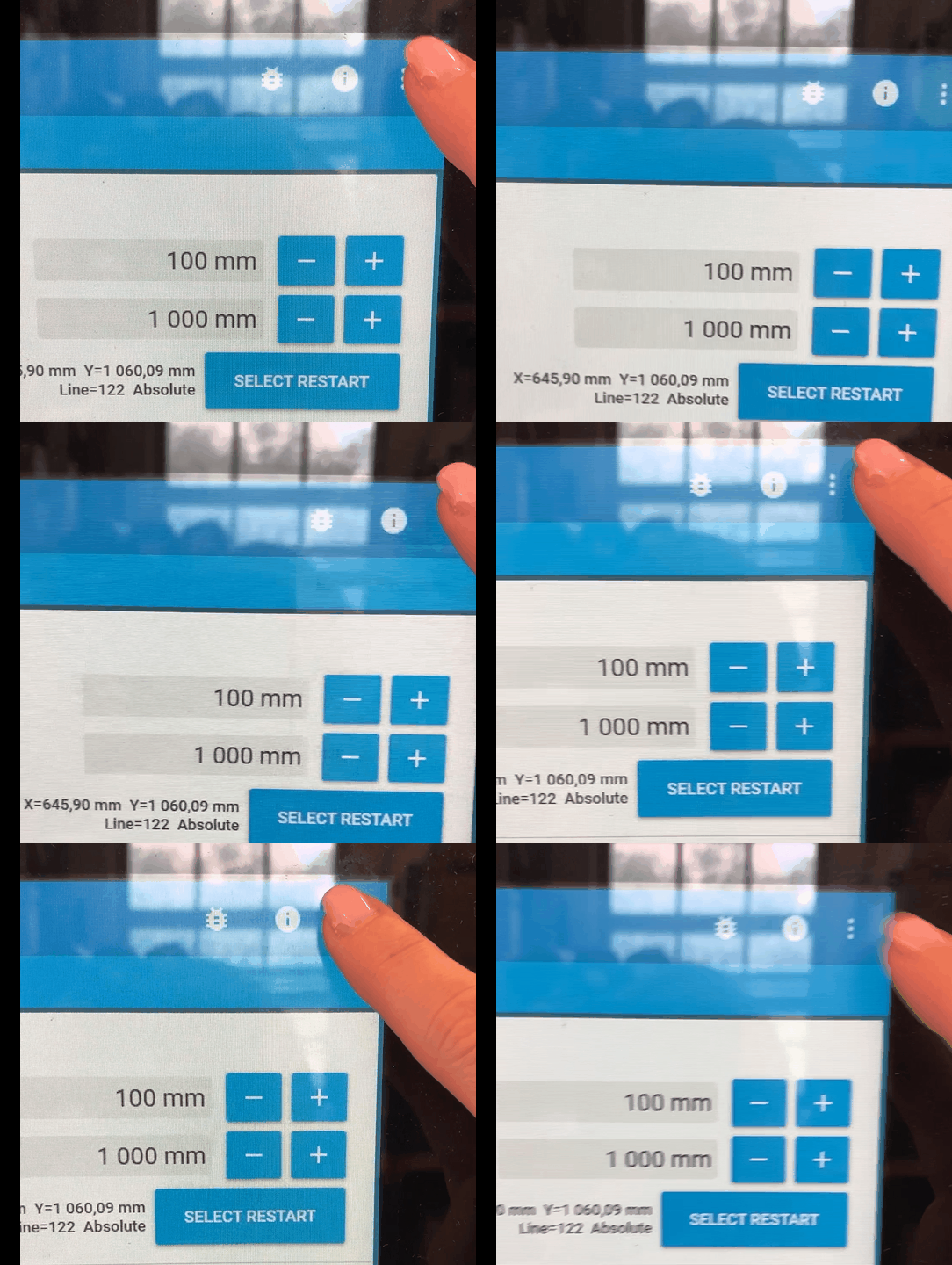
I've seen this problem for both a simple PopupBox and a more complex scenario where a custom control has a PopupBox in its control template. The animation above demonstrates the simple scenario and the XAML for that case looks like this:
<mdt:PopupBox FocusVisualStyle="{x:Null}">
    <StackPanel>
        <Button Name="ReportProblem" Content="Report Problem..."/>
        <Separator/>
        <Button Name="Hide" Content="Hide"/>
        <Separator/>
        <Button Name="Exit" Content="Exit"/>
    </StackPanel>
</mdt:PopupBox>
In the complex scenario the content of the PopupBox has a TextBox which gets its focus set when the IsPopupOpen is changed to true. This seems to happen before PopupBox own change handler which in turn calls AnimateChildrenIn. The way I do this is through binding IsPopupOpen to another property which has a property changed handler where the focus is set. I might change to use the Opened/Closed events instead which would make the focus be set "after" PopupBox handles the property change event.
But still, the behavior is observed even for the simple scenario. That makes me think maybe something else is in play.
The problem is similar to #725 in how it behaves but not how the PopupBox properties are set. I do not make use of PopupMode="MouseOverEager"
Keeping these notes from @Keboo as a reminder of what try out during troubleshooting:
@mgnslndh thank you. A few additional questions. Are you able to share the contents of your popup box? I am wondering if perhaps some of the timing is coming into play because the AnimateChildrenIn method. I am thinking that perhaps the issue is that it attempts to move mouse capture before those storyboards have been applied.
I am not sure I remember your setup exactly, but did you also have the stack trace that was occurring when the popupbox was closing? I am also wondering if perhaps there is some element (like a textbox) that is getting keyboard focus, but then dropping it when the popupbox animates on.
As a simple test you might try copying in the existing PopupBox template, and renaming the PART_ to be something else so the control doesn't find it. This should effectively turn off the animations.
Also if you don't mind opening an issue for this, that would help me keep track of it so this does not get lost.
 mgnslndh
All 13 comments
This snippet from the logs show which control has captured the mouse during the click procedure:
2019-08-15 07:42:07.904 +02:00 [Debug      ] [01] OnLostMouseCapture: Sender=MaterialDesignThemes.Wpf.PopupBox, Mouse.Captured=<null>
2019-08-15 07:42:07.948 +02:00 [Debug      ] [01] OnPopupBoxOpened: Sender=MaterialDesignThemes.Wpf.PopupBox, Mouse.Captured=MaterialDesignThemes.Wpf.PopupBox
2019-08-15 07:42:08.029 +02:00 [Debug      ] [01] OnPopupBoxClosed: Sender=MaterialDesignThemes.Wpf.PopupBox, Mouse.Captured=<null>
2019-08-15 07:42:08.030 +02:00 [Debug      ] [01] OnLostMouseCapture: Sender=MaterialDesignThemes.Wpf.PopupBox, Mouse.Captured=<null>
Since this is a touch screen application, where we take advantage of the built in touch keyboard, I wonder if it somehow breaks the popup.
mgnslndh
on 15 Aug 2019
I have a another popup scenario with the same behavior. The popup content is much more complex but the control is basically a numeric input popup.
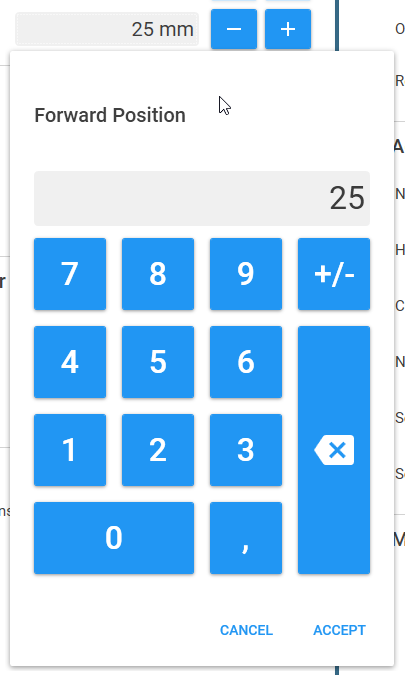
This log snippet shows when the popup works and it is possible to enter the value 300 and close the popup:
2019-08-14 11:21:21.077 +02:00 [Debug      ] [01] OnLostMouseCapture: Sender=MaterialDesignThemes.Wpf.PopupBox, Mouse.Captured=<null>
2019-08-14 11:21:21.078 +02:00 [Debug      ] [01] NumericPopupBox 'Offset Y' IsOpen=True, Mouse.Captured=<null>
2019-08-14 11:21:21.078 +02:00 [Debug      ] [01] BaseDialogPopup.OnOpened
2019-08-14 11:21:21.078 +02:00 [Debug      ] [01] NumericPopupBox: displayValueTextBox.Focus()
2019-08-14 11:21:21.079 +02:00 [Debug      ] [01] OnPopupBoxOpened: Sender=MaterialDesignThemes.Wpf.PopupBox, Mouse.Captured=MaterialDesignThemes.Wpf.PopupBox
2019-08-14 11:21:21.951 +02:00 [Debug      ] [01] OnLostMouseCapture: Sender=MaterialDesignThemes.Wpf.PopupBox, Mouse.Captured=System.Windows.Controls.Primitives.RepeatButton: 3
2019-08-14 11:21:22.153 +02:00 [Debug      ] [01] OnLostMouseCapture: Sender=MaterialDesignThemes.Wpf.PopupBox, Mouse.Captured=System.Windows.Controls.Primitives.RepeatButton: 0
2019-08-14 11:21:22.295 +02:00 [Debug      ] [01] OnLostMouseCapture: Sender=MaterialDesignThemes.Wpf.PopupBox, Mouse.Captured=System.Windows.Controls.Primitives.RepeatButton: 0
2019-08-14 11:21:22.719 +02:00 [Debug      ] [01] OnLostMouseCapture: Sender=MaterialDesignThemes.Wpf.PopupBox, Mouse.Captured=System.Windows.Controls.Button: ACCEPT
2019-08-14 11:21:22.726 +02:00 [Debug      ] [01] BaseDialogPopup.OnAccepted
2019-08-14 11:21:22.726 +02:00 [Debug      ] [01] BaseDialogPopup.OnClosing
2019-08-14 11:21:22.726 +02:00 [Debug      ] [01] NumericPopupBox 'Offset Y' IsOpen=False, Mouse.Captured=MaterialDesignThemes.Wpf.PopupBox
2019-08-14 11:21:22.726 +02:00 [Debug      ] [01] BaseDialogPopup.OnClosed
2019-08-14 11:21:22.727 +02:00 [Debug      ] [01] OnLostMouseCapture: Sender=MaterialDesignThemes.Wpf.PopupBox, Mouse.Captured=<null>
2019-08-14 11:21:22.727 +02:00 [Debug      ] [01] OnPopupBoxClosed: Sender=MaterialDesignThemes.Wpf.PopupBox, Mouse.Captured=<null>
This snippet from the log shows when the popup does not work and behaves just like the simple scenario described above (and shown in the screen capture):
2019-08-15 07:42:50.820 +02:00 [Debug      ] [01] OnLostMouseCapture: Sender=MaterialDesignThemes.Wpf.PopupBox, Mouse.Captured=<null>
2019-08-15 07:42:50.822 +02:00 [Debug      ] [01] NumericPopupBox 'Forward Position' IsOpen=True, Mouse.Captured=<null>
2019-08-15 07:42:50.823 +02:00 [Debug      ] [01] BaseDialogPopup.OnOpened
2019-08-15 07:42:50.823 +02:00 [Debug      ] [01] NumericPopupBox: displayValueTextBox.Focus()
2019-08-15 07:42:50.825 +02:00 [Debug      ] [01] OnPopupBoxOpened: Sender=MaterialDesignThemes.Wpf.PopupBox, Mouse.Captured=MaterialDesignThemes.Wpf.PopupBox
2019-08-15 07:42:50.867 +02:00 [Debug      ] [01] NumericPopupBox 'Forward Position' IsOpen=False, Mouse.Captured=<null>
2019-08-15 07:42:50.867 +02:00 [Debug      ] [01] BaseDialogPopup.OnClosed
2019-08-15 07:42:50.918 +02:00 [Debug      ] [01] OnPopupBoxClosed: Sender=MaterialDesignThemes.Wpf.PopupBox, Mouse.Captured=<null>
2019-08-15 07:42:50.918 +02:00 [Debug      ] [01] OnLostMouseCapture: Sender=MaterialDesignThemes.Wpf.PopupBox, Mouse.Captured=<null>
@Keboo As mentioned here is the behaviour I see for the dialoghost popup on a touchscreen, 4495 is the DialogHost.AnchorBottom from the MaterialDesignInXaml.Examples solution. 4497 is the same but with the MaterialDesignEmbeddedDialogHost style added to the dialoghost. It seems like the edit box loses focus and the keyboard popup determines it is no longer required and collapses.
 Zangl
on 19 Aug 2019
Zangl
on 19 Aug 2019
@Keboo I'm not sure how to capture the logs, is that something I can switch on in the toolkit or is that integral to your code @mgnslndh?
Zangl
on 19 Aug 2019
@Zangl have you registered a separate issue? I'm just curious to read it if you have. I am experiencing the exact same behavior as in the attached videos. The Windows touch keyboard pops up and disappear in a random fashion. I did not think this behavior was related to MDIX but rather thought it to be a buggy Windows 10 feature. The root cause might be the same but I'm not sure.
The snippets are from my application log and I do not think it is possible to turn on logging for MDIX.
mgnslndh
on 19 Aug 2019
@mgnslndh No I haven't atm, @Keboo recommended attaching to this issue as he believes its the same issue.
I not sure its a windows 10 issue, I feel its likely an MDIX issue (in my case at least). It only appears to be popup related, any other input box I have work as expected, its only if an input box is on the popup the behaviour as shown in the video is experienced.
Ah ok, the logs looked great so I thought I would ask just in case it was something I'd missed in the MDIX config :-)
Zangl
on 19 Aug 2019
Ok, @Zangl its nice to have more people on board trying to fix this :) I've struggled with both issues for a while and finally we might be able to track down the root cause.
@Keboo Anything you want us to try, be sure to let us know.
mgnslndh
on 19 Aug 2019
I'm wondering if the animation could interfere and cause the popup to close some how? PopupBox does not seem to support TransitionAssist.DisableTransitions
mgnslndh
on 23 Aug 2019
Any fix for this? having same issue here.
 garzajp93
on 18 Oct 2019
garzajp93
on 18 Oct 2019
@garzajp93 are you able to reproduce this behavior? We're trying to understand under which circumstances this behavior occurs.
mgnslndh
on 19 Oct 2019
@Zangl & @garzajp93 do you disable the default stylus and touch support in WPF?
Either by App.Config:
<?xml version="1.0" encoding="utf-8" ?>
<configuration>
  <runtime>
    <AppContextSwitchOverrides value="Switch.System.Windows.Input.Stylus.DisableStylusAndTouchSupport=true" />
  </runtime>
</configuration>
Or by code:
public static void DisableWpfTabletSupport()
{
    // Get a collection of the tablet devices for this window.
    TabletDeviceCollection devices = System.Windows.Input.Tablet.TabletDevices;


    if (devices.Count > 0)
    {
        // Get the Type of InputManager.
        Type inputManagerType = typeof(System.Windows.Input.InputManager);


        // Call the StylusLogic method on the InputManager.Current instance.
        object stylusLogic = inputManagerType.InvokeMember("StylusLogic",
                    BindingFlags.GetProperty | BindingFlags.Instance |
                    BindingFlags.NonPublic,
                    null, InputManager.Current, null);


        if (stylusLogic != null)
        {
            // Get the type of the stylusLogic returned
            // from the call to StylusLogic.
            Type stylusLogicType = stylusLogic.GetType();


            // Loop until there are no more devices to remove.
            while (devices.Count > 0)
            {
                // Remove the first tablet device in the devices collection.
                stylusLogicType.InvokeMember("OnTabletRemoved",
                        BindingFlags.InvokeMethod |
                        BindingFlags.Instance | BindingFlags.NonPublic,
                        null, stylusLogic, new object[] { (uint)0 });
            }
        }
    }
}
Is anyone able to provide a project that reproduces this problem? I spent some time trying to reproduce this on a Surface Go using the code snippets here but was not able to replicate the behavior.
 Keboo
on 31 Oct 2019
Keboo
on 31 Oct 2019
@Keboo good call to remove this issue from the 3.0 milestone. I can not reproduce this error and I have only seen it in production. I'm tracking it to see how often it happens and as of now it rarely happens.
mgnslndh
on 4 Nov 2019
Related issues
 wongjiahau
·
17Comments
wongjiahau
·
17Comments
 bbougot
·
13Comments
bbougot
·
13Comments
 greuelpirat
·
12Comments
greuelpirat
·
12Comments
 TheSylence
·
12Comments
TheSylence
·
12Comments
 sagevpremium
·
10Comments
sagevpremium
·
10Comments
Most helpful comment
@Keboo As mentioned here is the behaviour I see for the dialoghost popup on a touchscreen, 4495 is the DialogHost.AnchorBottom from the MaterialDesignInXaml.Examples solution. 4497 is the same but with the MaterialDesignEmbeddedDialogHost style added to the dialoghost. It seems like the edit box loses focus and the keyboard popup determines it is no longer required and collapses.
1298 Dialog host popup on touch.zip