Materialdesigninxamltoolkit: change context menu language
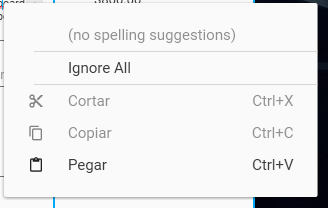
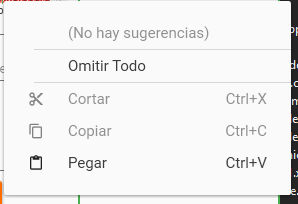
How can you change the context menu language?
Sorry I did not realize that the image was not public.
 sammyas12
All 6 comments
Image not available. You restricted access.
 MairwunNx
on 9 Apr 2019
MairwunNx
on 9 Apr 2019
@sammyas12 can you paste the image directly into the issue? We would also want to know which control this is referencing.
As for changing the language you typically change the language at the application level. You can see an example of doing that here
 Keboo
on 9 Apr 2019
Keboo
on 9 Apr 2019
@sammyas12 can you paste the image directly into the issue? We would also want to know which control this is referencing.
As for changing the language you typically change the language at the application level. You can see an example of doing that here
My application already has this configured but still it keeps appearing as shown in the image.
Even change the configuration in the demo and the same thing happens to me just cut, copy and paste appear in Spanish (es-MX) and the rest in English.
sammyas12
on 10 Apr 2019
@sammyas12 Hello, Friend, I ask you to note that localization works separately for each thread, make sure that you change it from the same thread to which you want to apply. I had a similar problem, but not with the option like yours.
Please, for fast reply from author or me - just make a mention to whom to contact 😄
MairwunNx
on 10 Apr 2019
@sammyas12 that is being caused because of the way that this library handles the context menu. I have added some documentation to the wiki on how you can modify it.
Keboo
on 11 Apr 2019
@sammyas12 that is being caused because of the way that this library handles the context menu. I have added some documentation to the wiki on how you can modify it.
It was solved with the information you gave me, thank you very much.
sammyas12
on 11 Apr 2019
Related issues
 soi013
·
3Comments
soi013
·
3Comments
 svjansen
·
4Comments
svjansen
·
4Comments
 ranjan-2209
·
4Comments
ranjan-2209
·
4Comments
 Xaalek
·
3Comments
Xaalek
·
3Comments
 TFTomSun
·
4Comments
TFTomSun
·
4Comments
Most helpful comment
@sammyas12 that is being caused because of the way that this library handles the context menu. I have added some documentation to the wiki on how you can modify it.