Materialdesigninxamltoolkit: How to create rounded corner button
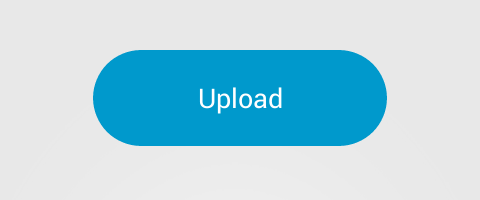
How can i create rounded corner button based on material design styles?
like this:
 AmRo045
All 6 comments
If you code with intellisence, try type "uni" or "corner", I 100% know what it exists, but I forgot property name.
 MairwunNx
on 14 Jan 2019
MairwunNx
on 14 Jan 2019
I believe, there is a no property exposed for this. It's set to 2 by default.
Button Style: MaterialDesignTheme.Button.xaml#L56
 dhilmathy
on 18 Jan 2019
dhilmathy
on 18 Jan 2019
With the addition of ButtonAssist.CornerRadius shouldn't this question be closed? Or at least updated?
 AlbertAlonso
on 14 Jun 2019
AlbertAlonso
on 14 Jun 2019
Has ButtonAssist:CornerRadius not made it to the nuget release yet as I'm getting The property 'ButtonAssist.CornerRadius' does not exist in XML namespace 'http://materialdesigninxaml.net/winfx/xaml/themes'. on the latest version (2.5.1) targeting dotnet 4.8?
 syserr0r
on 26 Jun 2019
syserr0r
on 26 Jun 2019
Sorry all, yes this will be fixed in the 2.6.0 release. I have adjusted the milestone.
@syserr0r you can download the latest preview nuget packages to get access to the new ButtonAssist.CornerRadius
 Keboo
on 26 Jun 2019
Keboo
on 26 Jun 2019
Wow, thank-you for that fast response -- I'd just checked the commits and figured that out at the same time you posted this.
syserr0r
on 26 Jun 2019
Related issues
 gitjsdr26
·
3Comments
gitjsdr26
·
3Comments
 nrmohan
·
3Comments
nrmohan
·
3Comments
 Awsmolak
·
3Comments
Awsmolak
·
3Comments
 BryceBarbara
·
3Comments
gitjsdr26
·
4Comments
BryceBarbara
·
3Comments
gitjsdr26
·
4Comments
Most helpful comment
I believe, there is a no property exposed for this. It's set to
2by default.Button Style: MaterialDesignTheme.Button.xaml#L56