image-area + camera (camera on right lower-right(or left)-hand side)
 ghost
ghost
All 13 comments
I tried adding both of those together and there is just far too much detail to try to fit in one icon. Does something simplified like this work for your needs?

 casesandberg
on 14 Dec 2016
casesandberg
on 14 Dec 2016
Yes, please. But if possible, could the plus be a camera?
ghost
on 14 Dec 2016
I believe that replacing the camera with a plus would be too small and unrecognizable. I believe what @casesandberg has done works great.
 MrGrigri
on 21 Dec 2016
MrGrigri
on 21 Dec 2016
@casesandberg we'll need a zip file with the svg.
MrGrigri
on 29 Dec 2016
What should we name this icon?
crop + select
select + rectangle
????
 Templarian
on 15 Feb 2017
Templarian
on 15 Feb 2017
Maybe select-area.
MrGrigri
on 15 Feb 2017
Could we use the select icon as the base and have a plus and minus variant? Would be useful for tools that add to or remove from an existing selection.
 JamesCoyle
on 19 Feb 2017
JamesCoyle
on 19 Feb 2017
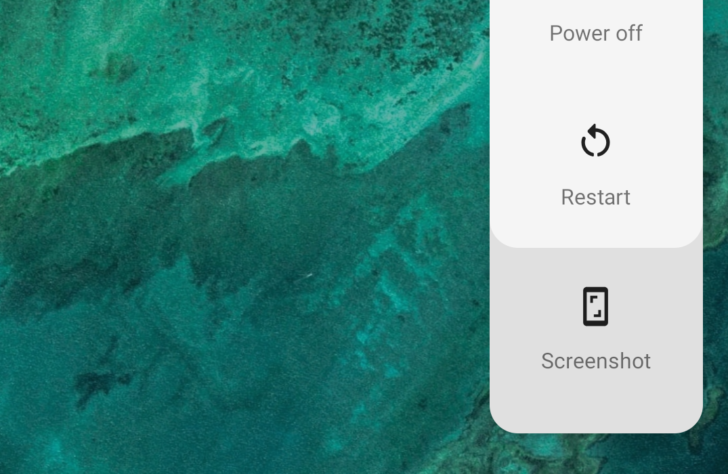
In Android P there's a new screenshot icon in the power menu:
 GreenTurtwig
on 8 Mar 2018
GreenTurtwig
on 8 Mar 2018
aspect ratio would probably complement that for desktops.
 PeterShaggyNoble
on 8 Mar 2018
PeterShaggyNoble
on 8 Mar 2018
@PeterShaggyNoble Good point, might be a good idea to create icons for monitor and laptop too.
GreenTurtwig
on 8 Mar 2018
GreenTurtwig
on 8 Mar 2018
In Premiere Pro there's an option to export a frame, which uses a camera symbol.
The Windows Snipping tool uses a scissors symbol and some random circle.
Other common symbols:


 CoDEmanX
on 14 Mar 2018
CoDEmanX
on 14 Mar 2018
Templarian
on 24 Jul 2018
Related issues
 kimdv
·
3Comments
MrGrigri
·
3Comments
kimdv
·
3Comments
MrGrigri
·
3Comments
 ButchMonkey
·
3Comments
ButchMonkey
·
3Comments
 vishnu1991
·
3Comments
vishnu1991
·
3Comments
 JackDrakkar
·
3Comments
JackDrakkar
·
3Comments
Most helpful comment
I tried adding both of those together and there is just far too much detail to try to fit in one icon. Does something simplified like this work for your needs?