Material: icon(svg): large icon from cache causes 100% CPU during RegEx replacement
Bug
Since AngularJS Material version 1.1.11,
The site is stuck after the second opening of the dialog with the SVG icons
CodePen and steps to reproduce the issue:
CodePen
1)Click on "CUSTOM DIALOG" button.
2)Close the dialog
3)Click again on the "CUSTOM DIALOG" button.
4)Chrome stuck.
When I debug it I saw that the code is stuck on this function "transformClone".
issue: Chrome
Which versions of AngularJS, Material, OS, and browsers are affected?
- AngularJS: 1.7.7
- AngularJS Material: 1.1.13 , 1.1.12 , 1.1.11
- OS: Windows
- Browsers: all
Thanks :)
 korengal
All 57 comments
Not an expert with Regex, bit that's definitely causing the perf issues.
specifically
/(.*xlink:href="#)(\w*)(".*)/g
and
/(.*url\(#)(\w*)(\).*)/g
It's also worth noting that this SVG is very large ~171KB, maybe there are better alternatives to parsing with a RegEx?
 codymikol
on 23 Feb 2019
codymikol
on 23 Feb 2019
That would seem to indicate that it does eventually complete and display the dialog? I didn't wait long enough to see that. I assumed that it was causing some kind of infinite loop.
 Splaktar
on 24 Feb 2019
Splaktar
on 24 Feb 2019
I believe it would show up eventually, however I have no idea how long the RegEx would take to complete.
The ReEx it gets stuck on is 497405 characters
The related code is
// Inject the cacheSuffix into all instances of url(id) and xlink:href="#id".
// This use of innerHTML should be safe from XSS attack since we are only injecting the
// cacheSuffix with content from $mdUtil.nextUid which we verify is a finite number above.
clone.innerHTML = clone.innerHTML.replace(/(.*url\(#)(\w*)(\).*)/g, addCacheSuffixToId);
clone.innerHTML = clone.innerHTML.replace(/(.*xlink:href="#)(\w*)(".*)/g, addCacheSuffixToId);
I'm wondering if this could accomplished via querySelectorAll, but I'm thinking this had to be be some kind of IE workaround.
codymikol
on 24 Feb 2019
codymikol
on 24 Feb 2019
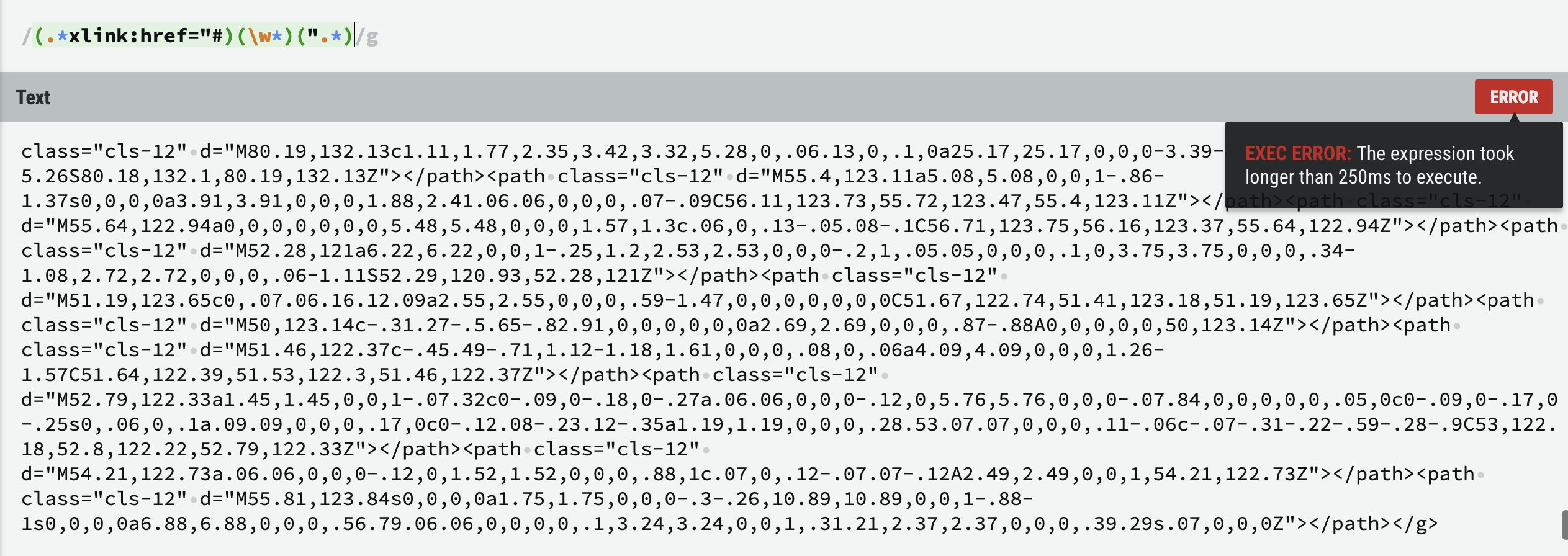
It takes longer than 250ms in Regexr and times out given the same scenario
codymikol
on 24 Feb 2019
Yeah, I can't reproduce this using a standard material icon like close (CodePen).
Splaktar
on 25 Feb 2019
What specifically are those RegExs doing? is that not something that querySelector is capable of?
codymikol
on 25 Feb 2019
The first block is run on IE11. The second on everything else.
We need to update parts of the SVG to add the cache suffix to the id so that it will match the image's actual id, otherwise the image will be broken. It has to be string replacement of some type, I'm not aware of a querySelector mode that allows for DOM modification via string replacement.
Splaktar
on 25 Feb 2019
https://github.com/angular/material/issues/8689 is the original issue that needed to be fixed where ids were getting mangled and breaking references within SVGs.
It was fixed by PR https://github.com/angular/material/pull/11342.
But that caused regression https://github.com/angular/material/issues/11603 in IE11. IE11 was fixed via PR https://github.com/angular/material/pull/11635.
Another related PR (https://github.com/angular/material/pull/11465) has been proposed as well, but it doesn't look like it would conflict with this.
Splaktar
on 25 Feb 2019
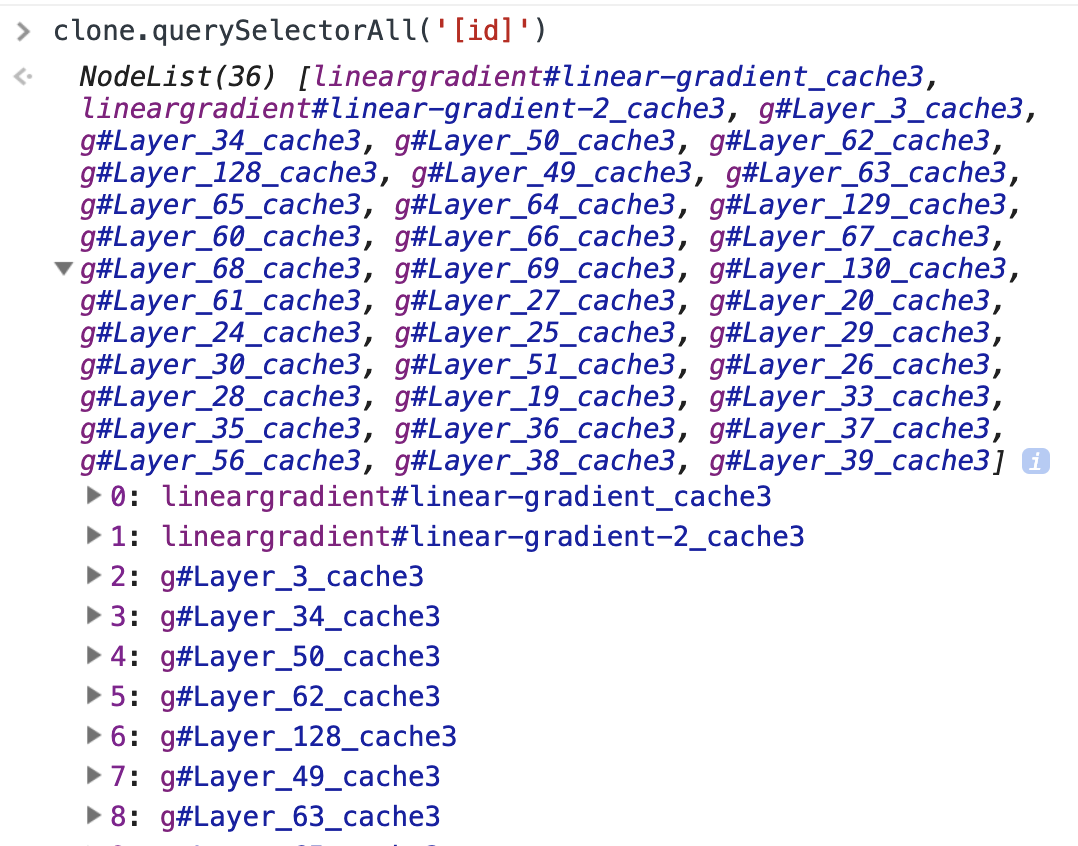
Why does it need to be done with a string replacement? Is it not possible to get all elements with ids and just modify them?
codymikol
on 25 Feb 2019
In the originally proposed fix, there was more usage of querySelectorAll, including an incomplete set of many different queries. It only matched url references, but not xlink:href references. We moved away from that to RegEx due to how verbose it was.
Splaktar
on 25 Feb 2019
Here's an example:
<svg><g id="angular"></g><defs><filter id="shadow"></filter></defs><path filter="url(#shadow)"></path></svg>
Our caching would change shadow to something like shadow_cache1. The replacement we need to do is changing url(#shadow) to url(#shadow_cache1).
So it's not just a matter of querying for [id] attributes. You need to query for every attribute that can contain a url or xlink:href (filter, stroke, mask, animate, etc) and then do a replacement on the values of those attributes.
Splaktar
on 25 Feb 2019
I wonder if we can make replace(/(.*url\(#)(\w*)(\).*)/g, addCacheSuffixToId) more efficient and what impact that might have. It does look like replace("url(#" + item.id + ")", "url(#" + item.id + cacheSuffix + ")") would be considerably more efficient. So it may be worth going back to the more verbose format (adding in a second set of queries for xlink:href) which is likely to offload more of the work to the browser (with better performance).
Splaktar
on 25 Feb 2019
I agree with that. You should be able to iterate over all ids and then all relevant svg properties within those ids, replacing the attribute value as necessary.
codymikol
on 25 Feb 2019
It looks like this handles the ids:
https://github.com/angular/material/blob/7cde443325ecc7bb7370a06766d0c98a8f5981b3/src/components/icon/js/iconService.js#L501-L503
Are SVG nodes limited to referring to ids within parent nodes? If so, then it would be efficient to just query these descendantElems. If not, then we need to query from the parent (clone).
Splaktar
on 25 Feb 2019
I thought that was the case, but it looks like not.
in this w3schools example this is not the case
So yes, querying from the clone element will be necessary 🐔
codymikol
on 25 Feb 2019
I've got a local reproduction of this set up finally. The first load does take some time (~300ms). I think that captures any normal performance delay of a larger SVG. The second opening of the dialog taking 100% CPU for 10+ minutes does not strike me as something that 'slow RegEx' would be responsible for.
Splaktar
on 25 Feb 2019
Set a breakpoint on the first regex, when you hit it the second time it will hang.
codymikol
on 25 Feb 2019
Yeah, it's certainly those lines that is causing the issue, commenting out both of these lines does fix the hang:
https://github.com/angular/material/blob/7cde443325ecc7bb7370a06766d0c98a8f5981b3/src/components/icon/js/iconService.js#L514-L515
I feel like there is still some kind of infinite replacement being triggered here, not just an inefficient RegEx.
Splaktar
on 25 Feb 2019
Hmmm, I'm going to try just running that regex by itself on the same string locally and see if I get a similar outcome.
codymikol
on 25 Feb 2019
I'm fairly certain that's the issue, check out this repo here
Edit: fixed link
codymikol
on 25 Feb 2019
Yeah, that's very helpful.
I tested with the change from PR https://github.com/angular/material/pull/11465 (which changes the ids even the first time a SVG is used) and it does indeed cause this same issue on the first time the dialog opens.
So the first time the RegEx is triggered is when it hangs. The first time it loads, the cache replacements aren't triggered and the RegEx isn't run.
Splaktar
on 25 Feb 2019
It looks like xlink:href is an attribute, so that should simplify that lookup to a single query (similar to the [id] query). url is the tricky/verbose bit.
Splaktar
on 25 Feb 2019
I'm looking for docs on what attributes support url()
codymikol
on 25 Feb 2019
codymikol
on 25 Feb 2019
This seems to work for the xlink:href:
    angular.forEach(clone.querySelectorAll('[*|href]:not([href])'), function(descendantElem) {
      if (descendantElem.getAttribute('xlink:href')) {
        descendantElem.setAttribute('xlink:href',
          descendantElem.getAttribute('xlink:href') + cacheSuffix);
      }
    });
@codymikol did you notice that anything was missing from the url query here or in this list?
      urlSelector = '[a="url(#' + descendantElem.id + ')"], ' +
        '[altGlyph="url(#' + descendantElem.id + ')"], ' +
        '[animate="url(#' + descendantElem.id + ')"], ' +
        '[animateColor="url(#' + descendantElem.id + ')"], ' +
        '[animateMotion="url(#' + descendantElem.id + ')"], ' +
        '[animateTransform="url(#' + descendantElem.id + ')"], ' +
        '[clip-path="url(#' + descendantElem.id + ')"], ' +
        '[color-profile="url(#' + descendantElem.id + ')"], ' +
        '[src="url(#' + descendantElem.id + ')"], ' +
        '[cursor="url(#' + descendantElem.id + ')"], ' +
        '[feImage="url(#' + descendantElem.id + ')"], ' +
        '[fill="url(#' + descendantElem.id + ')"], ' +
        '[filter="url(#' + descendantElem.id + ')"], ' +
        '[image="url(#' + descendantElem.id + ')"], ' +
        '[linearGradient="url(#' + descendantElem.id + ')"], ' +
        '[marker="url(#' + descendantElem.id + ')"], ' +
        '[marker-smart="url(#' + descendantElem.id + ')"], ' +
        '[marker-mid="url(#' + descendantElem.id + ')"], ' +
        '[marker-end="url(#' + descendantElem.id + ')"], ' +
        '[mask="url(#' + descendantElem.id + ')"], ' +
        '[pattern="url(#' + descendantElem.id + ')"], ' +
        '[radialGradient="url(#' + descendantElem.id + ')"], ' +
        '[script="url(#' + descendantElem.id + ')"], ' +
        '[stroke="url(#' + descendantElem.id + ')"], ' +
        '[textPath="url(#' + descendantElem.id + ')"], ' +
        '[tref="url(#' + descendantElem.id + ')"], ' +
        '[set="url(#' + descendantElem.id + ')"], ' +
        '[use="url(#' + descendantElem.id + ')"]';
Hmmm I'm looking at the docs and I think that list may have too much. I think the following will get all possible attributes
angular.forEach(clone.querySelectorAll('[fill][marker][marker-start][marker-end][shape-inside][shape-subtract][stroke]');
For example can linearGradient be an attribute? From what I can tell that is an element
I do see some I don't see in the docs though, like marker-smart. I need to do a little more reading.
According to the link I posted above those attributes are the ones that support url() but
codymikol
on 25 Feb 2019
I'm seeing another issue as well. SVG's can have a <style> with CSS in it. These styles can use url() like the one here:
    .cls-17 {
      fill: url(#linear-gradient);
    }
    .cls-18 {
      fill: url(#linear-gradient-2);
    }
We'll need to RegEx these as I don't think that we can use querySelectorAll on them, plus there isn't strict formatting on the CSS, so I don't see how that could work anyway.
Splaktar
on 25 Feb 2019
Yeah, here's a linearGradient example from this problematic SVG:
    <linearGradient id="linear-gradient_cache40" x1="70.8" y1="86.05" x2="70.91" y2="82.32"
                    gradientUnits="userSpaceOnUse">
      <stop offset="0" stop-color="#301010" stop-opacity="0"></stop>
      <stop offset="0.31" stop-color="#301010" stop-opacity="0.1"></stop>
      <stop offset="0.67" stop-color="#301010" stop-opacity="0.4"></stop>
      <stop offset="1" stop-color="#301010" stop-opacity="0.8"></stop>
    </linearGradient>
    <linearGradient id="linear-gradient-2_cache40" x1="33.94" y1="85.6" x2="34.04" y2="82.35"
                    xlink:href="#linear-gradient_cache40"></linearGradient>
Yeah, but that is an element, the above example [linearGradient="url(#' + descendantElem.id + ')"] specifies an attribute.
codymikol
on 25 Feb 2019
Yeah, it looks like both linearGradient and radialGradient can only be elements.
Splaktar
on 25 Feb 2019
      urlSelector =
        '[color-profile="url(#' + descendantElem.id + ')"], ' +
        '[src="url(#' + descendantElem.id + ')"], ' +
        '[cursor="url(#' + descendantElem.id + ')"], ' +
        '[fill="url(#' + descendantElem.id + ')"], ' +
        '[filter="url(#' + descendantElem.id + ')"], ' +
        '[image="url(#' + descendantElem.id + ')"], ' +
        '[mask="url(#' + descendantElem.id + ')"], ' +
        '[pattern="url(#' + descendantElem.id + ')"], ' +
        '[script="url(#' + descendantElem.id + ')"], ' +
        '[stroke="url(#' + descendantElem.id + ')"], ' +
        '[tref="url(#' + descendantElem.id + ')"], ' +
        '[set="url(#' + descendantElem.id + ')"], ' +
        '[use="url(#' + descendantElem.id + ')"]';
Ones that need to be checked:
clip-path
marker-mid
marker-start
marker-end
Ones that don't
Anything camelCase
animate
marker-smart
codymikol
on 25 Feb 2019
codymikol
on 25 Feb 2019
marker-smart apparently should have been marker-start 😁
Splaktar
on 25 Feb 2019
marker-smartapparently should have beenmarker-start😁
I've added a link to marker-smart above
codymikol
on 25 Feb 2019
These seem fairly reasonable other than src which I can't find any reference for:
      urlSelector = '[clip-path="url(#' + descendantElem.id + ')"], ' +
        '[color-profile="url(#' + descendantElem.id + ')"], ' +
        '[cursor="url(#' + descendantElem.id + ')"], ' +
        '[fill="url(#' + descendantElem.id + ')"], ' +
        '[filter="url(#' + descendantElem.id + ')"], ' +
        '[marker-start="url(#' + descendantElem.id + ')"], ' +
        '[marker-mid="url(#' + descendantElem.id + ')"], ' +
        '[marker-end="url(#' + descendantElem.id + ')"], ' +
        '[mask="url(#' + descendantElem.id + ')"], ' +
        '[src="url(#' + descendantElem.id + ')"], ' +
        '[stroke="url(#' + descendantElem.id + ')"], ';
Looking good to me and of course some silly method to make that easier to maintain
var query ='color-profile,cursor,fill,filter,marker-start,marker-end,marker-mid,mask,stroke'
.split(',').reduce(function(collection, attribute) {
  return collection + '[' + attribute + '="url(#' + descendantElem.id + ')"]';
});
It looks like color-profile might just be a css property, I can't find an svg usage
codymikol
on 25 Feb 2019
It looks like we may need to add href.
Splaktar
on 25 Feb 2019
It looks like we may need to add href.
I'm having trouble finding an example of that other than xlink:href
codymikol
on 25 Feb 2019
It mentions that xlink:href is deprecated in SVG2 in favor of href, so anywhere that xlink:href is used, we could also see href.
flood-color, stop-color, and lighting-color are questionable. I don't think that iccolor can refer to an id reference, but it's not 100% clear.
Splaktar
on 25 Feb 2019
It looks like I was wrong before about all camelCase items being elements, apparently some are definitely valid attributes This for example
I doubled checked anything that I wrote off before, and can confirm that none of those are svg attributes
Unfortunately the MDN docs are pretty sparse on a lot of these elements and many of the links on the attributes page are dead, I'm going to try and find some better documentation.
codymikol
on 25 Feb 2019
I'm almost done going through them all and I just found out that a <paint> can be a reference (i.e. url()). So I think that I'll have to take one more pass.
Splaktar
on 25 Feb 2019
Looks like we need to add vector-effect.
Splaktar
on 25 Feb 2019
I've been looking around at existing SVG libraries seeing if there are any existing FOSS solutions to this kind of search that can be "borrowed" 😉 No such luck thus far
codymikol
on 25 Feb 2019
The following seems to give us decent queries:
    var svgUrlAttributes = [
      'clip-path', 'color-profile', 'cursor', 'fill', 'filter', 'href', 'marker-start',
      'marker-mid', 'marker-end', 'mask', 'stroke', 'vector-effect'
    ];

      var urlQuerySelector = '';
      for (i = 0; i < svgUrlAttributes.length; i++) {
        urlQuerySelector += '[' + svgUrlAttributes[i] + '="url(#' + descendantElem.id + ')"]';
        if (i + 1 < svgUrlAttributes.length) {
          urlQuerySelector += ', ';
        }
      }
Output:
[clip-path="url(#linear-gradient)"], [color-profile="url(#linear-gradient)"], [cursor="url(#linear-gradient)"], [fill="url(#linear-gradient)"], [filter="url(#linear-gradient)"], [href="url(#linear-gradient)"], [marker-start="url(#linear-gradient)"], [marker-mid="url(#linear-gradient)"], [marker-end="url(#linear-gradient)"], [mask="url(#linear-gradient)"], [stroke="url(#linear-gradient)"], [vector-effect="url(#linear-gradient)"]
[clip-path="url(#Layer_39)"], [color-profile="url(#Layer_39)"], [cursor="url(#Layer_39)"], [fill="url(#Layer_39)"], [filter="url(#Layer_39)"], [href="url(#Layer_39)"], [marker-start="url(#Layer_39)"], [marker-mid="url(#Layer_39)"], [marker-end="url(#Layer_39)"], [mask="url(#Layer_39)"], [stroke="url(#Layer_39)"], [vector-effect="url(#Layer_39)"]
Need to add style as well.
Then that leaves the last issue, needing to change the stylesheet mentioned in https://github.com/angular/material/issues/11651#issuecomment-466861501.
Splaktar
on 25 Feb 2019
It looks like the only way is going to be using a regex on each stylesheet, there seems to be no API for modifying the inner styles of the tag according to this
codymikol
on 25 Feb 2019
I can't find anywhere that says that there can only be one <style> element, so I will have to assume that there may be multiple.
Splaktar
on 25 Feb 2019
There can be multiple as per this
codymikol
on 25 Feb 2019
Hooray, it works! url() references in <style> element updated as well:
    .cls-17 {
      fill: url(#linear-gradient_cache40);
    }
    .cls-18 {
      fill: url(#linear-gradient-2_cache40);
    }
@codymikol many thanks for your help with this complex issue! I think that we both learned a lot about SVGs 😁
PR https://github.com/angular/material/pull/11653 has been posted. I will try to do some IE11 testing tomorrow.
Splaktar
on 25 Feb 2019
Hi,
thanks a lot :)
I tried the new version (PR #11653 has been posted.)
Some SVG icons not loading on the second time (not cached correctly?)
The error is : net::ERR_INVALID_URL
For example,
this SVG:
https://media.kavanu.co/appointmentTypes/1/48788ed2c4c044b49972fa0f69fda4ba.svg
I Edit the plunker to check it with more icons:
Thanks :))
korengal
on 25 Feb 2019
@Splaktar No problem, learned quite a bit!
codymikol
on 25 Feb 2019
I was talking to someone with a lot more experience with RegEx than me and they said the issue is that the expressions are matching everything before and after the match itself. We worked on a solution to the first regular expression and came up with
/url(#[^\s]+?)/gi
This seemed to work against the example I posted earlier for finding url(#someid) within the document.
Although I was a bit confused as this seemed to suggest that the initial RegEx were matching the entire document if any url(#test) instances were found. Are that any tests that currently prove that these replace as expected?
codymikol
on 26 Feb 2019
The issue with the SVG from is that it does xlink:href="data:img/png;base64,<data>".
In this case, we're taking the base64 image data and corrupting it by adding _cache48 to the end of the string. We need to only change the contents if it refers to an id. I've made that change and verified the fix.
Splaktar
on 1 Mar 2019
Here's the CodePen full of SVGs in a dialog updated for the latest push of PR https://github.com/angular/material/pull/11653. Everything seems to be working well.
Splaktar
on 1 Mar 2019
Related issues
 rtprakash
·
3Comments
rtprakash
·
3Comments
 chriseyhorn
·
3Comments
chriseyhorn
·
3Comments
 diogodomanski
·
3Comments
diogodomanski
·
3Comments
 sbondor
·
3Comments
sbondor
·
3Comments
 rdantonio
·
3Comments
rdantonio
·
3Comments