Material-ui: [theme] Improve augmentColor(color) warning
We have a problem with our project where when we run npm i after a git clone the theme is not recognized. Default colours are used. Lately we have this problem too.
Error: Material-UI: the color provided to augmentColor(color) is invalid.
The color object needs to have a main property or a 500 property.
I reckon that augmentColor method is MUI library method.
 DaVitzi
All 17 comments
👋 Thanks for using Material-UI!
We use GitHub issues exclusively as a bug and feature requests tracker, however,
this issue appears to be a support request.
For support, please check out https://material-ui.com/getting-started/support/. Thanks!
If you have a question on StackOverflow, you are welcome to link to it here, it might help others.
If your issue is subsequently confirmed as a bug, and the report follows the issue template, it can be reopened.
![support[bot] picture](https://avatars1.githubusercontent.com/in/6408?v=4&s=40) support[bot]
on 26 Mar 2020
support[bot]
on 26 Mar 2020
If this is not a bug then what? I cannot find something by looking up into stackoverflow or anywhere else. Can you please provide at least some information? That would be much appreciated as we are blocked right now.
DaVitzi
on 26 Mar 2020
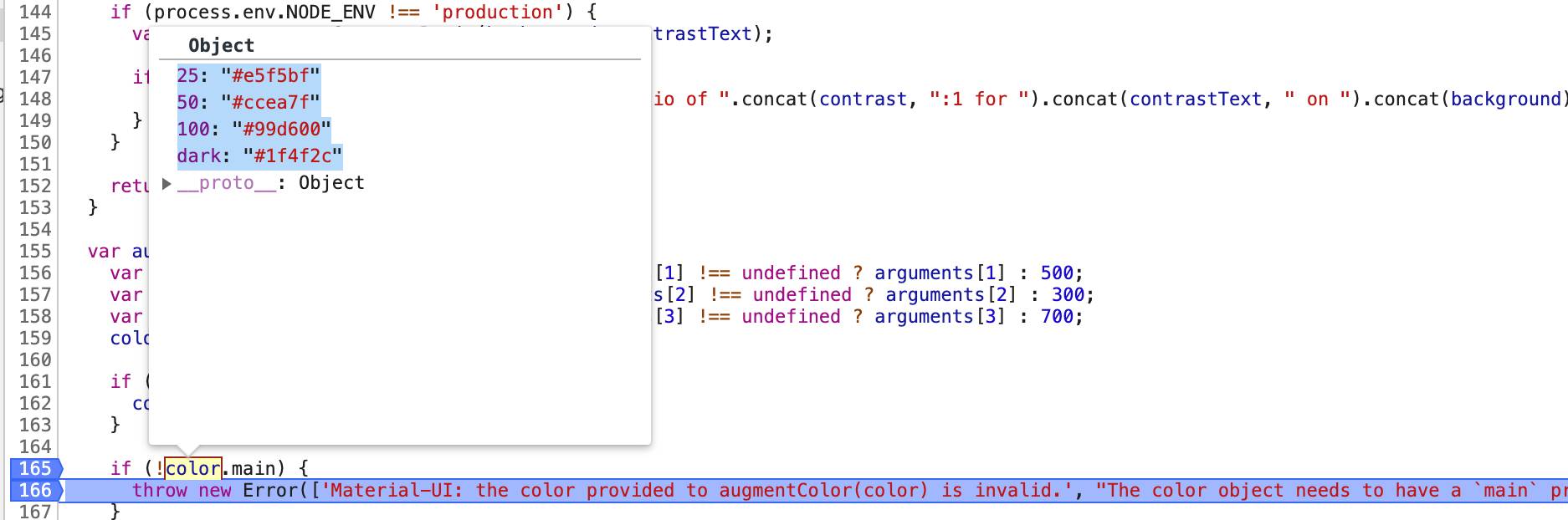
Same issue here, seems like a "main" or 500 is required all of the sudden ~~
 DDDDDanica
on 1 Apr 2020
DDDDDanica
on 1 Apr 2020
Do we have a reproduction?
 oliviertassinari
on 1 Apr 2020
oliviertassinari
on 1 Apr 2020
I managed to solve this in a way. There are two libraries for the theme. One is inside
@material-ui/core/styles/
and the other is in
@material-ui/styles/.
The first one is a function using the default theme as infrastructure wherever you're not overriding its props while the second is just a plain empty theme waiting to be filled with content.
We were messing up with using the wrong library. I changed our app theme 'listen' to the /core library so we do not have to match every property needed and leave the MUI do the rest.
So the first part of the answer to this problem is use the right library. The second part is that when you have a color palette, I believe MUI assumes every property inside this object is a color. So it warns you that every property inside this object must have a sub-property called main or 500 because every color must have it by default.
For example palette.js :
import { colors } from '@material-ui/core';

export default {
    myColor: {
        main: colors.blue[500]
    },
    primary: {
        contrastText: colors.green[500],
        dark: colors.red[800],
        main: colors.red[500],
        light: colors.indigo[100]
    }
}
and then you can create your theme like:
import { createMuiTheme } from '@material-ui/core';
import palette from './palette';

const theme = createMuiTheme({
    palette
});

export default theme;
This will override just the color palette.
More info here
DaVitzi
on 1 Apr 2020
MUI assumes every property inside this object is a color.
@DaVitzi As far as I know, it doesn't. It sounds very wrong.
We were messing up with using the wrong library.
As far as I know, it shouldn't matter. It sounds very wrong.
@DDDDDanica A reproduction would be awesome.
oliviertassinari
on 1 Apr 2020
So,
MUI assumes every property inside this object is a color.
@DaVitzi As far as I know, it doesn't. It sounds very wrong.
Well, you must be right on this one because I just tested it, but are you sure about the second:
We were messing up with using the wrong library.
@DaVitzi As far as I know, it shouldn't matter. It sounds very wrong.
Is there any chance @material-ui/styles library need this main color property while @material-ui/core/styles doesn't because define defaults everywhere like documentation kinda says?
DaVitzi
on 1 Apr 2020
Is there any chance @material-ui/styles library need this main color property while @material-ui/core/styles doesn't because define defaults everywhere like documentation kinda says?
As long as the same theme is propagated in the react tree, it should be fine (meaning bahave as expected).
oliviertassinari
on 1 Apr 2020
I'm suddenly getting the exact same error after upgrading to CRA 4.0. Here's the code:
import { createMuiTheme } from '@material-ui/core/styles';

export const theme = createMuiTheme({
    palette: {
        background: {
            default: colors.background,
        },
        primary: {
            main: colors.primary,
        },
        secondary: {
            main: colors.secondary,
        },
        error: {
            main: colors.error,
        },
    },
...
...where colors.* above are simply hexa strings.
 picosam
on 25 Oct 2020
picosam
on 25 Oct 2020
@picosam Do you have a reproduction?
oliviertassinari
on 25 Oct 2020
@oliviertassinari here you go: https://codesandbox.io/s/cool-night-92rij
picosam
on 26 Oct 2020
@picosam Oh nice, thanks for the reproduction. So we have:
import { createMuiTheme } from "@material-ui/core/styles";

export const theme = createMuiTheme({
  palette: {
    primary: {
      main: undefined
    }
  }
});
that outputs a confusing warning:
Material-UI: The color provided to augmentColor(color) is invalid.
The color object needs to have amainproperty or a500property.
But it should return:
Material-UI: The color provided to augmentColor(color) is invalid.
primary.mainshould be a string, butundefinedwas provided instead.
I think that we could apply the following diff. The most important part is about using hasOwnProperty to discriminate between "I didn't provide the right structure" to I didn't provide the right value".
diff --git a/packages/material-ui/src/styles/createPalette.js b/packages/material-ui/src/styles/createPalette.js
index 840461aec8..d09d83a892 100644
--- a/packages/material-ui/src/styles/createPalette.js
+++ b/packages/material-ui/src/styles/createPalette.js
@@ -154,32 +154,38 @@ export default function createPalette(palette) {
     return contrastText;
   }

-  const augmentColor = (color, mainShade = 500, lightShade = 300, darkShade = 700) => {
+  const augmentColor = ({ color, mainShade = 500, lightShade = 300, darkShade = 700, name }) => {
     color = { ...color };
     if (!color.main && color[mainShade]) {
       color.main = color[mainShade];
     }

-    if (!color.main) {
+    if (!color.hasOwnProperty('main')) {
       throw new MuiError(
-        'Material-UI: The color provided to augmentColor(color) is invalid.\n' +
+        'Material-UI: The color%s provided to augmentColor(color) is invalid.\n' +
           'The color object needs to have a `main` property or a `%s` property.',
+        name ? ` (${name})` : '',
         mainShade,
       );
     }

     if (typeof color.main !== 'string') {
       throw new MuiError(
-        'Material-UI: The color provided to augmentColor(color) is invalid.\n' +
-          '`color.main` should be a string, but `%s` was provided instead.\n\n' +
-          'Did you intend to use one of the following approaches?\n\n' +
-          'import { green } from "@material-ui/core/colors";\n\n' +
+        'Material-UI: The color%s provided to augmentColor(color) is invalid.\n' +
+          '`color.main` should be a string, but `%s` was provided instead.\n' +
+          '\n' +
+          'Did you intend to use one of the following approaches?\n' +
+          '\n' +
+          'import { green } from "@material-ui/core/colors";\n' +
+          '\n' +
           'const theme1 = createMuiTheme({ palette: {\n' +
           '  primary: green,\n' +
-          '} });\n\n' +
+          '} });\n' +
+          '\n' +
           'const theme2 = createMuiTheme({ palette: {\n' +
           '  primary: { main: green[500] },\n' +
           '} });',
+        name ? ` (${name})` : '',
         JSON.stringify(color.main),
       );
     }
@@ -208,17 +214,22 @@ export default function createPalette(palette) {
       // The palette mode, can be light or dark.
       mode,
       // The colors used to represent primary interface elements for a user.
-      primary: augmentColor(primary),
+      primary: augmentColor({ color: primary, name: 'primary' }),
       // The colors used to represent secondary interface elements for a user.
-      secondary: augmentColor(secondary, 'A400', 'A200', 'A700'),
+      secondary: augmentColor({
+        color: secondary,
+        mainShade: 'A400',
+        lightShade: 'A200',
+        darkShade: 'A700',
+      }),
       // The colors used to represent interface elements that the user should be made aware of.
-      error: augmentColor(error),
+      error: augmentColor({ color: error, name: 'error' }),
       // The colors used to represent potentially dangerous actions or important messages.
-      warning: augmentColor(warning),
+      warning: augmentColor({ color: warning, name: 'warning' }),
       // The colors used to present information to the user that is neutral and not necessarily important.
-      info: augmentColor(info),
+      info: augmentColor({ color: info, name: 'info' }),
       // The colors used to indicate the successful completion of an action that user triggered.
-      success: augmentColor(success),
+      success: augmentColor({ color: success, name: 'succes' }),
       // The grey colors.
       grey,
       // Used by `getContrastText()` to maximize the contrast between
diff --git a/packages/material-ui/src/styles/createPalette.test.js b/packages/material-ui/src/styles/createPalette.test.js
index 939023f63f..454bca0a1d 100644
--- a/packages/material-ui/src/styles/createPalette.test.js
+++ b/packages/material-ui/src/styles/createPalette.test.js
@@ -3,7 +3,7 @@ import { deepOrange, indigo, pink } from '../colors';
   it('should create a palette with a rich color object', () => {
     const palette = createPalette({
       primary: deepOrange,
@@ -98,14 +98,19 @@ describe('createPalette()', () => {
     const palette = createPalette({});

     it('should accept a color', () => {
-      const color1 = palette.augmentColor(indigo);
+      const color1 = palette.augmentColor({ color: indigo });
       expect(color1).to.deep.include({
         dark: '#303f9f',
         light: '#7986cb',
         main: '#3f51b5',
         contrastText: '#fff',
       });
-      const color2 = palette.augmentColor(indigo, 400, 200, 600);
+      const color2 = palette.augmentColor({
+        color: indigo,
+        mainShade: 400,
+        lightShade: 200,
+        darkShade: 600,
+      });
       expect(color2).to.deep.include({
         light: '#9fa8da',
         main: '#5c6bc0',
@@ -116,7 +121,9 @@ describe('createPalette()', () => {

     it('should accept a partial palette color', () => {
       const color = palette.augmentColor({
-        main: indigo[500],
+        color: {
+          main: indigo[500],
+        },
       });
       expect(color).to.deep.include({
         light: 'rgb(101, 115, 195)',
@@ -148,6 +155,9 @@ describe('createPalette()', () => {
       expect(() => createPalette({ primary: { main: { foo: 'bar' } } })).to.throw(
         '`color.main` should be a string, but `{"foo":"bar"}` was provided instead.',
       );
+      expect(() => createPalette({ primary: { main: undefined } })).to.throw(
+        '`color.main` should be a string, but `undefined` was provided instead.',
+      );
     });

     it('logs an error when the contrast ratio does not reach AA', () => {
@oliviertassinari ok, so what you're saying is the real bug I have is that the color value background that I'm providing to main isn't being resolved correctly? If this is the case I must check if this has to do with upgrading to Typescript 4.0
picosam
on 26 Oct 2020
@picosam Your value is undefined in the reproduction.
oliviertassinari
on 26 Oct 2020
@oliviertassinari do you happen to understand why? After all, the value is present in both the .scss file and in the Typescript module I created to expose it...
picosam
on 26 Oct 2020
No idea. If you are interested in improving the error message with the above diff, we would be happy to review a pull request. Happy to discuss/challenge the changes :).
oliviertassinari
on 26 Oct 2020
I'm on this.
 reedanders
on 2 Nov 2020
reedanders
on 2 Nov 2020
Related issues
 finaiized
·
3Comments
finaiized
·
3Comments
 TimoRuetten
·
3Comments
TimoRuetten
·
3Comments
 zabojad
·
3Comments
zabojad
·
3Comments
 newoga
·
3Comments
newoga
·
3Comments
 ghost
·
3Comments
ghost
·
3Comments
Most helpful comment
If this is not a bug then what? I cannot find something by looking up into stackoverflow or anywhere else. Can you please provide at least some information? That would be much appreciated as we are blocked right now.