Material-ui: [TextField] Outlined renders gap with label = empty string
Regression for outlined text-field with label="".
- [x] The issue is present in the latest release.
- [x] I have searched the issues of this repository and believe that this is not a duplicate.
Current Behavior 😯
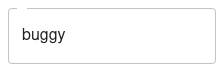
(buggy is the value)
Expected Behavior 🤔

(fine is the value)
Steps to Reproduce 🕹
https://codesandbox.io/s/trusting-snow-8ses9
Steps:
- Use a
TextFieldwithlabel=""
It works when omitting the label prop at all (or with label={undefined}).
This problem seems to occur since v4.9.0 - it works fine with prior versions!
Context 🔦
I wanted to display the input without a label and stumbled across this.
Your Environment 🌎
| Tech | Version |
| ----------- | ------- |
| Material-UI | v4.9.2 |
| React | |
| Browser | |
| TypeScript | |
| etc. | |
 LorenzHenk
All 2 comments
I think we want to stick with string => some label, undefined => no label semantics. It's simpler that way instead of separately handling empty strings. We would also need to document these because "empty string" is not obvious.
With regards to regressions: This would also apply to label={0} which doesn't make much sense at all.
To avoid churn we could special case label === "" and remove it in v5 to avoid type overloading and two-values-doing-the-same thing API issues.
 eps1lon
on 12 Feb 2020
eps1lon
on 12 Feb 2020
I can pick it up if no body mind
 captain-yossarian
on 13 Feb 2020
captain-yossarian
on 13 Feb 2020
Related issues
 chris-hinds
·
3Comments
chris-hinds
·
3Comments
 activatedgeek
·
3Comments
activatedgeek
·
3Comments
 ericraffin
·
3Comments
ericraffin
·
3Comments
 ryanflorence
·
3Comments
ryanflorence
·
3Comments
 TimoRuetten
·
3Comments
TimoRuetten
·
3Comments
Most helpful comment
I can pick it up if no body mind