Material-ui: [Autocomplete] Popup doesn't close upon clicking
Steps to Reproduce the issue:
- click on the component ( input field or down-arrow on the side ).
- select a value.
- click the arrow on the side again.
- click outside anywhere.
Expected: dropdown should close
Output: It doesn't close.
YOU CAN TEST IT HERE: https://material-ui.com/components/autocomplete/
 nayaksoumya56
All 8 comments
@nayaksoumya56 I can't reproduce. Do you have more details?
 oliviertassinari
on 25 Jan 2020
oliviertassinari
on 25 Jan 2020
@oliviertassinari, I can still reproduce this, both in the docs, and in my own app.
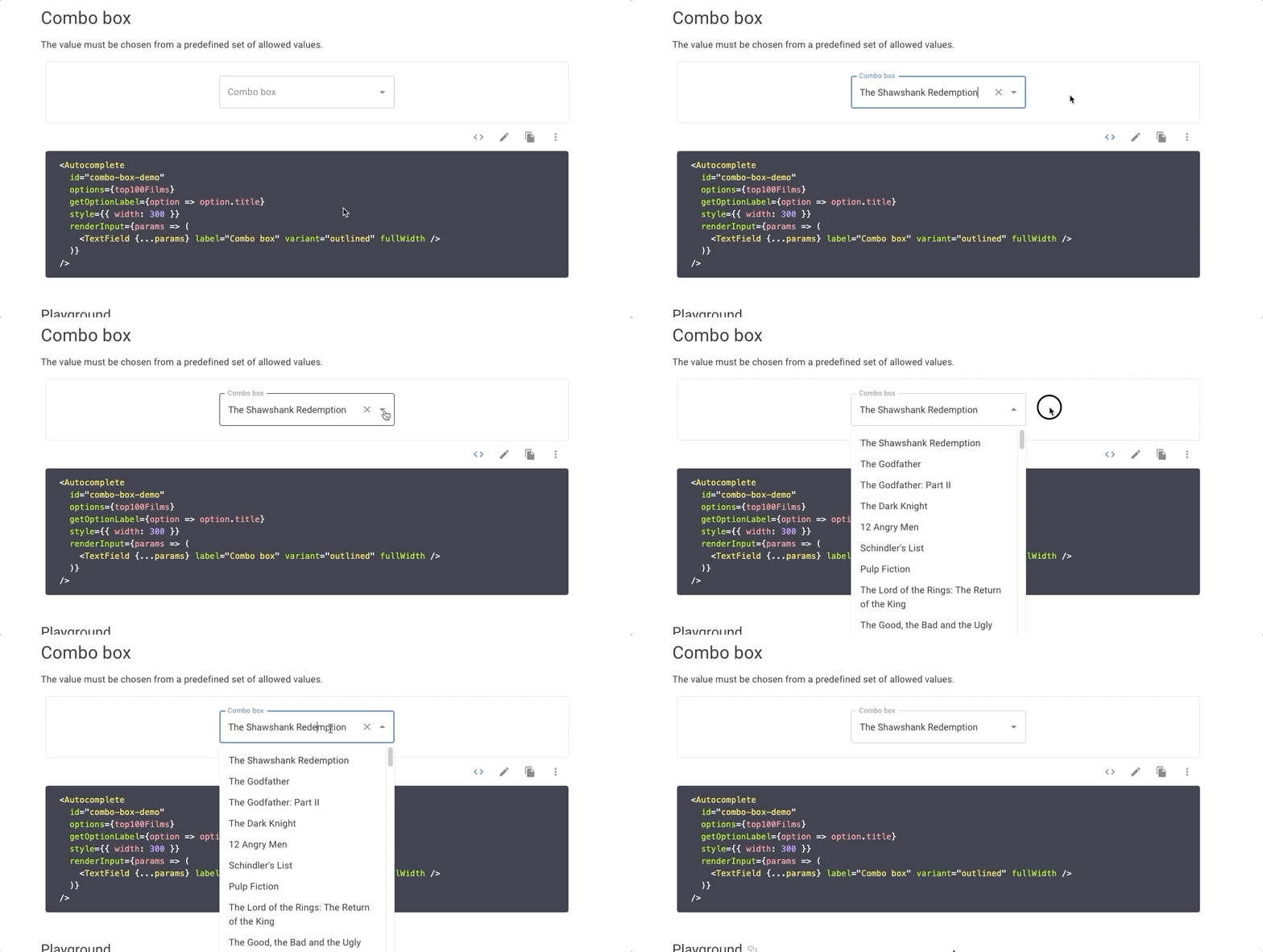
The issue is sometimes when you have an item selected and click the dropdown arrow, the Autocomplete doesn't gain focus, thus when you click off, the dropdown list doesn't close.
Here are my steps:
- Go to Material-UI docs
- Go to Autocomplete component
- Select a value in the Combo Box section
- Close the dropdown
- Click the dropdown arrow
- If the border is highlighted, click off the Autocomplete and try again
- If the border is not highlighted, click off the Autocomplete
- The listbox doesn't close
You can work around this by clicking one of the options or clicking the text in the input.
I was going to file a new issue, but I saw this one existed.
I'll attach a GIF
 zekehernandez
on 17 Feb 2020
zekehernandez
on 17 Feb 2020
Hi, currently I'm facing this issue, any news on this?
 gogevorgyan
on 21 Jun 2020
gogevorgyan
on 21 Jun 2020
I am also experiencing this
 luketgriffith
on 23 Jun 2020
luketgriffith
on 23 Jun 2020
I am also having same issue...I think it will work on material ui grid or material ui property only....Not on a html div
 spatil77937
on 29 Jul 2020
spatil77937
on 29 Jul 2020
But not sure how can I fix this?
spatil77937
on 29 Jul 2020
@zekehernandez For the GIF and the instructions to reproduce the issue, unfortunately, I can't reproduce :/.
oliviertassinari
on 1 Aug 2020
I can no longer reproduce it on the docs site whereas I was able to easily back when I first posted. I'll try using the latest version of the Autocomplete, maybe it was fixed? 🤷♂️
zekehernandez
on 3 Aug 2020
Related issues
 rbozan
·
3Comments
rbozan
·
3Comments
 FranBran
·
3Comments
FranBran
·
3Comments
 zabojad
·
3Comments
zabojad
·
3Comments
 mattmiddlesworth
·
3Comments
mattmiddlesworth
·
3Comments
 revskill10
·
3Comments
revskill10
·
3Comments