Material-ui: IE 11 issue: *Material-UI: unsupported `` color. We support the following formats: #nnn, #nnnnnn, rgb(), rgba(), hsl(), hsla().*
- [ x] The issue is present in the latest release.
- [ x] I have searched the issues of this repository and believe that this is not a duplicate.
Current Behavior 😯
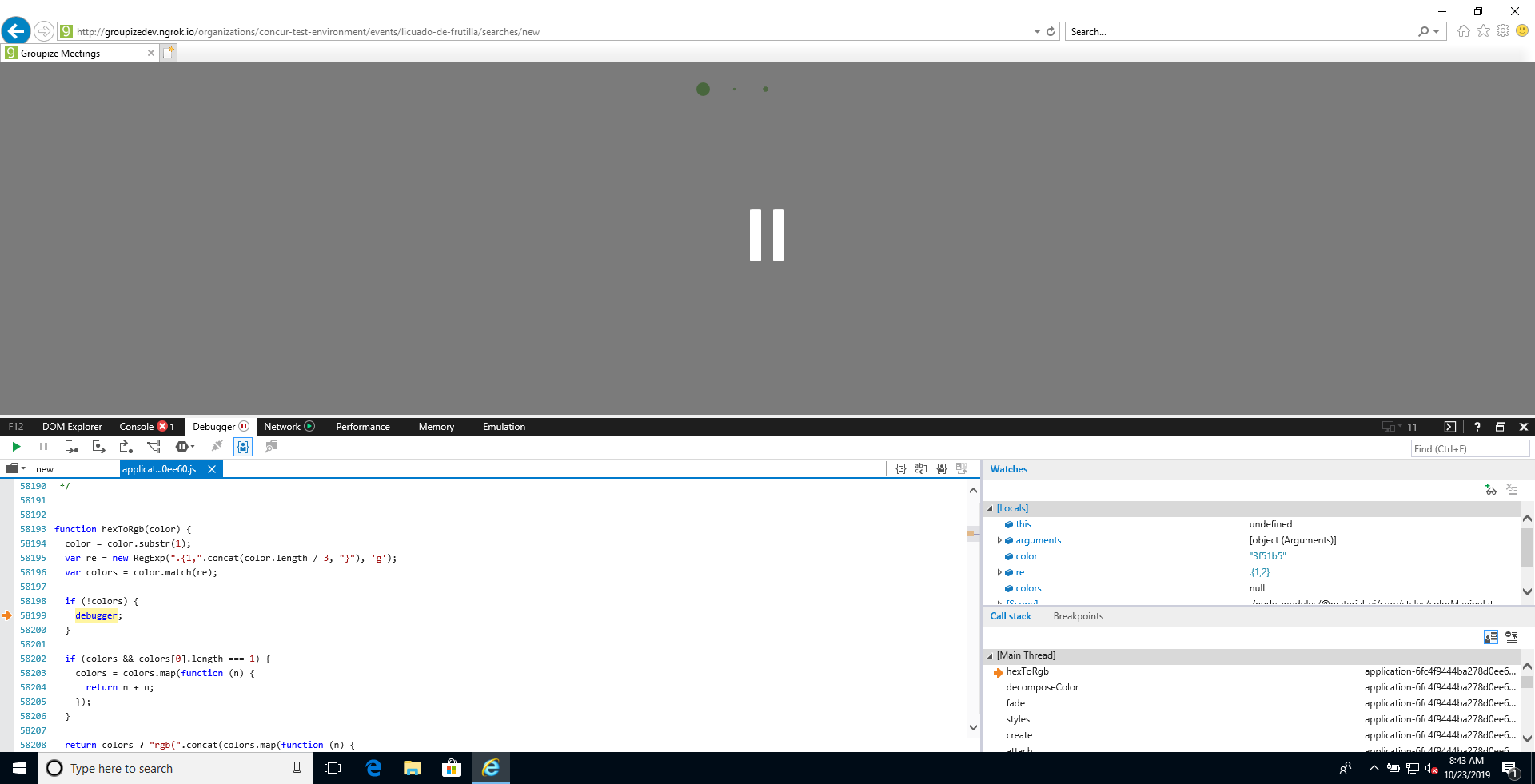
Debugging the Material UI code on my IE 11 (from Virtual Machine), I got that inside the function hexToRgb, the code let colors = color.match(re); return null:
The following screenshot has the locals variables:
Expected Behavior 🤔
The color.match should return an array with the matches
Your Environment 🌎
Internet Explorer 11
| Tech | Version |
| ----------- | ------- |
| Material-UI | v4.5.1 |
 AugustoPedraza
All 7 comments
What version of IE 11 and OS version are you using?
This looks like a very obscure bug with regular expressions.
Edit:
Could you include a reproduction? The error message including an empty string while your breakpoints list 3f51b5 is odd. I can run #3f51b5 as a primary theme color in IE 11.805.17763.0
 eps1lon
on 24 Oct 2019
eps1lon
on 24 Oct 2019
The issue has been closed because it does not conform to our issue requirements.
Please provide a full reproduction test case. This would help a lot 👷 .
A live example would be perfect. This codesandbox.io template _may_ be a good starting point. Thank you!
 oliviertassinari
on 24 Oct 2019
oliviertassinari
on 24 Oct 2019
BTW, I figured out the problem: our stack was using es6-shim library, that was adding "buggy" Regex behavior to IE 11. Fortunately, after a hard work, I was able to identify and remove the component that was importing it.
AugustoPedraza
on 24 Oct 2019
🎉 thanks for sharing!
oliviertassinari
on 24 Oct 2019
@oliviertassinari not sure if exactly the same issue but in a typescript project I ran into having a theme like
const theme = createMuiTheme({
  palette: {
    background: {
      default: "white"
    }
  }
});
Steps to reproduce:
- Have
theme.palette.background.default = "white" - Don't get any type warnings/errors and the app seems to work fine
- Load a snackbar and get thrown an error
Material-UI: unsupported 'white' color.
Try out sandbox here: https://codesandbox.io/s/material-ui-unsupported-color-t6iof
 larsenwork
on 24 Feb 2020
larsenwork
on 24 Feb 2020
As an aside somehow it understands that e.g. theme.palette.primary.main can't be black.
Looking at the typescript definitions I don't know how it does that. It seems like it's only a runtime check inside colorManipulator.

larsenwork
on 24 Feb 2020
Hi @oliviertassinari , @AugustoPedraza , @eps1lon
I ran into same issue, When i try importing the pagination component.
Below is the simple code this:
Pagination count={10} color="primary"
Im See Error:
Material-UI: unsupported "" color.
We support the following formats: #nnn, #nnnnnn, rgb(), rgba(), hsl(), hsla().
Error: Material-UI: unsupported `` color.
We support the following formats: #nnn, #nnnnnn, rgb(), rgba(), hsl(), hsla().
at decomposeColor (http://localhost:9009/vendors~main.af2f024373da7d352b1c.bundle.js:37827:11)
at decomposeColor (http://localhost:9009/vendors~main.af2f024373da7d352b1c.bundle.js:37820:12)
at fade (http://localhost:9009/vendors~main.af2f024373da7d352b1c.bundle.js:37923:11)
at styles (http://localhost:9009/vendors~main.af2f024373da7d352b1c.bundle.js:183220:97)
at Object.create (http://localhost:9009/vendors~main.af2f024373da7d352b1c.bundle.js:194793:35)
at attach (http://localhost:9009/vendors~main.af2f024373da7d352b1c.bundle.js:195233:32)
at http://localhost:9009/vendors~main.af2f024373da7d352b1c.bundle.js:195375:7
at useSynchronousEffect (http://localhost:9009/vendors~main.af2f024373da7d352b1c.bundle.js:195327:14)
at useStyles (http://localhost:9009/vendors~main.af2f024373da7d352b1c.bundle.js:195367:5)
at WithStyles (http://localhost:9009/vendors~main.af2f024373da7d352b1c.bundle.js:195857:21)
 mohammed-shakeel-by
on 30 Apr 2020
mohammed-shakeel-by
on 30 Apr 2020
Related issues
 reflog
·
3Comments
reflog
·
3Comments
 sys13
·
3Comments
sys13
·
3Comments
 activatedgeek
·
3Comments
activatedgeek
·
3Comments
 finaiized
·
3Comments
finaiized
·
3Comments
 ghost
·
3Comments
ghost
·
3Comments