Material-ui: Misaligned Label on Select Component
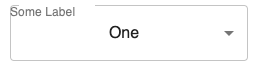
The label on the Select component is misaligned when we send the option variant=outlined.
- [x] The issue is present in the latest release.
- [x] I have searched the issues of this repository and believe that this is not a duplicate.
Current Behavior 😯
When the property variant=outlined is sent to the Select component, and you also need a label the label is misaligned with respect to the borderline.
Expected Behavior 🤔
Ideally, the position of the label should be aligned with the borderline.

Steps to Reproduce 🕹
- Use the
Selectcomponent - Set the property
varianttooutlined. - Use a label with the component
InputLabel
https://codesandbox.io/s/stop-text-focus-navigation-zckl1
Context 🔦
Just trying to use the select component with a label. I've been able to find a workaround changing the position of the label, but by default, the label position is misaligned.
Your Environment 🌎
| Tech | Version |
| ----------- | ------- |
| Material-UI | v4.5.1 |
| React | 16.8.8 |
| Browser | Google Chrome |
| TypeScript | 3.3.3 |
 amaia00
All 4 comments
👋 Thanks for using Material-UI!
We use GitHub issues exclusively as a bug and feature requests tracker, however,
this issue appears to be a support request.
For support, please check out https://material-ui.com/getting-started/support/. Thanks!
If you have a question on StackOverflow, you are welcome to link to it here, it might help others.
If your issue is subsequently confirmed as a bug, and the report follows the issue template, it can be reopened.
![support[bot] picture](https://avatars1.githubusercontent.com/in/6408?v=4&s=40) support[bot]
on 15 Oct 2019
support[bot]
on 15 Oct 2019
tip: check how our demos are structured.
 oliviertassinari
on 15 Oct 2019
oliviertassinari
on 15 Oct 2019
Is it fixed already? Beacause I am still able to reproduce it
 kkamenov1
on 25 Oct 2019
kkamenov1
on 25 Oct 2019
I came across this issue today and the problem lies on using the outlined variant in the Select component and not in FormControl (not aware if it's unintended).
 iaacosta
on 8 Aug 2020
iaacosta
on 8 Aug 2020
Related issues
 pola88
·
3Comments
pola88
·
3Comments
 ghost
·
3Comments
ghost
·
3Comments
 iamzhouyi
·
3Comments
iamzhouyi
·
3Comments
 rbozan
·
3Comments
rbozan
·
3Comments
 revskill10
·
3Comments
revskill10
·
3Comments
Most helpful comment
I came across this issue today and the problem lies on using the
outlinedvariant in theSelectcomponent and not inFormControl(not aware if it's unintended).