Material-ui: [TextField] Outlined label gap is delayed after server-side hydration
After page load, the first time elements has default browser css styles and only after 1-3 second they became as they should be (look at the video https://cl.ly/c374d670fe2a )

- [x] The issue is present in the latest release.
- [x] I have searched the issues of this repository and believe that this is not a duplicate.
Current Behavior 😯
I see changing styles while the page is being rendered. Here is video with the issue video of the issue.
Expected Behavior 🤔
Render correctly styled element immediately
Steps to Reproduce 🕹
Steps:
- Clone the repo https://github.com/mui-org/material-ui/tree/master/examples/nextjs
- Add any element (I use the
<TextField Element variant="outlined" />for example) - Push The Refresh button in you browser and you will see this issue
Your Environment 🌎
| Tech | Version |
| ----------- | ------- |
| Material-UI | v4.4.0 |
| React | latest |
| Browser | Chrome |
| OS | Mac OS |
 taime
taime
All 7 comments
I use the
<TextField Element variant="outlined" />
This is expected, we rely on the availability of the layout measurements to correctly position the gap for the label. You could work around the problem by setting a background color to the label that matches the background. We could document this limitation in https://material-ui.com/components/text-fields/#limitations. Do you want to handle it? :)
 oliviertassinari
on 4 Sep 2019
oliviertassinari
on 4 Sep 2019
Some more details:
I put this element:
<TextField
          autoFocus={true}
          variant="outlined"
          className="auth-input"
          InputLabelProps={{
            shrink: true,
          }}
        />
I'm using shrink: true, because without it, there is another bug (with placeholder and autofill chrome).
here is the image:
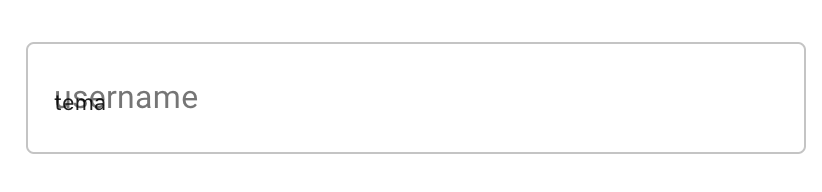
Here is the video: https://cl.ly/5a0f7a688c1b
If somebody wuold tell how to solve this issue, it would be great!
taime
on 5 Sep 2019
I'm using shrink: true, because without it, there is another bug (with placeholder and autofill chrome).
See #14427.
oliviertassinari
on 5 Sep 2019
I use the
<TextField Element variant="outlined" />This is expected, we rely on the availability of the layout measurements to correctly position the gap for the label. You could work around the problem by setting a background color to the label that matches the background. We could document this limitation in https://material-ui.com/components/text-fields/#limitations. Do you want to handle it? :)
@oliviertassinari Can I document this if possible 😄
 adeelibr
on 11 Oct 2019
adeelibr
on 11 Oct 2019
It would be nice for this to wait for #17483
 joshwooding
on 12 Oct 2019
joshwooding
on 12 Oct 2019
Agree, we should also wait for the direction #17680 takes.
oliviertassinari
on 13 Oct 2019
We have found a solid solution in #17680. It should do it.
oliviertassinari
on 30 Nov 2019
Related issues
 pola88
·
3Comments
pola88
·
3Comments
 mb-copart
·
3Comments
mb-copart
·
3Comments
 finaiized
·
3Comments
finaiized
·
3Comments
 revskill10
·
3Comments
revskill10
·
3Comments
 TimoRuetten
·
3Comments
TimoRuetten
·
3Comments
Most helpful comment
It would be nice for this to wait for #17483