Material-ui: TextInput Label doesn't shrink when filling from inputRef
When I'm using react-hook-form to set some values in a TextInput I receive from the server, it populates correctly, but doesn't shrink the label.
- [x] The issue is present in the latest release.
- [x] I have searched the issues of this repository and believe that this is not a duplicate.
Current Behavior 😯
Currently the text is overlapping the placeholder text.
Expected Behavior 🤔
The placeholder should shrink and display above the filled text.
Steps to Reproduce 🕹
https://codesandbox.io/s/react-hook-form-mui-textfield-3czpw
Context 🔦
This started happening in v4.2.1 and up. It works in v4.2.0.
 minhaferzz
All 30 comments
Are you sure about the reproduction? I don't see any issue.
 oliviertassinari
on 15 Aug 2019
oliviertassinari
on 15 Aug 2019
@oliviertassinari Yes, I might have forgotten to save the code the codesandbox. Please check it again. The placeholder is overlapping the text.
minhaferzz
on 16 Aug 2019
Could the problem come from https://github.com/mui-org/material-ui/pull/16526?
oliviertassinari
on 16 Aug 2019
I was experiencing this issue as well, using values instead of inputRef though. I fixed it by simply checking if there were any values or not, like this:
value={ props.myProp ? props.myProp : '' }
 erfan226
on 20 Aug 2019
erfan226
on 20 Aug 2019
I don't understand why that library needs to mutate the value in the DOM instead of using defaultValue on the <input />. Could you verify that it cannot work with defaultValue being specified on the element?
Using defaultValue should automatically cause the filled state and we don't need extra effect handling.
 eps1lon
on 20 Aug 2019
eps1lon
on 20 Aug 2019
@eps1lon I checked his code and tested what you said and it worked!
I changed my code as well. But still, using default value on number inputs doesn't fix the issue. Email, Text, and Tel work perfectly, but not number inputs.
erfan226
on 20 Aug 2019
@erfan226 I have marked your comments as off topics as you are not using the inputRef prop. Your case is different. You are very likely switching between the uncontrolled and controlled mode. Check the warnings in the console.
oliviertassinari
on 21 Aug 2019
hi @eps1lon, Yes you can set defaultValue on the input and it should work. However, this library is leveraging some of the goodies from the uncontrolled component, which means when we declare defaultValues in the custom hook.
eg: useForm({ defaultValues: { test: '123' } })
This library itself have to mutate the input value. hope this makes sense, I would love to make this lib compatible with material-ui, as myself is a big fang of MUI. let me know if things I can improve to make integration easier, or even how things should be done in usage so I can document on the website.
 bluebill1049
on 21 Aug 2019
bluebill1049
on 21 Aug 2019
However, this library is leveraging some of the goodies from the uncontrolled component, which means when we declare defaultValues in the custom hook.
defaultValue as a prop is for uncontrolled components. Why is this not sufficient and requires mutating the instance?
eps1lon
on 22 Aug 2019
defaultValue as a prop is for uncontrolled components. Why is this not sufficient and requires mutating the instance?
It's more of a DX thing, like I mentioned above when dev wants to declare all default values in one go. The library allows them to write things like
const { register } = useForm({
  defaultValues: {
    firstName: "bill",
    lastName: "luo",
    email: "[email protected]",
    pets: [ 'dog', 'cat' ]
  }
})

<input name="firstName" ref={register} />
during register the input mutation will happen.
bluebill1049
on 22 Aug 2019
But why do you need to go outside of react to change the value? We already have all the tools in place to solve these issues. We specifically want to avoid mutating the instance from outside because this can cause all sorts of unforeseen issues. Especially when you're building a brand new library using hooks there's really no need to go back to handling state via DOM.
If your concern is DX you could just as well use const props = useForm(); <input {...props} /> where props = { value, ref }. This seems like you just want it to look faster because render counts don't change.
eps1lon
on 22 Aug 2019
The more I look at this the more I feel like using defaultValue as a prop is even better for DX. Your example has an indirection between the input name and its default value. One has to look at the component, check the name, look at the hook, scan for the key with the name and then sees the default value.
By having name and defaultValue at the component I have those next to each other and eliminate potential bugs when mispelling/renaming names or keys.
eps1lon
on 22 Aug 2019
First of all, thanks for the feedback :)
We specifically want to avoid mutating the instance from outside because this can cause all sorts of unforeseen issues.
In this instance, I couldn't see an issue when setting up the default value. It leverages the native DOM API and it's not "outside" (it using component ref).
This seems like you just want it to look faster because render counts don't change.
I disagree with the above statement, it's not the intention for this library to "look" faster. The intention is great DX and better performance (it can be). I don't want to go for syntax like <input {...props} /> which I don't want to go into such discussion.
I guess the solution right now is to trigger an extra re-render when user changing defualtValue, I am happy to document it down in the website, so users do aware. thanks for looking into this issue tho.
bluebill1049
on 22 Aug 2019
By having name and defaultValue at the component I have those next to each other and eliminate potential bugs when mispelling/renaming names or keys.
Totally agree, one of the reasons we had typescript support to declare a type, so avoid misspell the name.
bluebill1049
on 22 Aug 2019
I don't want to go for syntax like which I don't want to go into such discussion.
Well I'm happy to hear your reasoning but if you don't want to discuss this we can close the issue. I'll wait a bit in case someone else has other arguments.
The intention is great DX and better performance (it can be).
Could you share some benchmarks so that we can evaluate if it would make sense to support this API?
Totally agree, one of the reasons we had typescript support to declare a type, so avoid misspell the name.
This sounds interesting. How do you make sure I can't write const { register } = useForm({ defaultValues: { bar: 'baz' } }); <input name="foo" ref={register} />;?
eps1lon
on 22 Aug 2019
Well I'm happy to hear your reasoning but if you don't want to discuss this we can close the issue. I'll wait a bit in case someone else has other arguments.
It's a design decision which I made when I start building react hook form. I prefer things to be more declarative so devs can see each prop. Not a big fan of {...props} you need to overwrite or get overwritten by what's in the ...props.
The intention is great DX and better performance (it can be).
sure, do you mean overall performance enhancement of this library or just setting up defaultValue? When I made my statement above, I meant overall. If you are interested in terms of overall performance enhancement, I have a couple of screenshot on the website: https://react-hook-form.com
This sounds interesting. How do you make sure I can't write const { register } = useForm({ defaultValues: { bar: 'baz' } }); ;?
export interface Props<Data extends DataType> {
  mode?: Mode;
  defaultValues?: Partial<Data>;
  nativeValidation?: boolean;
  validationFields?: (keyof Data)[];
  validationSchema?: any;
  submitFocusError?: boolean;
}
This is what we have at the moment, this library is still very young and we are still consistently improving on the type and everything else. I don't think we can prevent everything but at least we try :)
By the way, my intention was not to ask MUI to make a change for react-hook-form, rather than find a solution in between.
bluebill1049
on 22 Aug 2019
Would defaultValue handle a case where I would need to load a value from a server and set the default value at that time?
minhaferzz
on 22 Aug 2019
@minhaferzz no :(
bluebill1049
on 23 Aug 2019
I'm closing, following https://github.com/mui-org/material-ui/pull/17025#issuecomment-523541442. @bluebill1049 let us know if you see more people facing this issue, we could revaluate in the future.
oliviertassinari
on 24 Aug 2019
Thanks @oliviertassinari and @eps1lon anyhow for looking into this.
bluebill1049
on 24 Aug 2019
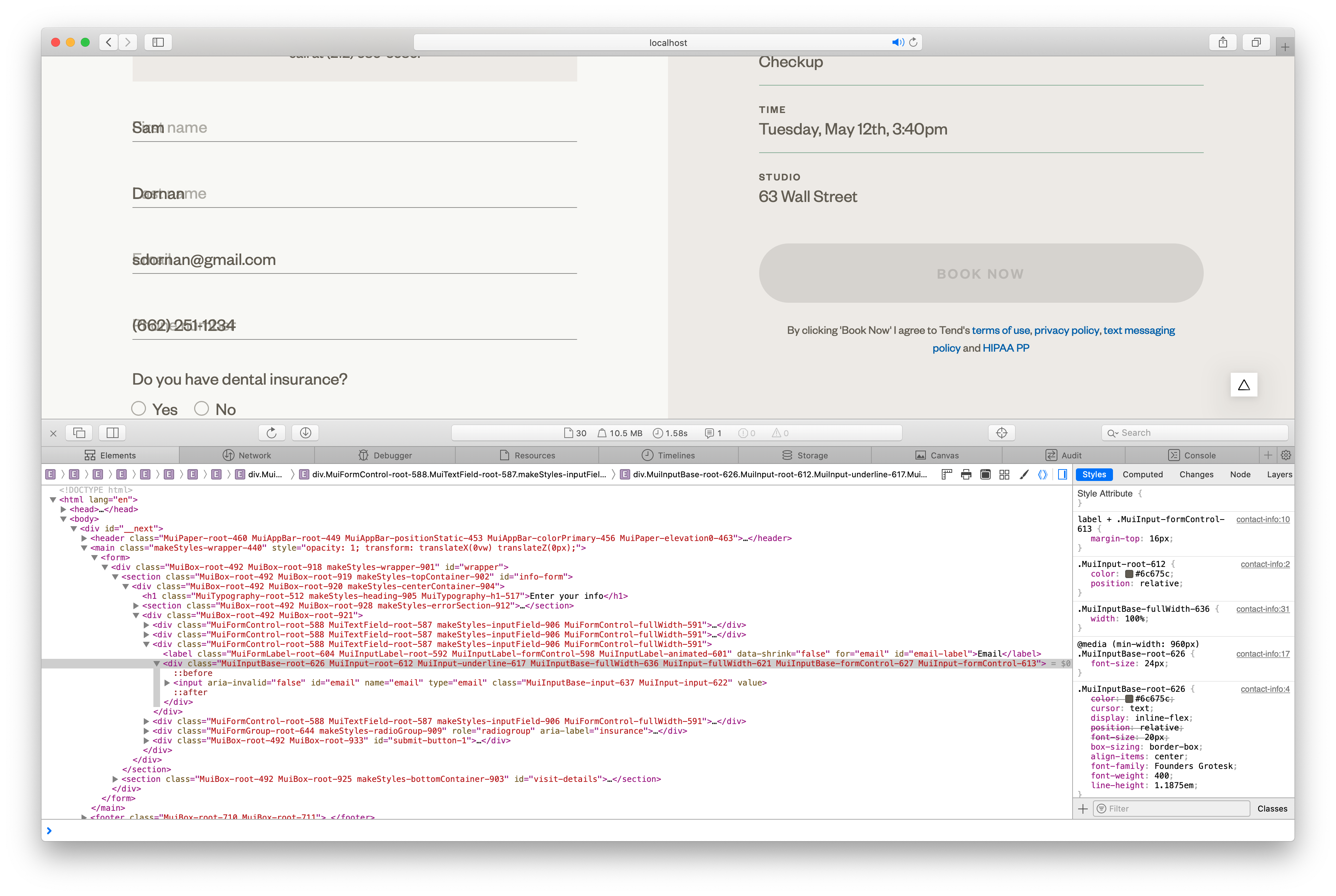
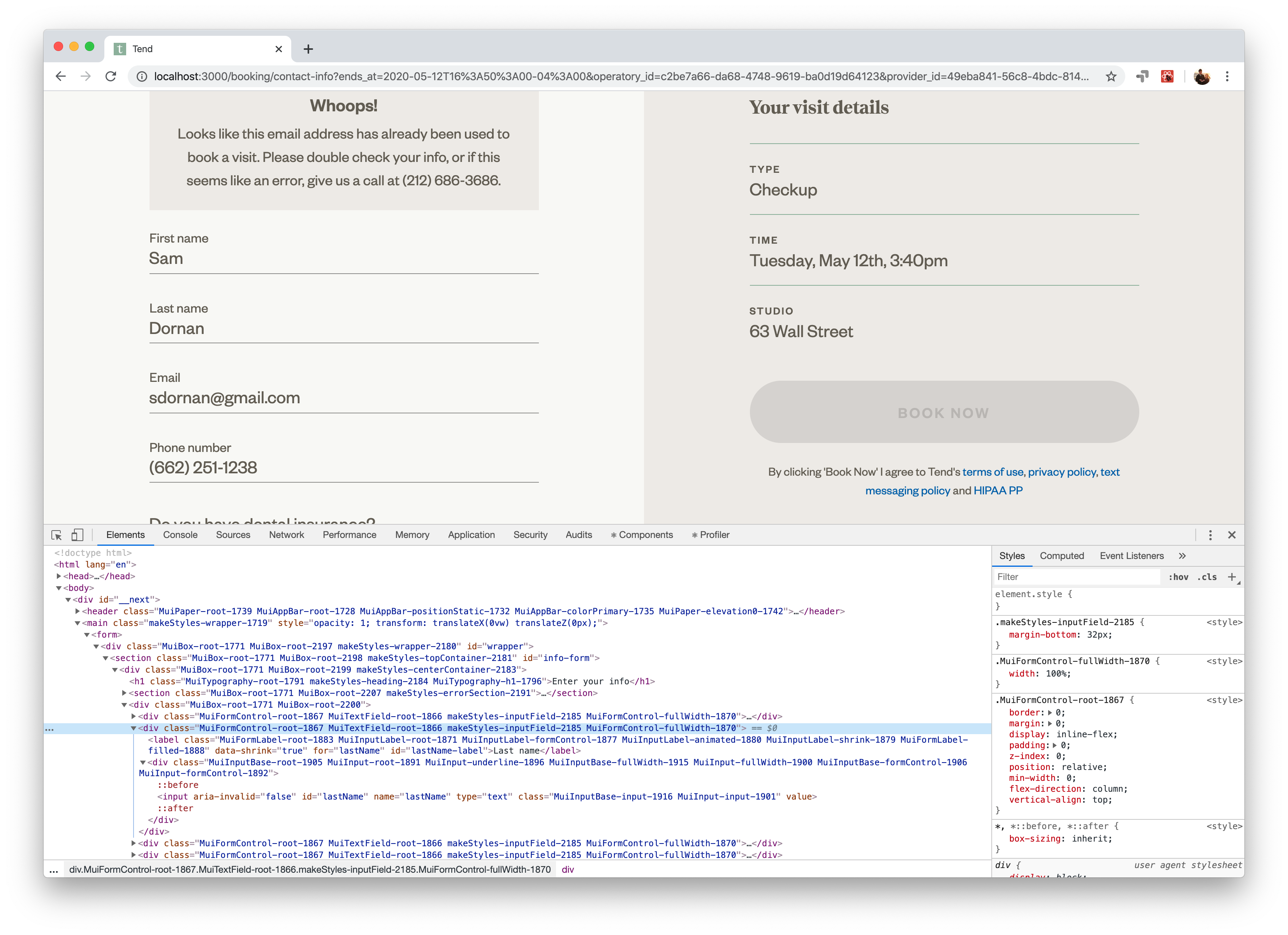
I'm having a similar issue as this, but it's unclear if it's the same or different. I'm using setValue() on a few Material UI input fields on page load, but the labels are not shrinking properly in Safari only. In Chrome, the MuiInputLabel-shrink and MuiInputLabel-filled classes are being properly applied. Let me know if I should open a separate issue, or if it's a Material UI problem and I should open an issue there.
 sdornan
on 2 Mar 2020
sdornan
on 2 Mar 2020
@sdornan If you have a minimal live reproduction that show that the issue originates from Material-UI, e.g. using codesandbox, feel free to open a new issue. In the case of react-hook-form, we have already explored some of the issues with the approach the library took. More details in https://github.com/mui-org/material-ui/issues/18269#issuecomment-562892026.
oliviertassinari
on 2 Mar 2020
@sdornan please consider using Controller with MUI components.
https://react-hook-form.com/api#Controller
bluebill1049
on 2 Mar 2020
Here's a reproduction: https://codesandbox.io/s/hopeful-mountain-cgx6p
Will open a new issue if necessary.
sdornan
on 2 Mar 2020
@sdornan did you got this resolved?
 gradinarot
on 27 Mar 2020
gradinarot
on 27 Mar 2020
@gradinarot https://react-hook-form.com/api#Controller
bluebill1049
on 27 Mar 2020
I manged to solve it by passing InputLabelProps and biding the "shrink" prop to the field's value.
gradinarot
on 28 Mar 2020
@bluebill1049 Using Controller does not work on Safari either.
 rfoel
on 13 May 2020
rfoel
on 13 May 2020
@rfoel I don't think so. Provide a code sandbox and screenshots/video.
bluebill1049
on 14 May 2020
@gradinarot I did the same thing as you.
sdornan
on 14 May 2020
Related issues
 anthony-dandrea
·
3Comments
anthony-dandrea
·
3Comments
 pola88
·
3Comments
pola88
·
3Comments
 mb-copart
·
3Comments
mb-copart
·
3Comments
 iamzhouyi
·
3Comments
iamzhouyi
·
3Comments
 chris-hinds
·
3Comments
chris-hinds
·
3Comments