Material-ui: [styles] Dynamic makeStyles changes specifity (rules precedence)
- [x] This is not a v0.x issue.
- [x] I have searched the issues of this repository and believe that this is not a duplicate.
(It might be related with #15511 )
Expected Behavior 🤔
Using a dynamic and static style should have the same css rule precedence.
Current Behavior 😯
Rules created with dynamic styles (passing a props to the useStyles) have a higher precedence than static rules. So if both mixing dynamic and static properties declarations that may override have different behaviors than if both declaration are static (values) or dynamic (functions).
Steps to Reproduce 🕹
Link: https://codesandbox.io/s/quirky-sun-cbedp
This is the getting started dashboard. The only change that has been made is that the drawerWidth, instead of being a global variable, is passed to the useStyles hook as a prop. This change makes that the drawer won't collapse. This is caused as the dynamic drawerPaper css rule gets a higher specificity than the drawerPaperClose.
- Write two css classes, the second one should override a property of the first one.
- Apply both css classes to a component
- Change the property that is overrided in first css class to a function (make it dynamic instead of a static value)
- Check the result, the property won't be overrided (different behavior than if the properties are both static or both dynamic)
Context 🔦
I'm trying to use css properties with dynamic values. Although the work around is transforming all the properties that might override to functions, having different behaviors is a bit confusing.
Your Environment 🌎
| Tech | Version |
|--------------|---------|
| Material-UI | v4.1.1 |
| React | v16.8.6 |
| Browser | Chromium Versión 74.0.3729.169 (Build oficial) Arch Linux (64 bits) |
| TypeScript | No |
| etc. | |
 NickCis
All 7 comments
@NickCis Thanks for the report. This problem was partially highlighted in #15511.
 oliviertassinari
on 21 Jun 2019
oliviertassinari
on 21 Jun 2019
@NickCis I'm having the same issue, could you elaborate on how your workaround works? thanks!
 stefanoTron
on 26 Jun 2019
stefanoTron
on 26 Jun 2019
@littletower
You have to declare as functions all the styles that override. Eg:
const useStyles = makeStyles(theme => ({
myClass: {
width: ({ width }) => width,
},
override: {
width: () => 120,
}
});
EDIT: I tried with both v4.3.0 and v4.5.0, standard create-react-app boiler plate
I also have this issue on Production though... you can see in the screenshot below that on localhost (left) the background has the correct color, but on production (right picture, using serve after npm run build) the background is "under" MuiPaper-root in terms of order and gets overwritten.
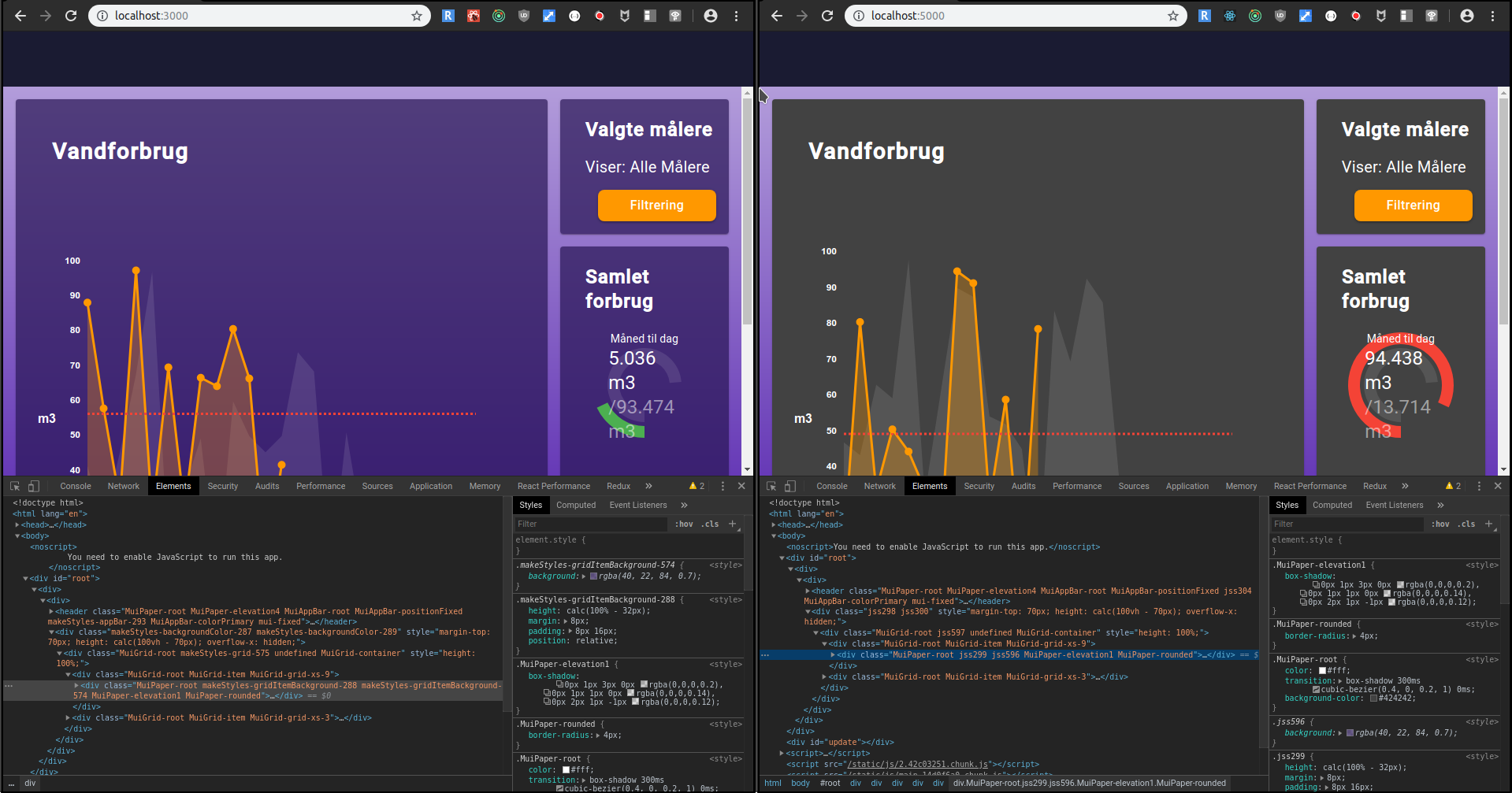
the code is below
Note:
- ItemG is
- GridContainer is
- As you can see I tried with both Paper className and Paper classes.root
- As a workaround I did the CSS blasphemy of using " !important"
Using !important in your CSS usually means you're narcissistic & selfish or lazy. Respect the devs
to come...
const ChartContainer = (props) => {
    const colorTheme = useSelector((state) => state.settings.colorTheme)
    const classes = containerStyles({ color: colorTheme })
    const [chart, setChart] = useState('waterusage')

    return <GridContainer style={{ height: '100%' }}>
        <ItemG xs={9} >
            <Paper classes={{ root: classes.gridItemBackground }}>
                <MainChart chart={chart} setChart={setChart} />
            </Paper>
        </ItemG>
        <ItemG xs={3}>
            <ItemG container direction={'row'} style={{ height: '100%' }}>
                <ItemG xs={12} style={{ height: '25%' }}>
                    <Paper className={classes.gridItemBackground}>
                        <DeviceTableWidget />
                    </Paper>

                </ItemG>
                <ItemG xs={12} style={{ height: '50%' }}>
                    <Paper className={classes.gridItemBackground}>
                        <ArcGraph chart={chart} id={`arc-graph-${chart}`} />
                    </Paper>

                </ItemG>
                <ItemG xs={12} style={{ height: '25%' }}>
                    <Paper className={classes.gridItemBackground}>
                        <DevicesWidget />
                    </Paper>

                </ItemG>
            </ItemG>
        </ItemG>
    </GridContainer>
}
containerStyles:
import { colors } from '@material-ui/core'
import { bgColors } from './backgroundColors';
import { darken } from '@material-ui/core/styles';
import hexToRgba from 'hex-to-rgba'
import { makeStyles } from '@material-ui/styles';

const containerStyles = makeStyles(theme => ({
    gridItemBackground: {
        position: 'relative',
        height: 'calc(100% - 32px)',
        padding: '8px 16px',
        margin: 8,
        background: props => darken(hexToRgba(colors[props.color][700], 0.7), 0.5),
    }
}))


export default containerStyles
 Alexand3r
on 11 Oct 2019
Alexand3r
on 11 Oct 2019
I am using gatsby and material-ui/makeStyles (latest versions) and after the build i experience random issues. In those cases some classes are added like class="jss4 jss9", but some of them just contain wrong styles and destroy the layout after build. While using the dev server everything is fine. Is there any way to do without this generated classes and kep the original class names instead?
 wende60
on 29 Apr 2020
wende60
on 29 Apr 2020
Got the same issue here:
Material UI 4.10.2 + NextJS 9.4.4
 szhielelp
on 20 Jul 2020
szhielelp
on 20 Jul 2020
An update, this issue is being resolved in v5 thanks to #22342 and the new @material-ui/styled-engine package. We are replacing the withStyles & makeStyles APIs with the styled() one. It's no longer possible to create multiple style rule, instead, developers can use nested CSS selectors.
oliviertassinari
on 12 Nov 2020
Related issues
 newoga
·
3Comments
newoga
·
3Comments
 finaiized
·
3Comments
finaiized
·
3Comments
 reflog
·
3Comments
reflog
·
3Comments
 ericraffin
·
3Comments
ericraffin
·
3Comments
 activatedgeek
·
3Comments
activatedgeek
·
3Comments
Most helpful comment
EDIT: I tried with both v4.3.0 and v4.5.0, standard create-react-app boiler plate
I also have this issue on Production though... you can see in the screenshot below that on localhost (left) the background has the correct color, but on production (right picture, using
serveafternpm run build) the background is "under" MuiPaper-root in terms of order and gets overwritten.the code is below
Note:
containerStyles: