Material-ui: Inherited styles overriding the component styles
- [X] This is not a v0.x issue.
- [X] I have searched the issues of this repository and believe that this is not a duplicate.
Expected Behavior 🤔

The header class .MuiAppBar-colorPrimary should override .MuiPaper-root and hence show blue color instead of white.
Current Behavior 😯
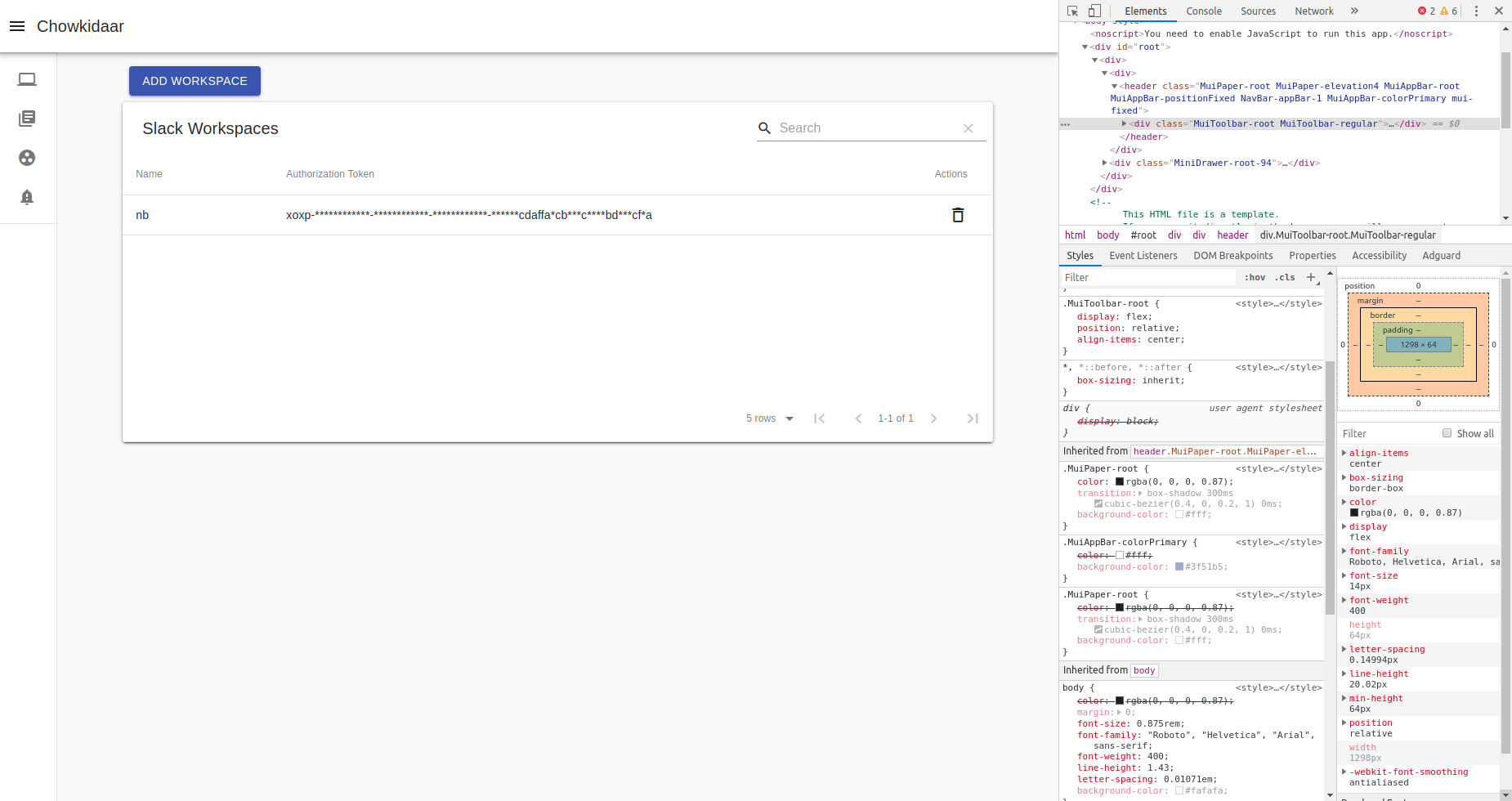
MuiPaper-root is overiding .MuiAppBar-colorPrimary.
Steps to Reproduce 🕹
I would try to reproduce it and edit this. I thought someone might have idea whats going on.
Context 🔦
I have single app root, no jss code etc. The only extra dependency apart from default react-material stack is unstated. I see double .MuiPaper-root class, may be something is off there.
Also I haven't used even themeprovider tag or baseline anywhere
Your Environment 🌎
| Tech | Version |
|--------------|---------|
| Material-UI | v4.0.1 |
| React |^16.8.6 |
| Browser |Chrome|
|material-table| 1.38.0|
 MohitKS5
All 4 comments
This issue might be related with https://github.com/mui-org/material-ui/issues/16100
Can you please screenshot how styles look like within your <head>? No matter what classes are used by the html elements, when at the same level of specificity, it all depends on the which rules are rendered the first and the latter ones will always override the former ones.
 dereksangshi
on 7 Jun 2019
dereksangshi
on 7 Jun 2019
Thanks to #15610 I found the problem
The problem seems to lie here.
import Paper from '@material-ui/core/Paper/Paper';
changing to this removed the issue.
import Paper from '@material-ui/core/Paper';
feel free to close :)
MohitKS5
on 7 Jun 2019
@dereksangshi if you still want the screenshot:

MohitKS5
on 7 Jun 2019
Thanks for this issue, for us the problem was importing Paper like this
import Paper from '@material-ui/core/Paper/index';
It took me several hours of debugging because the import was done in another component
 mjduijn
on 26 Jul 2019
mjduijn
on 26 Jul 2019
Related issues
 newoga
·
3Comments
newoga
·
3Comments
 ryanflorence
·
3Comments
ryanflorence
·
3Comments
 ghost
·
3Comments
ghost
·
3Comments
 mb-copart
·
3Comments
ghost
·
3Comments
mb-copart
·
3Comments
ghost
·
3Comments
Most helpful comment
Thanks to #15610 I found the problem
The problem seems to lie here.
import Paper from '@material-ui/core/Paper/Paper';changing to this removed the issue.
import Paper from '@material-ui/core/Paper';feel free to close :)