Material-ui: [Popper] Position offset when the container is placed with margin-left:auto
- [x] This is not a v0.x issue.
- [x] I have searched the issues of this repository and believe that this is not a duplicate.
Expected Behavior 🤔
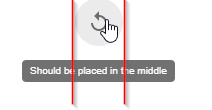
Current Behavior 😯
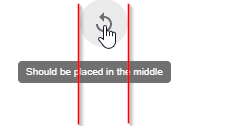
Steps to Reproduce 🕹
Link: https://codesandbox.io/s/flamboyant-goldwasser-d6hrb?fontsize=14
- Hover over icon button
Context 🔦
The problem is related to layout of the parent dom elements as well. The parent element of the popper anchor must be styled with margin-left:auto and the body should not have any padding or margin.
Possible Solution 🧠
https://github.com/mui-org/material-ui/compare/next...FStuerzlinger:patch-1
After initializing Popper JS, a scheduled Update fixes the layout problem.
It seems that popper is not able to determine the correct possition of the anchor element upfront. Triggering popper.scheduleUpdate() triggers a revalidation of the popper positions after layout.
Your Environment 🌎
| Tech | Version |
|--------------|---------|
| Material-UI | v3.9.3 |
| React | 16.8.6 |
| Browser | Chrome,Firefox,IE |
 FStuerzlinger
All 4 comments
@FStuerzlinger Thanks for the report. My answer would be the same as for #15194. This is a core issue with popper.js. It should be fixed at their level. If you can provide a reproduction with the library and report the problem on their side, it would be perfect. On a side note, it doesn't happen on MacOS. It seems to be a Windows thing.
 oliviertassinari
on 18 May 2019
oliviertassinari
on 18 May 2019
@FStuerzlinger I have experienced the same problem, and thanks to you submitting this issue I've also been able to identify the cause as margin-left: auto. I've found a solution that works for me, though I do agree it should be fixed in the popper.js.
In your codesandbox, you can set margin-left: calc((100vw - 200px) / 2);. This is far from ideal and may not work in all situations, but I thought I'd leave this here in case anybody needs a quick fix while waiting for a proper solution from popper.js.
 wmaurer
on 22 May 2019
wmaurer
on 22 May 2019
I believe I have narrowed down this issue and I've submitted a PR that fixes the original sandbox.
 pkmnct
on 23 May 2019
pkmnct
on 23 May 2019
Yes, that seems to fix the issue for me 👍
Thank you 😄
FStuerzlinger
on 24 May 2019
Related issues
 ghost
·
3Comments
ghost
·
3Comments
 revskill10
·
3Comments
revskill10
·
3Comments
 mb-copart
·
3Comments
mb-copart
·
3Comments
 activatedgeek
·
3Comments
activatedgeek
·
3Comments
 iamzhouyi
·
3Comments
iamzhouyi
·
3Comments
Most helpful comment
I believe I have narrowed down this issue and I've submitted a PR that fixes the original sandbox.