Material-ui: Link to Usage from Installation doc
Just a suggestion on how to make the first-time documentation experience a little more smooth.
The Get Started button on the homepage links to the Installation doc.
When the viewport is slightly narrow, the nav on the left is hidden.

To complete the getting started experience, it'd be helpful to include a Next steps section at the bottom of the Installation doc, that links to the Usage.
 kaycebasques
All 10 comments
I can submit this PR. Just running the idea by you all first.
kaycebasques
on 27 Mar 2019
@kaycebasques It's an excellent ideal. I have a task for it in my backlog. I have never found the time to do it. It's something we can generalize to all the pages of the documentation. A < previous | next > links with a preview of the linked pages will improve the navigation :). We would love to review your pull request <3.
 oliviertassinari
on 27 Mar 2019
oliviertassinari
on 27 Mar 2019
@kaycebasques Did you had the chance to move forward on this problem?
oliviertassinari
on 19 Apr 2019
I like styled-components solution of the problem:
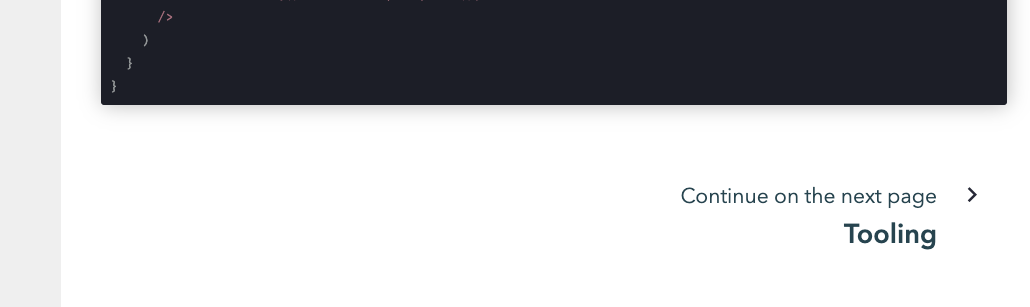
https://www.styled-components.com/docs/api#deprecated-innerref-prop
oliviertassinari
on 20 Apr 2019
@oliviertassinari I'll take on this task if no one else is!
 jztang
on 4 May 2019
jztang
on 4 May 2019
@jztang activePage & pages from PageContext will be useful to you in determining the next page. See: https://github.com/mui-org/material-ui/blob/9634f2954adc512e32d785666932248f2716577d/docs/src/modules/components/AppDrawer.js#L98 & https://github.com/mui-org/material-ui/blob/9634f2954adc512e32d785666932248f2716577d/docs/src/modules/components/MarkdownDocsContents.js#L14 for example.
activePage is the path to the current page, pages is the docs page tree structure as an object.
 mbrookes
on 4 May 2019
mbrookes
on 4 May 2019
My plan was to just manually put links in each docs page one at a time, but now I realize that solution isn't particularly efficient, and it would be much better to find neighboring pages via the tree. 😂
I assume that means I only need to make a change in the file that generates the layout of each docs page. However, I'm not sure where to find that file in the codebase - could you point me in the right direction?
jztang
on 5 May 2019
Probably round about here: https://github.com/mui-org/material-ui/blob/d0c7b070156b30908cee2b9c657469a3d6f406b3/docs/src/modules/components/MarkdownDocs.js#L167-L168
mbrookes
on 5 May 2019
Sorry, I'm going to have to unclaim this issue. I didn't realize that it was out of the scope of my knowledge until now. 😥
jztang
on 9 May 2019
No worries, there are plenty of good first issues you could tackle if you would still like to contribute.
mbrookes
on 10 May 2019
Related issues
 chris-hinds
·
3Comments
chris-hinds
·
3Comments
 activatedgeek
·
3Comments
activatedgeek
·
3Comments
 anthony-dandrea
·
3Comments
anthony-dandrea
·
3Comments
 ghost
·
3Comments
ghost
·
3Comments
 mattmiddlesworth
·
3Comments
mattmiddlesworth
·
3Comments
Most helpful comment
@oliviertassinari I'll take on this task if no one else is!