Material-ui: Does Tab component attempt to hide vertical scrollbar? Does it work for you?
I am using Chrome on MacOS.
On MaterialUI demo website, when I scroll tabs left and right, I DON'T see the vertical scroll.
https://material-ui.com/demos/tabs/#scrollable-tabs
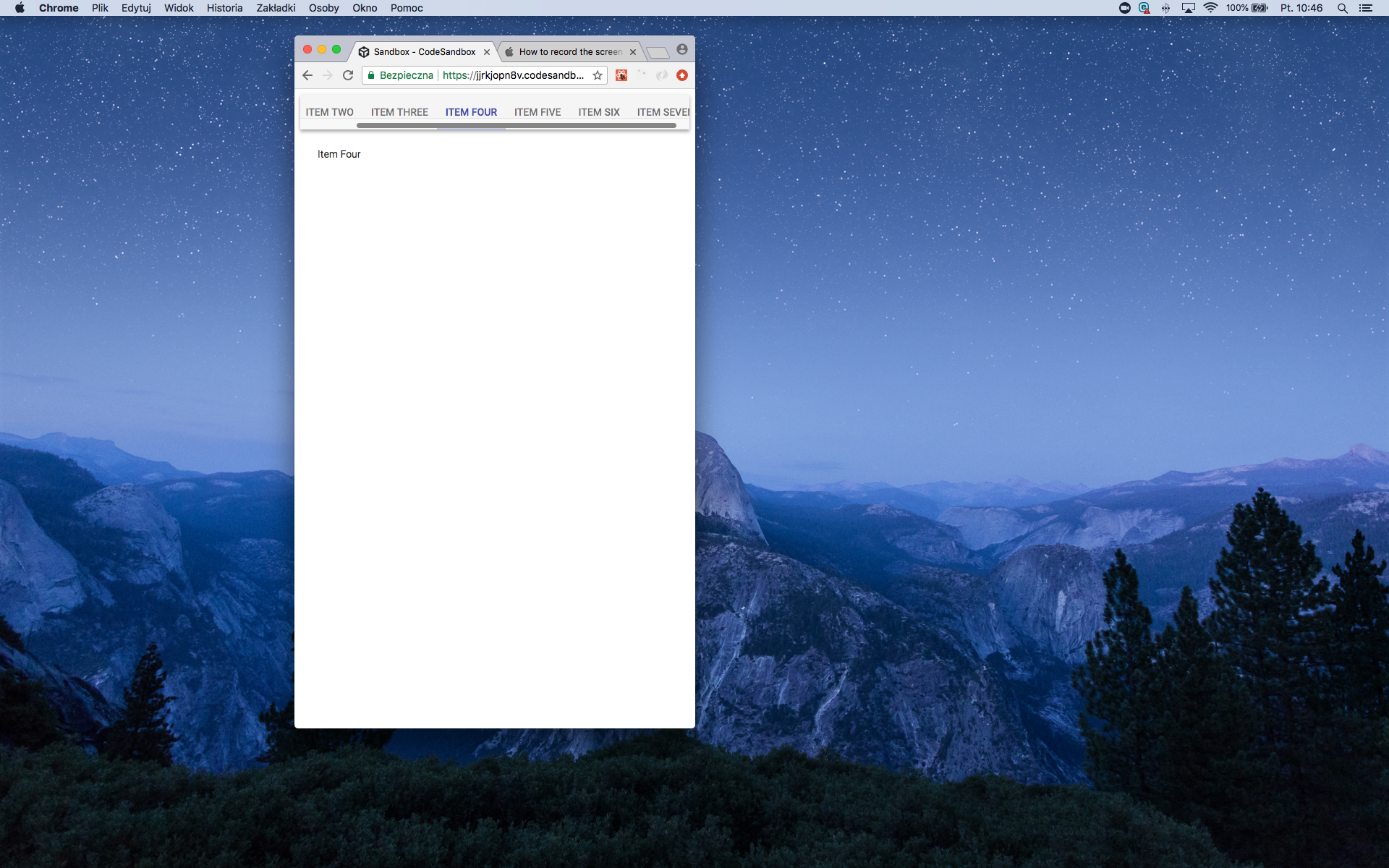
And yet in all other examples (codesandbox, using component in own application) I can see the scrollbar. What baffles me is this inconsistent behaviour. What magic causes it? What makes matters worse is that some of my coworkers can see the scrollbar on their computers and others don't.
https://codesandbox.io/s/jjrkjopn8v

What's more, after digging into Tabs source code, I have seen that there is an attempt to measure scroll size. Does it work for you?
https://github.com/mui-org/material-ui/blob/next/packages/material-ui/src/Tabs/ScrollbarSize.js
My questions:
So what is overall status of scrollbar on Tabs component? Is presence of visible scrollbar considered a bug, or do we accept it?
Does anyone also get inconsistent behaviour where you don't see scrollbar in official demo but see it in codesandbox? Does anyone have any ideas what may cause it?
 mpodlasin
All 11 comments
The Tabs' scrollbar shouldn't be visible. How can we reproduce the problem?
 oliviertassinari
on 1 Mar 2019
oliviertassinari
on 1 Mar 2019
Well, the provided codesandbox is a reproduction for me. I see scrollbar there.
I use chrome 65 on MacOS. Does it work ok for you?
My coworker on chrome 72 on MacOS has seen scrollbars even on material-ui demo website.
Also to be clear: I see scrollbar only while I am scrolling. Not on first render of webpage.
Potential fix:
What seems to work as a crude quick fix was setting this properties in css:
https://stackoverflow.com/a/35203104
This makes scrollbar have constant width, which makes ScrollbarSize component actually work and set proper size.
Or even simpler set for scrollable element:
.scrollable::-webkit-scrollbar {
  -webkit-appearance: none;
  width: 0;
  height: 0;
}
@mpodlasin Interesting. I might know what's going on. MacOS has a smart scrollbar display logic. It's enabled by default but you can change it in the main settings:

sorry, french user here
I'm using the nondefault option that reproduces the Windows behavior: the scrollbar is always visible and has its own width. I have changed it as its the most common behavior. It helps me find scroll issue sooner.
We are measuring the scrollbar width in order to hide it: https://github.com/mui-org/material-ui/blob/c0287df54346221af06a5fea860a9d2e58e0f2d1/packages/material-ui/src/Tabs/Tabs.js#L127
It doesn't work in your case. I think that we can move your CSS code in the core. What do you think about it?
oliviertassinari
on 2 Mar 2019
~Given the browser support https://caniuse.com/#feat=css-scrollbar, we might be able to kill ScrollbarSize at some point.~
oliviertassinari
on 2 Mar 2019

I have visible scrollbars as well, in the situation when Tabs rendered in hidden container and then by controlling visibility of parent element <div hidden="false" />Tabs are shown. Resizing window makes them disappear, so I assume some event is not triggered on hidden element.
"@material-ui/core": "4.0.0-alpha.8",
 Romanior
on 24 Apr 2019
Romanior
on 24 Apr 2019
@Romanior I believe it's a different issue. In your case, the scrollbar has it's own height. I like your customization, it would make a great new example in the documentation. I think that it's the same problem as #14077.
oliviertassinari
on 24 Apr 2019
@oliviertassinari Thank you for fast response, indeed this looks related to #14077. I ended up controlling visibility with
 &.--hidden {
      height: 0;
      overflow: hidden;
    }
@oliviertassinari Would be happy to add it, can you please point to the best place to start with? Thanks.
Romanior
on 24 Apr 2019
@Romanior It depends on what you mean. If you are referring to this issue resolution, what I have in mind is:
--- a/packages/material-ui/src/Tabs/Tabs.js
+++ b/packages/material-ui/src/Tabs/Tabs.js
@@ -36,6 +36,10 @@ export const styles = theme => ({
     display: 'inline-block',
     flex: '1 1 auto',
     whiteSpace: 'nowrap',
+    '&::-webkit-scrollbar': {
+      appearance: 'none',
+      height: 0,
+    },
   },
   /* Styles applied to the tablist element if `!variant="scrollabl. */
   fixed: {
If you are referring to the customzation demo, I was thinking of this demo: https://next.material-ui.com/demos/tabs/#customized-tabs. There is a couple of more customizations here https://mui-treasury.com/components/tabs, but none match the Bootstrap version like yours :).
oliviertassinari
on 24 Apr 2019
@oliviertassinari I could replicate the issue of a visible scrollbar at https://material-ui.com/demos/tabs/#automatic-scroll-buttons

I tried cross-browser vendor prefixed styling
scrollable: {
    overflowX: 'scroll',
    /* Hidden scrollbar vendor prefixed. */
    msOverflowStyle: 'none',
    overflow: '-moz-scrollbars-none',
    scrollbarWidth: 'none',
    '&::-webkit-scrollbar': {
      display: 'none'
     },
  }
it fixed it on all browsers
 Umerbhat
on 20 May 2019
Umerbhat
on 20 May 2019
@Umerbhat It sounds like you can submit a pull request :).
oliviertassinari
on 20 May 2019
Related issues
 ryanflorence
·
3Comments
ryanflorence
·
3Comments
 zabojad
·
3Comments
zabojad
·
3Comments
 sys13
·
3Comments
sys13
·
3Comments
 anthony-dandrea
·
3Comments
anthony-dandrea
·
3Comments
 pola88
·
3Comments
pola88
·
3Comments
Most helpful comment
~Given the browser support https://caniuse.com/#feat=css-scrollbar, we might be able to kill ScrollbarSize at some point.~