Material-ui: How to use and override themes with hooks
Hey!
I'm struggling in properly using and overriding themes. I want to use the default theme with some custom overrides (e.g. different font size).
Example: https://codesandbox.io/s/j7owzjlnqv
    "react": "16.8.0-alpha.1",
    "react-dom": "16.8.0-alpha.1",
    "react-scripts": "2.1.3",
    "@material-ui/core": "3.9.0",
    "@material-ui/styles": "^3.0.0-alpha.8"
With typescript, I _cannot_ seem to use createMuiTheme from @material-ui/core/styles as importing it gives a conflict between jss@9 and jss@10 (latter is used by @material-ui/styles)
Thanks!
 wilcoschoneveld
All 14 comments
This is a common confusion. ThemeProvider is a generic theme provider. It does not automatically include the material-ui theme. You have to explicitly use it:
import { Typography } from "@material-ui/core";
import { createMuiTheme } from "@material-ui/core/styles";
import { ThemeProvider } from "@material-ui/styles";

function App() {
  const theme = createMuiTheme({
    typography: { body1: { fontSize: "2rem" } }
  });
  return (
    <ThemeProvider theme={theme}>
      <Typography variant="body1">Hey</Typography>
    </ThemeProvider>
  );
}
 eps1lon
on 17 Jan 2019
eps1lon
on 17 Jan 2019
@eps1lon What about my last paragraph?
With typescript, I _cannot_ seem to use
createMuiThemefrom@material-ui/core/stylesas importing it gives a conflict betweenjss@9andjss@10(latter is used by@material-ui/styles)
and your comment here: https://github.com/mui-org/material-ui/pull/14117#issuecomment-453454471
wilcoschoneveld
on 17 Jan 2019
Could you show me the error message that it produces? The conflict should be resolved by your package manager. What you shouldn't do is mixing the styling solution from core and styles.
eps1lon
on 17 Jan 2019

I don't think I import anything from core/styles other than:
import { createMuiTheme } from "@material-ui/core/styles";
What could I be doing wrong? Thanks a lot for the quick replies, I really appreciate it.
wilcoschoneveld
on 17 Jan 2019
What do you mean with "cannot use". It's working at runtime for me: https://codesandbox.io/embed/ql1z78nlrq?codemirror=1
eps1lon
on 17 Jan 2019
I've tried to isolate the issue in our project but still have no clue what's going on. Anyway here's steps for you to reproduce:
- Download https://codesandbox.io/s/9lr1kn73xw
- Unpack .zip locally
- Run
yarnto install dependencies yarn start-> will throw the error
Thanks a lot!
wilcoschoneveld
on 18 Jan 2019
@eps1lon did you manage to reproduce the issue with the steps i've outlined?
wilcoschoneveld
on 21 Jan 2019
This seems to happen sometimes because jss@10 comes bundled with its own type declarations. jss@9 does not, so @material-ui/core has a dependency on @types/jss. If jss@10 and @types/jss is hoisted, then the types from jss@10 will be used, even though @material-ui/core is using the implementation from jss@9 which is installed nested.
  |--@types/jss
  |--@material-ui/core
  |  |--node_modules
  |     |--jss@9
  |--@material-ui/styles
  |--jss@10
If jss@9 happens to be hoisted instead, or @types/jss is not hoisted from @material-ui/core then this issue disappears, as the correct types will be resolved.
To me this seems like an issue with how type dependencies are resolved. Types from a hoisted install of a different version is used, if the nested install does not have types. In my opinion, only types from the package were the implementation is imported from should be used (the closest install), and then fall back to @types if there are no types in that package (types from other hoisted installs should be ignored).
I'm not sure if this is an issue with TypeScript itself or only babels typescript support (I tested this with CRA)
 skoging
on 29 Jan 2019
skoging
on 29 Jan 2019
~@skoging Seems like you posted in the wrong issue. This is basically what I outlined in https://github.com/mui-org/material-ui/issues/14297#issuecomment-458508064~
The issue with typescript and conflicting jss types is continued in #14297. Usage issue seems resolved with https://github.com/mui-org/material-ui/issues/14217#issuecomment-455174494
eps1lon
on 30 Jan 2019
This is a common confusion.
ThemeProvideris a generic theme provider. It does not automatically include the material-ui theme. You have to explicitly use it:import { Typography } from "@material-ui/core"; import { createMuiTheme } from "@material-ui/core/styles"; import { ThemeProvider } from "@material-ui/styles"; function App() { const theme = createMuiTheme({ typography: { body1: { fontSize: "2rem" } } }); return ( <ThemeProvider theme={theme}> <Typography variant="body1">Hey</Typography> </ThemeProvider> ); }
I tried your example and I can't get the override works:
npx create-react-app test --typescript && cd test
npm i @material-ui/core @material-ui/styles react@next react-dom@next
npm start
The style is not modified as shown below:
import React from "react";
import { Button } from "@material-ui/core";
import { createMuiTheme } from "@material-ui/core/styles";
import { ThemeProvider } from "@material-ui/styles";

export default function App() {
  const theme = createMuiTheme({
    overrides: {
      MuiButton: {
        contained: {
          color: "blue",
          padding: 50
        }
      }
    }
  });
  return (
    <ThemeProvider theme={theme}>
      <Button variant="contained">Click me</Button>
    </ThemeProvider>
  );
}
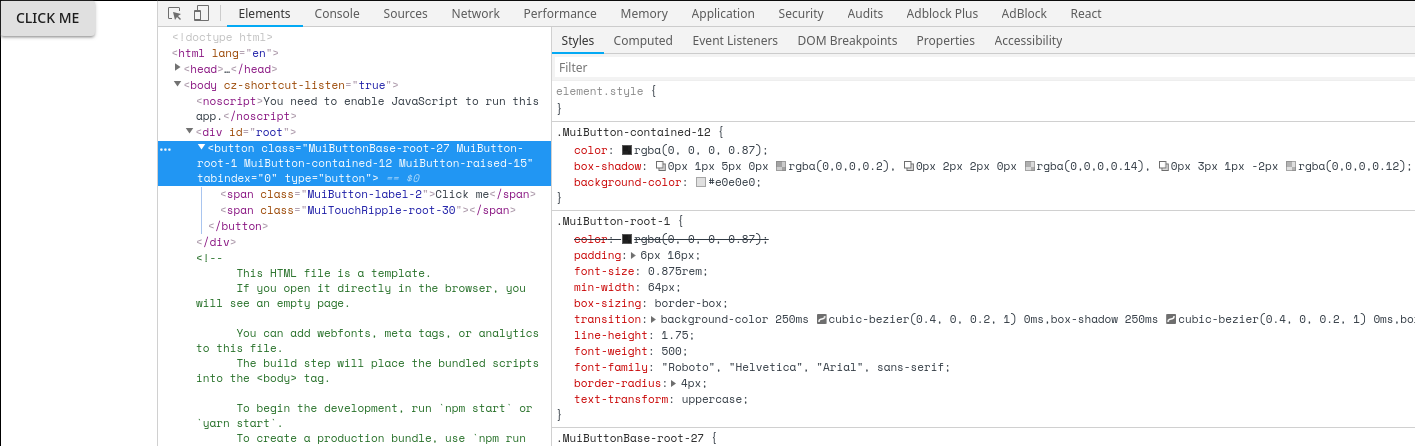
  "dependencies": {
    "@material-ui/core": "^3.9.1",
    "@material-ui/styles": "^3.0.0-alpha.9",
    "@types/jest": "23.3.13",
    "@types/node": "10.12.21",
    "@types/react": "16.8.1",
    "@types/react-dom": "16.0.11",
    "react": "^16.8.0-alpha.1",
    "react-dom": "^16.8.0-alpha.1",
    "react-scripts": "2.1.3",
    "typescript": "3.3.1"
  },
 soywod
on 3 Feb 2019
soywod
on 3 Feb 2019
@soywod Did you bootstrap @material-ui/styles via install? https://material-ui.com/css-in-js/basics/#migration-for-material-ui-core-users
eps1lon
on 3 Feb 2019
Yes I did, I tried from the index.tsx and in the App.tsx, I have the same result :/
soywod
on 4 Feb 2019
@soywod Could you open a separate issue and follow the template please? Especially a codesandbox would help here. If I paste your code into the original codesandbox included in this issue everything is working fine.
eps1lon
on 4 Feb 2019
Done #14407
soywod
on 4 Feb 2019
Related issues
 newoga
·
3Comments
newoga
·
3Comments
 ericraffin
·
3Comments
ericraffin
·
3Comments
 reflog
·
3Comments
reflog
·
3Comments
 finaiized
·
3Comments
finaiized
·
3Comments
 rbozan
·
3Comments
rbozan
·
3Comments
Most helpful comment
This is a common confusion.
ThemeProvideris a generic theme provider. It does not automatically include the material-ui theme. You have to explicitly use it: