Material-ui: [Hooks] Unable to override the css of any component (@material-ui/[email protected]). css is applied in the wrong order(With CRA).
The examples in code sandbox are working perfectly with the latest version of the material-ui/core and material-ui/styles, but when I used the same code in a project that is scaffolded with CRA the hook css are applied in the wrong order.
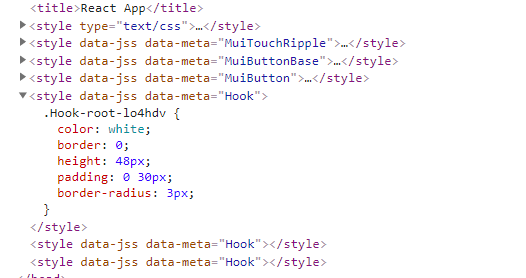
I have tried with the following example https://codesandbox.io/s/m7z43yrmjj (the css rules are applied in the correct order in code sandbox), when i use the code in CRA the css rules are applied in the wrong order(see the below image)
I have downgraded the @material-ui/styles version to 3.0.0-alpha.4 everything works perfectly. I believe there is a problem with the latest version (3.0.0-alpha.6)

- [x] This is not a v0.x issue.
- [x] I have searched the issues of this repository and believe that this is not a duplicate.
Expected Behavior 🤔
The CSS should be applied in the right order.
Current Behavior 😯
The CSS is not applied in the right order.
Steps to Reproduce 🕹
- Scaffolded app by executing "npx create-react-app my-app"
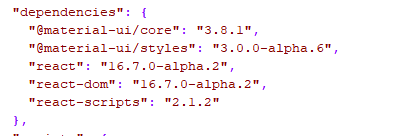
- Installed the packages npm install [email protected] [email protected] @material-ui/[email protected] @material-ui/[email protected]
- copied example code from the https://codesandbox.io/s/m7z43yrmjj
- executed "npm start"
Context 🔦
Your Environment 🌎
| Tech | Version |
|--------------|---------|
| Material-UI | v3.8.1 |
| React | 16.7.0-alpha.2 |
| Browser | Chrome V71 |
 thevarunraja
All 15 comments
To use @material-ui/styles you need to follow the installation steps listed here
 joshwooding
on 31 Dec 2018
joshwooding
on 31 Dec 2018
I have followed the steps. I have used the same example as shown in the docs. It's somehow not working with CRA(working in codesandbox). When I downgrade the @material-ui/styles version it's working. That is the reason i have raised this issue.
thevarunraja
on 31 Dec 2018
I can't re-create this then
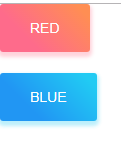
All I did extra was add the bootstrapping step from the docs
joshwooding
on 31 Dec 2018
@joshwooding It works, If I create a bootstrap file(For some reason this file is not necessary for old version 3.0.0-alpha.4). Thanks for helping me. Is there any reason the codesandbox example work without the intsall step.
thevarunraja
on 31 Dec 2018
I would ask @oliviertassinari for more info with the styles package
joshwooding
on 31 Dec 2018
@thevarunraja Wow, I'm surprised it works in the first place in the codesandbox given the core components and the new style package use different logics. I won't have the time to dig into it.
Haha, it's a Murth's law counterexample.
 oliviertassinari
on 31 Dec 2018
oliviertassinari
on 31 Dec 2018
@oliviertassinari I was going to say magic too 😆
joshwooding
on 31 Dec 2018
When I use the bootstrap file I have this:

And without, I have this:

@joshwooding : the Hook is never at the end, therefore css are still in wrong order. Am I missing something?
 MBach
on 7 Jan 2019
MBach
on 7 Jan 2019
@MBach Do you have a reproduction example?
oliviertassinari
on 7 Jan 2019
@oliviertassinari actually I've tried on codesandbox but without success. This is my real world project at work.
MBach
on 7 Jan 2019
@MBach 🤔 It's most likely an import order issue with the install() call. Alternatively, you can configure the two JSS instances (core, hook) to inject in the right order using the insertion point. I plan on simplifying the API. It's too cumbersome to change the insertion point as we are speaking.
oliviertassinari
on 7 Jan 2019
Seems a good alternative. Any good reading in order to configure JSS presets accordingly?
MBach
on 8 Jan 2019
@MBach https://material-ui.com/css-in-js/advanced/#html-comment (new) and https://material-ui.com/customization/css-in-js/#html-comment (legacy).
oliviertassinari
on 8 Jan 2019
I use the bootstrap file , the Hook is still at the end, version 3.0.0-alpha.4 doesn't have this issues.
 xielehe
on 3 Apr 2019
xielehe
on 3 Apr 2019
@xielehe try with v4-alpha.
oliviertassinari
on 3 Apr 2019
Related issues
 rbozan
·
3Comments
rbozan
·
3Comments
 finaiized
·
3Comments
finaiized
·
3Comments
 sys13
·
3Comments
sys13
·
3Comments
 ryanflorence
·
3Comments
ryanflorence
·
3Comments
 mb-copart
·
3Comments
mb-copart
·
3Comments