Material-ui: Rendering issue when using badges and noWrap text in List in IE11
When I add a badge to the avatar of list items the badge gets pushed to the left and the text gets hidden behind the avatar when overflow is meant to kick in. It behaves normally in Chrome and Edge.
- [x] This is not a v0.x issue.
- [x] I have searched the issues of this repository and believe that this is not a duplicate.
Expected Behavior 🤔
Overflow should behave correctly
Current Behavior 😯
Overflow messes up the layout of the list item. Can be seen in the link below.
Steps to Reproduce 🕹
Link:
Context 🔦
Your Environment 🌎
| Tech | Version |
|--------------|---------|
| Material-UI | latest |
| React | |
| Browser | |
| TypeScript | |
| etc. | |
 andokai
All 5 comments
@andokai I can confirm the issue on IE 11:

Adding a flex shrink value solves the issue.
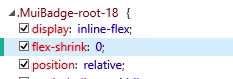
I think that we can move the style directly to the core. It sounds like a great default!
https://github.com/mui-org/material-ui/blob/dcbf543401ce2ffa83d1e3276af68a27691732a6/packages/material-ui/src/Badge/Badge.js#L12-L17
Do you want to take care of it?
 oliviertassinari
on 16 Dec 2018
oliviertassinari
on 16 Dec 2018
Sure thing!
andokai
on 17 Dec 2018
I've done some testing and setting flex-shrink seems to cause side effects in IE11 so I don't think it's a solution to the problem unfortunately. Basically a panel docked to the right of the list is now getting pushed down beneath it.
I'll try to find some time to build a codesandbox to reproduce.
andokai
on 17 Dec 2018
@andokai A reproduction would be great to describe the other issue.
Either way, I think that this flex-shrink can only help for all the browsers.
oliviertassinari
on 17 Dec 2018
@oliviertassinari How can I make the badge appear on the left side intentionally? By default, Mui-Badge has a right:0 css. All I want is to remove this.
 sarang12
on 17 Jul 2019
sarang12
on 17 Jul 2019
Related issues
 reflog
·
3Comments
reflog
·
3Comments
 rbozan
·
3Comments
rbozan
·
3Comments
 FranBran
·
3Comments
FranBran
·
3Comments
 chris-hinds
·
3Comments
chris-hinds
·
3Comments
 sys13
·
3Comments
sys13
·
3Comments
Most helpful comment
@andokai I can confirm the issue on IE 11:
Adding a flex shrink value solves the issue.
I think that we can move the style directly to the core. It sounds like a great default!
https://github.com/mui-org/material-ui/blob/dcbf543401ce2ffa83d1e3276af68a27691732a6/packages/material-ui/src/Badge/Badge.js#L12-L17
Do you want to take care of it?