Material-ui: [Slider] RTL behavior is broken.
Followed the guide, don't have problems with other components, been using material ui for over 7 month on this project, RTL is just fine.
tried implementing a Slider, but it's broken.
- [x ] This is not a v0.x issue.
- [ x] I have searched the issues of this repository and believe that this is not a duplicate.
Expected Behavior
this should not happen
https://i.gyazo.com/9258b17c7bc7aa1764c939f4d9382d7a.mp4
Current Behavior
this what happens
https://i.gyazo.com/9258b17c7bc7aa1764c939f4d9382d7a.mp4
Your Environment
| Tech | Version |
|--------------|---------|
| Material-UI |^3.0.1 |
| React | latest |
| Browser | chrome |
| TypeScript | x |
| etc. | lab is ^3.0.0-alpha.18|
 w3nda
w3nda
All 20 comments
Confirmed in https://codesandbox.io/s/wym4m8jw6l
It's working on the current docs. Seems like an issue with jss-rtl
 eps1lon
on 7 Oct 2018
eps1lon
on 7 Oct 2018
👋 Thanks for using Material-UI!
We use the issue tracker exclusively for bug reports and feature requests, however,
this issue appears to be a support request or question. Please ask on StackOverflow where the
community will do their best to help. There is a "material-ui" tag that you can use to tag your
question.
If you would like to link from here to your question on SO, it will help others find it.
If your issues is confirmed as a bug, you are welcome to reopen the issue using the issue template.
![support[bot] picture](https://avatars1.githubusercontent.com/in/6408?v=4&s=40) support[bot]
on 7 Oct 2018
support[bot]
on 7 Oct 2018
Please read https://material-ui.com/guides/right-to-left/#3-jss-rtl as @oliviertassinari suggested.
Working: https://codesandbox.io/s/9246304vy
eps1lon
on 7 Oct 2018
It's really not clear, first it says Internally, we are dynamically enabling this plugin when, I though that part 3 was explaining what happens internally, and afterwards you can look at the demo, and see that they don't use part 3 at all, and it works fine.
w3nda
on 7 Oct 2018
It's really not clear, first it says
@wangwenpei I agree, it's not clear. What do you think of:
-Internally, we are dynamically enabling this plugin when direction: 'rtl' is set on the theme.
+Internally, we are enabling this plugin when it's available in the JSS instance and direction: 'rtl' is set on the theme.
 oliviertassinari
on 7 Oct 2018
oliviertassinari
on 7 Oct 2018
Why it isn't dynamically used in Slider ? :(
right now I need to use the RTL wrapper in Slider and Switch
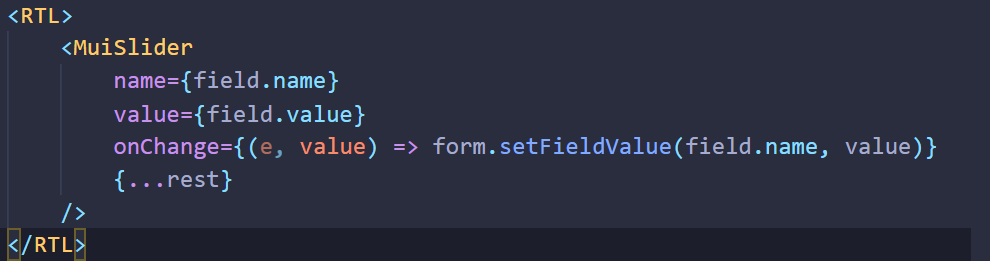
Moreover I think that your suggestion is not clear as well,
You should either require manually adding jss-rtl to the jss instance in the users project like you did in part 3; point out which components should be used under this RTL function, in my case that's Slider or make it flip by default in your end if I set 'direction': 'rtl'
w3nda
on 7 Oct 2018
Why it isn't dynamically used in
Slider? :(
You should wrap this around your hole app to get complete rtl support.
@wenduzer I was confused too. Maybe we can add warning message.
eps1lon
on 7 Oct 2018
@eps1lon Still, I don't understand why setting 'direction': 'rtl' isn't enough for the Slider to flip?
w3nda
on 7 Oct 2018
Why it isn't dynamically used in Slider ? :( right now I need to use the RTL wrapper in Slider and Switch
I don't understand. The JSS plugin has to be installed. We don't do it by default because most people don't need it. This way, we save bundle size for 80% of the people. This is step 3.
oliviertassinari
on 7 Oct 2018
@wenduzer
Because we depend on a jss-plugin that automatically flips all horizontal css properties. It's broken because we have to do it manually for inline styles. With theme.direction set to rtl only the thumb has rtl support because it uses inline styles. The track uses stylesheet styles which are left unchanged because you didn't load jss-rtl.
eps1lon
on 7 Oct 2018
@eps1lon so theme.direction set to rtl results in 'dynamically' flipping inline styles only, while loading jss-rtl will flip jss? is that correct?
no matter what I'm not sure this behavior is good
w3nda
on 7 Oct 2018
@wenduzer Yes
It assumes you have the plugin loaded if you set theme wide direction. In a perfect world a warning would be logged. Flipping inline styles globally would require quite the perf overhead for very minor use cases that are only caused by incomplete documentation.
eps1lon
on 7 Oct 2018
In a perfect world a warning would be logged.
:100: for that. I have been chatting about it a long time ago with @kof. Best solution to know if a plugin is loaded or not is to use feature detection.
oliviertassinari
on 7 Oct 2018
Is there any plugins system out there that allows specific plugin usage detection? I haven't seen one so far and I wonder what could be a solution. Having some sort of isPluginUsed(Symbol) would be possible, but feels evil.
 kof
on 7 Oct 2018
kof
on 7 Oct 2018
Internally, we are dynamically enabling this plugin when direction: 'rtl' is set on the theme. The CSS-in-JS documentation explains a bit more how this plugin is working. Head to the plugin README to know everything about it.
This makes it sound like the plugin is getting installed automatically and on Slide API there is no mention that in order "direction" prop to work it needs the plugin used.
Looks like mostly documentation issue to me.
kof
on 7 Oct 2018
I'd go with "documentation issue" as well, makes sense that it should be external if I want rtl support for specific components, but, if so, it should be written in the docs.
something like that,
Internally, we are dynamically enabling this plugin when direction: 'rtl' is set on the theme. Even though you installed the plugin in your project some components require loading it to the jss instance as described below.
The CSS-in-JS documentation explains a bit more how this plugin is working. Head to the plugin README to know everything about it.
Perfect world will be a list of components that require this behavior.
If you ever think of a better solution, maybe creating a clone MUI containing only rtl or manually changing styles according to theme.direction, feel free to mention me, I'd love to do that, just can't find the perfect solution yet.
w3nda
on 8 Oct 2018
@wenduzer I would replace some components by components, it's required by 90% of them. Looks good otherwise, do you want to submit a pull request? :)
In your example, RTL should be at the top of your React tree.
oliviertassinari
on 8 Oct 2018
Yeah, that's kinda sucks tho, putting it in the root of my project resulted in flipping my whole rtl project and anything being left went right, guess I'll use the RTL function for now.
w3nda
on 8 Oct 2018
Oh, I though you had a global use case for RTL, my bad.
oliviertassinari
on 8 Oct 2018
The project is RTL, but I use jss as my main styiling solution so it flips all my jss not only the material-ui ones
w3nda
on 8 Oct 2018
Related issues
 ericraffin
·
3Comments
ericraffin
·
3Comments
 mattmiddlesworth
·
3Comments
mattmiddlesworth
·
3Comments
 mb-copart
·
3Comments
mb-copart
·
3Comments
 iamzhouyi
·
3Comments
iamzhouyi
·
3Comments
 zabojad
·
3Comments
zabojad
·
3Comments
Most helpful comment
Please read https://material-ui.com/guides/right-to-left/#3-jss-rtl as @oliviertassinari suggested.
Working: https://codesandbox.io/s/9246304vy