Material-ui: TextField styling has changed
The TextField is acting differently in v3.1.1 compared to prior versions. Look at the downshift > Select multiple countries example:
- v3.1.1 positions the text field under the chips
- up to v3.1.0 positions the text field after the chips

- [x] This is not a v0.x issue.
- [x] I have searched the issues of this repository and believe that this is not a duplicate.
Expected Behavior
I would expect the TextField to be to the right of the chips and we wrapped only if it doesn't fit to the right anymore.
Current Behavior
The TextField is wrapped on a second line after a first selection.
Steps to Reproduce
Link: https://material-ui.com/demos/autocomplete/
- Go to the downshift example
- Select a country in the second input field
Context
Visually broke the multi-select component.
Your Environment
| Tech | Version |
|--------------|---------|
| Material-UI | v3.1.1 |
| Chrome | v69 |
 jozsi
jozsi
All 10 comments
Maybe related... I'm also noticing alignment issues in the endAdornment property/component of the <Input /> component. I have a <InputAdornment position='end' /> adornment with 2 <IconButton /> elements. In v3.1.1 the buttons are now misaligned:
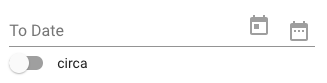
In previous versions - or at least up through v3.0.1 - the alignment is fine. I'm also using Chrome v69.
 hburrows
on 24 Sep 2018
hburrows
on 24 Sep 2018
@hburrows Do you have a reproduction?
 oliviertassinari
on 25 Sep 2018
oliviertassinari
on 25 Sep 2018
What @hburrows describes might be related to #12988.
 eps1lon
on 25 Sep 2018
eps1lon
on 25 Sep 2018
In previous versions - or at least up through v3.0.1 - the alignment is fine. I'm also using Chrome v69.
It was fine in 3.1.0, but broken in 3.1.1

 hashwin
on 25 Sep 2018
hashwin
on 25 Sep 2018
3.1.1 also affects styling of outlined fields (with and without labels).


 katzoo
on 25 Sep 2018
katzoo
on 25 Sep 2018
12975 broke the downshift select example. Without width: 100% the example lookes like 3.1.0.
eps1lon
on 25 Sep 2018
I am also running into the strike-through problem that @katzoo described on 3.1.1
screenshot:

 AirborneEagle
on 25 Sep 2018
AirborneEagle
on 25 Sep 2018
I retract my issue. It turned out I had some legacy CSS that was causing my issue -- likely due to CSS changes related to this. Removing my CSS altogether fixed my issue.
hburrows
on 27 Sep 2018
@katzoo What environment are you using to see this?
I have noticed it too on my Oneplus 6 on Chrome 69, but it's an indeterministic rendering artifact. We would have to fall back to the SVG implementation of @enagy27 to completely remove it. At the cost of a higher bundle size?
oliviertassinari
on 29 Sep 2018
@oliviertassinari I can only see this only in Chrome (stable 69.0.3497.100 as well as dev 71.0.3565.0), but maybe it's somehow related to how Chrome handles OS upscaling (125% for 4k resolution) - especially when changing page zoom (in browser) once makes this glitch disappear (I've seen worse regressions in "stable" versions :) ). Couldn't reproduce this in Firefox or any other machine with Chrome stable, so it seems like non material-ui issue.
The other thing went away with 3.1.2, so thank you and @slipo for fixing this :)
katzoo
on 1 Oct 2018
Related issues
 mb-copart
·
3Comments
mb-copart
·
3Comments
 activatedgeek
·
3Comments
activatedgeek
·
3Comments
 rbozan
·
3Comments
rbozan
·
3Comments
 FranBran
·
3Comments
FranBran
·
3Comments
 anthony-dandrea
·
3Comments
anthony-dandrea
·
3Comments