Material-ui: Stepper connector line is showing up even if its children is returning null.
- [x] This is a v1.x issue.
- [x] I have searched the issues of this repository and believe that this is not a duplicate.
Expected Behavior
Connector line should be hidden until its children return something
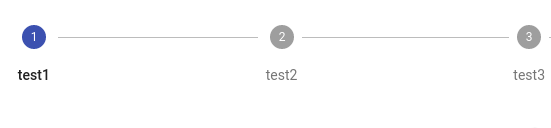
Current Behavior
But connector line is showing. check https://codesandbox.io/s/z2593oq374?from-embed

| Tech | Version |
|--------------|---------|
| Material-UI |latest |
 Anugraha123
All 8 comments
@Anugraha123 It's an edge case, but it looks like a test for a non-null step in this block:
https://github.com/mui-org/material-ui/blob/master/packages/material-ui/src/Stepper/Stepper.js#L77-L86
should fix it.
Do you want to work on it?
 mbrookes
on 27 Aug 2018
mbrookes
on 27 Aug 2018
@mbrookes Is correct, I think that I fix like this one is enough:
https://github.com/mui-org/material-ui/blob/a207808404a703d1ea2b03ac510343be6404b166/packages/material-ui/src/BottomNavigation/BottomNavigation.js#L31-L41
 oliviertassinari
on 27 Aug 2018
oliviertassinari
on 27 Aug 2018
@Anugraha123 Digging more into the problem on the pull request, I have realized that the source isn't the one I have identified. I was wrong. toArray is already removing the null elements. Yours is about digging into the rendering chain. Your pull request was breaking many unit tests. I'm not convinced we should have such logic. If we start digging into the React rendering chain, where should we stop? Going back to your example, we can solve the problem with:
-<customStep />
+{customStep()}
Is that enough?
oliviertassinari
on 28 Aug 2018
@oliviertassinari Thank you for your work but I am sorry I am still facing this issue after I have done as you said. Please check this case https://codesandbox.io/s/z2593oq374?from-embed
Anugraha123
on 29 Aug 2018
@Anugraha123 props.renderBottom always returns a ~child~ valid element.
- {props.renderBottom(props)}
+ {CustomStep(props)}
 eps1lon
on 29 Aug 2018
eps1lon
on 29 Aug 2018
Nice, let's fallback with this workaround. See if more people are facing this problem.
oliviertassinari
on 29 Aug 2018
@eps1lon so what if I use react class instead of using function for CustomStep
Anugraha123
on 31 Aug 2018
Expose a function from the class that checks if render would return nothing of interest and use that. Something like componentWillRender
class Component extends React.Component {
    static willRender(props) {
       return props.open;
    }

    render() {
        if (!Component.willRender(this.props)) {
            return null;
        }
        return "Hello, World!";
    }
}

const App = (props) => Component.willRender(props) && <Component {...props} />
The problem here is that it is not reasonable to do a lookahead into the component tree. Sure if it is only one level deep this might work but what if you change the component and have more than one level and only the bottom level actually renders something. You have to decide at the top level of the component tree if it should be displayed. Maybe there is a way but my gut tells me that this would make react alot slower if it always went down the hole tree and then decides if it renders the root because it would still need to call all lifecycle methods.
Some auxiliary links with a similar issue:
- https://stackoverflow.com/questions/33136399/is-there-a-way-to-tell-if-reactelement-renders-null
- https://www.npmjs.com/package/react-call-return
- got removed from the react repo because it is unstable; might come back
eps1lon
on 31 Aug 2018
Related issues
 activatedgeek
·
3Comments
activatedgeek
·
3Comments
 finaiized
·
3Comments
finaiized
·
3Comments
 revskill10
·
3Comments
revskill10
·
3Comments
 ghost
·
3Comments
ghost
·
3Comments
 iamzhouyi
·
3Comments
iamzhouyi
·
3Comments