Material-ui: Fixed div inside temporary drawer
Hi all, first congrats on v1, this project is looking great!
I searched all issues looking for a similar problem but couldn't find anything related to this.
So my situation is: I have a temporary drawer that displays scrollable content and I want a fixed header on top of it. What I found is that using position: fixed on the header should just do the work, and it actually does on every browser but chrome and firefox (it works fine on IE ..... ).
Chrome:
What I noticed is that as soon as the drawer is rendered on chrome the paper component has a style applied ( transform: translate(0px, 0px); transition: transform 225ms cubic-bezier(0, 0, 0.2, 1) 0ms; ) that is the main culprit of the fixed position not work.
I've been trying to override all transitions/transforms from the drawer/modal/paper/slider and can't seem to correctly remove the one that is causing this issue (seems to be in the paper component).
Firefox:
The header simply doesn't appear at all.
- [x] This is a v1.x issue (v0.x is no longer maintained).
- [x] I have searched the issues of this repository and believe that this is not a duplicate.
Expected Behavior
The header should be fixed on top of the drawer content while scrolling thru the content.
Current Behavior
Chrome:
Header acts as a position: relative because of the transform in the parent node.
Firefox:
Header is not displayed.
Steps to Reproduce (for bugs)
https://codesandbox.io/s/n0xoq1jr5p
There was also one weird scenario I couldn't reproduce on sandbox but is happening on my code. Chrome: Basically the behavior is as described above where it won't be position fixed, however when I resize the screen to a smaller breakpoint and try scrolling it starts working fine (if I maximize the screen after this it continues to work). I noticed that after the resizing (I do have a media query to make paper width 50% on larger breakpoint and full width on smaller) the transform is no longer applied to the parent node.
Your Environment
| Tech | Version |
|--------------|---------|
| Material-UI | 1.0.0-beta.45 |
| React | 16.3.2 |
| browser | Chrome 63.0.3239.84 (64-bit) |
| browser | Firefox 52.8.0 (32-bit) |
 izabelcalabria
All 4 comments
👋 Thanks for using Material-UI!
We use the issue tracker exclusively for bug reports and feature requests, however,
this issue appears to be a support request or question. Please ask on StackOverflow where the
community will do their best to help. There is a "material-ui" tag that you can use to tag your
question.
If you would like to link from here to your question on SO, it will help others find it.
If your issues is confirmed as a bug, you are welcome to reopen the issue using the issue template.
![support[bot] picture](https://avatars1.githubusercontent.com/in/6408?v=4&s=40) support[bot]
on 29 May 2018
support[bot]
on 29 May 2018
@izabelcalabria This question isn't specific to Material-UI. For instance, this can do the job, but there are different alternatives:
          <div
            style={{
              position: "relative",
              overflow: "auto"
            }}
          >
            <div
              style={{
                position: "fixed",
                top: 0,
                left: 0,
                right: 0,
                backgroundColor: "red"
              }}
            >
 oliviertassinari
on 29 May 2018
oliviertassinari
on 29 May 2018
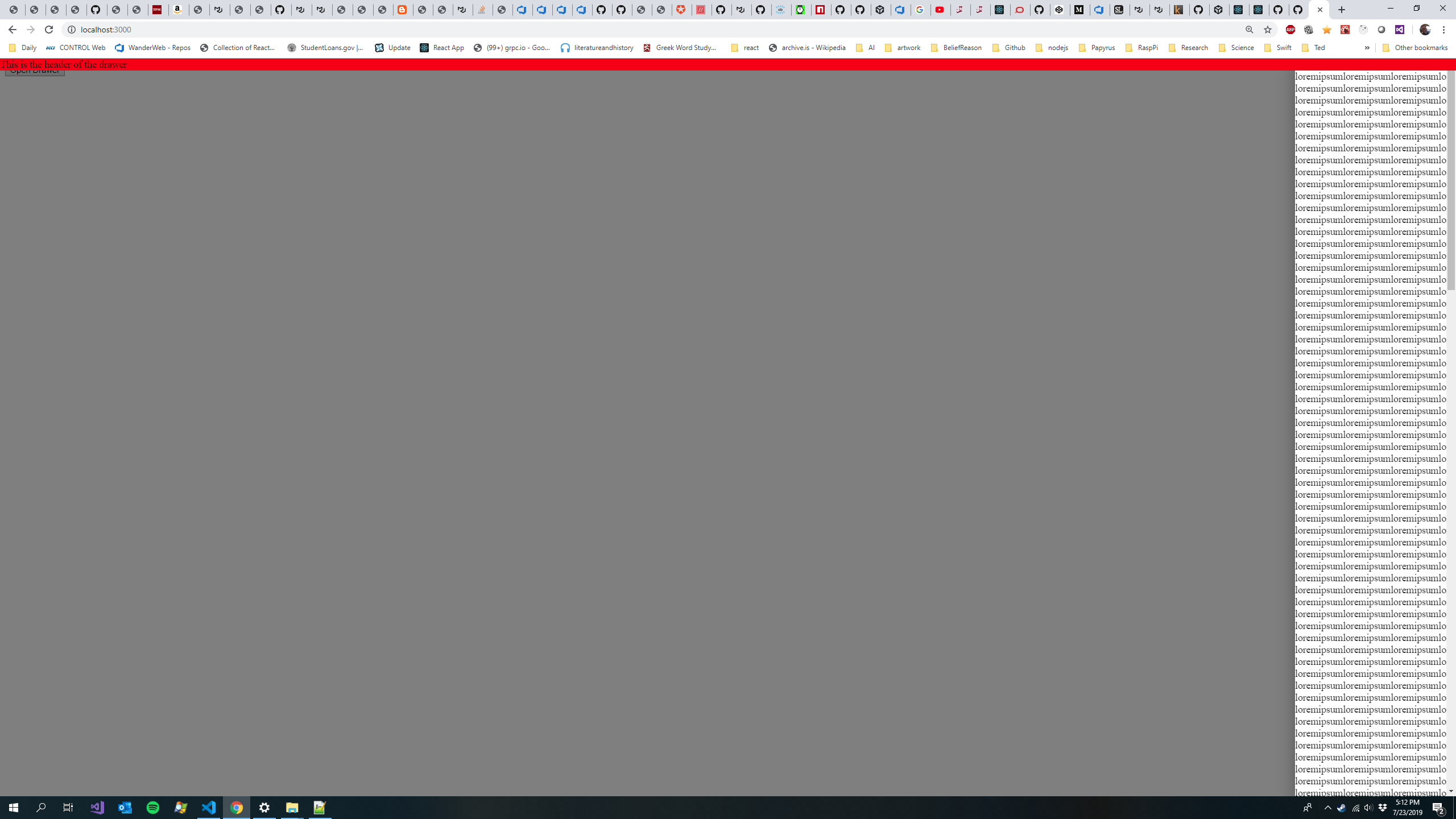
@oliviertassinari I find that this is broken when I apply to most recent released (v 4.2.1) of MUI.
Looks like:
 robcecil
on 23 Jul 2019
robcecil
on 23 Jul 2019
@izabelcalabria This question isn't specific to Material-UI. For instance, this can do the job, but there are different alternatives:
          <div
            style={{
              position: "relative",
              overflow: "auto"
            }}
          >
            <div
              style={{
                position: "fixed",
                top: 0,
                left: 0,
                right: 0,
                backgroundColor: "red"
              }}
            >
Doesn't work with @material-ui/core
https://codesandbox.io/s/material-ui-beta19-drawer-bug-xmtyn
 taqimustafa
on 8 Oct 2019
taqimustafa
on 8 Oct 2019
Related issues
 FranBran
·
3Comments
FranBran
·
3Comments
 activatedgeek
·
3Comments
activatedgeek
·
3Comments
 TimoRuetten
·
3Comments
TimoRuetten
·
3Comments
 mb-copart
·
3Comments
mb-copart
·
3Comments
 chris-hinds
·
3Comments
chris-hinds
·
3Comments
Most helpful comment
@izabelcalabria This question isn't specific to Material-UI. For instance, this can do the job, but there are different alternatives:
https://codesandbox.io/s/k376p3q46r