Material-ui: Menu's anchorOrigin and transformOrigin can't be changed
- [x] This is a v1.x issue (v0.x is no longer maintained).
- [x] I have searched the issues of this repository and believe that this is not a duplicate.
Expected Behavior
 | --> | 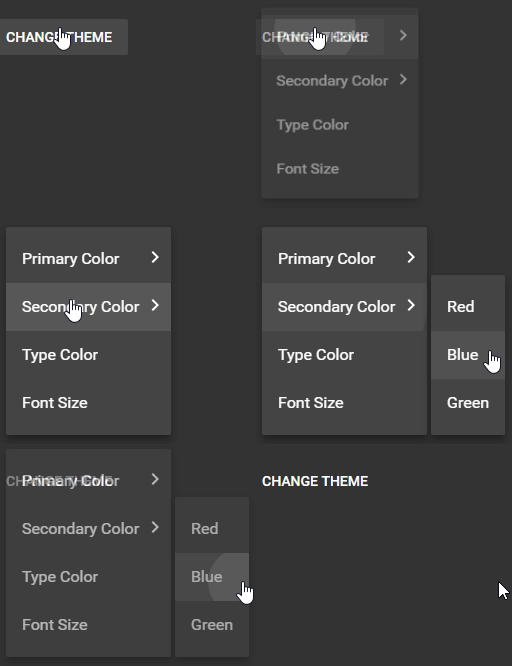 |
Being able to specify points (number, 'top', 'left', 'center', 'bottom' or 'right') on the anchor where the menus's anchorEl will attach to and the point on the menu which will attach to the anchor's origin (like Popover).
<Menu
+    anchorOrigin={{ vertical: "top", horizontal: "left" }}
+    transformOrigin={{ vertical: "top", horizontal: "left" }}
    id="simple-menu"
    anchorEl={anchorEl}
    open={Boolean(anchorEl)}
    onClose={this.handleClose}
>
    <MenuItem onClick={this.handleClose}>Profile</MenuItem>
    <MenuItem onClick={this.handleClose}>My account</MenuItem>
    <MenuItem onClick={this.handleClose}>Logout</MenuItem>
</Menu>
Current Behavior
anchorOrigin and transformOrigin are fixed (top left or top right).
Steps to Reproduce (for bugs)
/
Context
I am trying to create nested menus. The problem is that the menus render on top of each other with no way to change the anchor origin to 'right'.
Your Environment
| Tech | Version |
|--------------|---------|
| Material-UI | v1.0.0 |
 lukas-tr
All 7 comments
@lukas-tr Could you provide a reproduction example?
 oliviertassinari
on 21 May 2018
oliviertassinari
on 21 May 2018
https://material-ui.com/utils/popovers/#anchor-playground should be working with a Menu too. At the exception of the getContentAnchorEl warning in the console.
oliviertassinari
on 21 May 2018
My bad. The examples don't mention that you can anchor the menus out of the box.
This made me think that you can only position the menu using react-popper:
The Menu component uses the Popover component internally. However, you might want to use a different positioning strategy, or not blocking the scroll. For answering those needs, we expose a MenuList component that you can compose, with react-popper in this example.
lukas-tr
on 21 May 2018
@oliviertassinari
If I understood correctly, one should be able to use the Popover API for the positioning of the element on Menu component?
For me, it's not working. :/
Material-UI v1.0.0
          <Menu
            id="simple-menu"
            anchorOrigin={{
              vertical: 'bottom',
              horizontal: 'left',
            }}
            transformOrigin={{
              vertical: 'top',
              horizontal: 'left',
            }}
            anchorEl={anchorEl}
            open={Boolean(anchorEl)}
            onClose={this.handleClose}
          >
            <MenuItem onClick={this.handleClose}>Profile</MenuItem>
            <MenuItem onClick={this.handleClose}>My account</MenuItem>
            <MenuItem onClick={this.handleClose}>Logout</MenuItem>
          </Menu>
Currently:
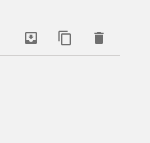
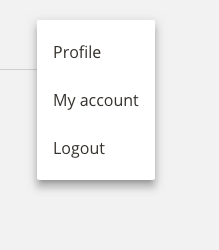
By clicking the first icon button with the Menu component configured like the above I get this:
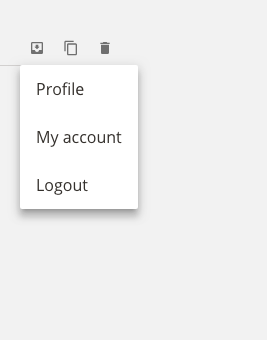
And when I do the same thing, but with the Popover component, the result looks correct:
 mnemanja
on 23 May 2018
mnemanja
on 23 May 2018
@mnemanja Check the warning in the console.
oliviertassinari
on 23 May 2018
Hi @oliviertassinari,
sorry for taking this long to respond, but I've just returned to the issue in question :)
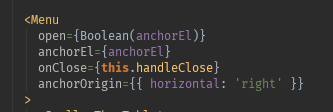
It doesn't make sense to me since I'm neither using the anchorOrigin.vertical nor setting the getContentAnchorEl.
@material-ui/core: 1.2.1

mnemanja
on 15 Jun 2018
This answer fixes the error message: https://github.com/mui-org/material-ui/issues/10804
mnemanja
on 15 Jun 2018
Related issues
 ghost
·
3Comments
ghost
·
3Comments
ghost
·
3Comments
ghost
·
3Comments
 TimoRuetten
·
3Comments
TimoRuetten
·
3Comments
 iamzhouyi
·
3Comments
iamzhouyi
·
3Comments
 revskill10
·
3Comments
revskill10
·
3Comments
Most helpful comment
This answer fixes the error message: https://github.com/mui-org/material-ui/issues/10804