Material-ui: long text MenuItems should ellipse
- [x] I have searched the issues of this repository and believe that this is not a duplicate.
This might be related: https://github.com/mui-org/material-ui/pull/3250 but i'm not sure
Expected Behavior
Menu item texts should ellipse
Current Behavior
They somehow don't, not sure why as text-overflow: ellipse is present
Steps to Reproduce (for bugs)
- https://codesandbox.io/s/p5kj9zw2xq
- resize the screen till it is to small to display the menu items
- realize it doesn't ellipse
Context
We have some menu item text which are to long on mobile.
Your Environment
| Tech | Version |
|--------------|---------|
| Material-UI | latest |
| React | latest |
| browser | chrome latest |
| etc | |
 sakulstra
All 14 comments
@sakulstra There is a conflict with the menu item text-overflow: ellipse CSS and the list item display: flex CSS. Related to https://bugs.chromium.org/p/chromium/issues/detail?id=327437.
 oliviertassinari
on 14 May 2018
oliviertassinari
on 14 May 2018
For anyone stepping into the problem it seems like wrapping the inner content into a div seems to solve the problem for now:
<FormControl style={{ maxWidth: "150px" }}>
        <Select value="red">
          {options.map(option => (
            <MenuItem key={option._id} value={option._id}>
              <div style={{ overflow: "hidden", textOverflow: "ellipsis" }}>
                {option.name}
              </div>
            </MenuItem>
          ))}
        </Select>
      </FormControl>
@oliviertassinari thanks for pointing out the problem :+1: - wouldn't have found the issue without you! Should this perhaps be the default behavior? or at least somehow be noted in the docs?
sakulstra
on 15 May 2018
@sakulstra - I have got around the issue by setting the display of the MenuItem to block. Seems a little less intrusive.
 kylane
on 7 Sep 2018
kylane
on 7 Sep 2018
Why can't I reproduce this?
 nathanmarks
on 10 Sep 2018
nathanmarks
on 10 Sep 2018
@nathanmarks Here are two reproductions that feature a patch:
I think that we have two options to move forward:
- We set display block in the menu list item. But I fear it will break the menu composition capabilities with the list item components like demonstrated in https://material-ui.com/demos/menus#customized-menuitem.
        <MenuItem>
          <ListItemIcon>
            <InboxIcon />
          </ListItemIcon>
          <ListItemText inset primary="Inbox" />
        </MenuItem>
- We remove the
text-overflow: ellipsis;style, it doesn't work anyway. We defer this responsibility to users. For instance, they can use thenoWrapproperty of the Typography.
            <MenuItem>
              <Typography variant="subheading" noWrap>
                Label
              </Typography>
            </MenuItem>
I like option 2. Any other idea?
oliviertassinari
on 11 Sep 2018
@oliviertassinari
This will break menu composition capabilities. Flexbox is generally the best way to align items in a row, it's much more elegant than the methods we had to resort to before flexbox.
I prefer this. While not 100% ideal, I actually think it's not outrageous. Is there any way we could use
ListItemTextfor this instead? We would just need to pass 2 more styles to theTypographycomponent insideListItemText(overflow: hidden; text-overflow: ellipsis). Would that break anything else?
nathanmarks
on 11 Sep 2018
@nathanmarks Let's document 2. then :). I'm adding the support for inherit so we don't have to know the variant:
            <MenuItem>
              <Typography variant="inherit" noWrap>
                Label
              </Typography>
            </MenuItem>
Is there any way we could use ListItemText for this instead?
What do we win? Typography is the low-level text primitive block. Even better, I love how people can build their own Box component in https://github.com/jxnblk/styled-system#usage.
oliviertassinari
on 11 Sep 2018
@oliviertassinari
Semantically speaking it makes sense since in other use cases that component is used for text inside menu items.
That being said, we win nothing, it is a bit heavy handed and I prefer your suggestion.
nathanmarks
on 12 Sep 2018
@oliviertassinari Is this just documenting the use of Typography in MenuItem and ListItem?
Similar to: https://codesandbox.io/s/yq68zl5xmx
 joshwooding
on 30 Oct 2018
joshwooding
on 30 Oct 2018
@joshwooding Yes, It about removing the dead CSS property and documenting it like described in point n°2 of https://github.com/mui-org/material-ui/issues/11380#issuecomment-420162553
oliviertassinari
on 1 Nov 2018
@oliviertassinari would the documenting involve a new example using Typography and marking the old example as deprecated?
joshwooding
on 1 Nov 2018
@joshwooding What's the old example? I think that we can add a new demo yes.
oliviertassinari
on 1 Nov 2018
@oliviertassinari Using ListItemText, although thinking about it ListItemText is still good for displaying primary and secondary lines of text. Therefore maybe changing the demo to show ListItemText being used with it's primary and secondary properties and Typography with a single line?
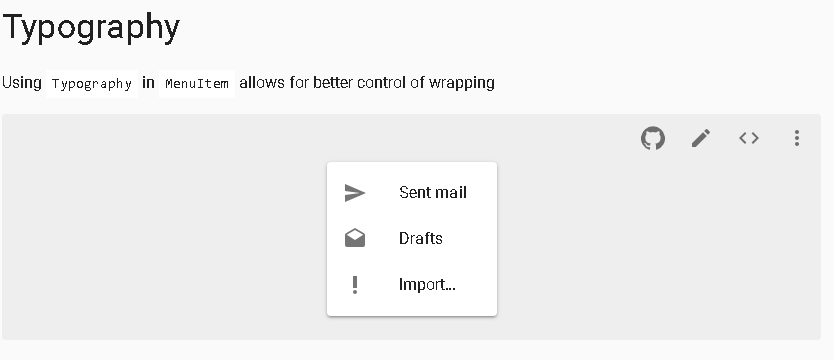
This is what I have for the demo so far. I'm coming up blank for what the demo description should be, do you have any suggestions?
joshwooding
on 1 Nov 2018
@joshwooding I think that it's good enough to open a pull request :).
oliviertassinari
on 2 Nov 2018
Related issues
 activatedgeek
·
3Comments
activatedgeek
·
3Comments
 finaiized
·
3Comments
finaiized
·
3Comments
 zabojad
·
3Comments
zabojad
·
3Comments
 chris-hinds
·
3Comments
chris-hinds
·
3Comments
 revskill10
·
3Comments
revskill10
·
3Comments
Most helpful comment
For anyone stepping into the problem it seems like wrapping the inner content into a div seems to solve the problem for now:
@oliviertassinari thanks for pointing out the problem :+1: - wouldn't have found the issue without you! Should this perhaps be the default behavior? or at least somehow be noted in the docs?