Material-ui: full page grey splash on ios
I'm using create-react-app and material, notice that on physical ios device, the page splashes, tried -webkit-tap-highlight-color: transparent, not working, don't know why, so I tried this example on material-ui repo, the example also get splashes, is this not a bug? If not, how can I fix it. Thanks!!!
- [x] I have searched the issues of this repository and believe that this is not a duplicate.
Your Environment
| Tech | Version |
|--------------|---------|
| Material-UI | "material-ui": "^1.0.0-beta.43" |
| React | "react": "^16.3.2" |
| browser | |
| etc | |


 huhaixiao
All 8 comments
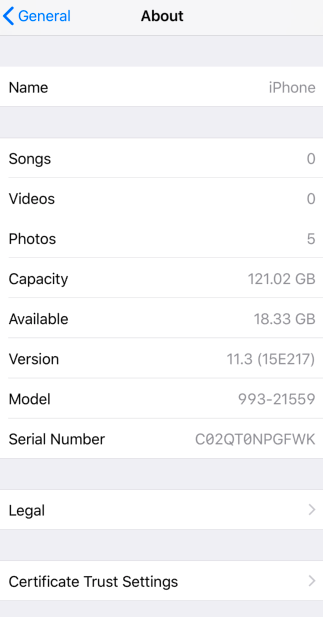
@huhaixiao We are missing version information. I couldn't reproduce the issue on the iPhone X simulator
 oliviertassinari
on 26 Apr 2018
oliviertassinari
on 26 Apr 2018
I produced this issue on real Apple device, screen capture is tricky, so I took two pictures, this grey splash is noticeable, I cloned the create-react-app example, build and deployed it at here, I believe if you try this on real device, you can notice the splash, many thanks!
huhaixiao
on 27 Apr 2018
I can reproduce the issue at the linked example.
 mbrookes
on 27 Apr 2018
mbrookes
on 27 Apr 2018
The simplest reproduction I could build:
import React from "react";
import ReactDOM from "react-dom";

function Index() {
  return <button onMouseDown={() => {}}>Wtf</button>;
}

ReactDOM.render(<Index />, document.querySelector("#root"));
https://codesandbox.io/s/p3npm3o6j7
I don't think that we can do anything about it. I have opened a bug on iOS side: https://bugreport.apple.com/web/?problemID=39801425
oliviertassinari
on 27 Apr 2018
One more though, removing the button from the page solves the problem: https://codesandbox.io/s/v39j4kzov5.
oliviertassinari
on 27 Apr 2018
 gaearon
on 7 Aug 2018
gaearon
on 7 Aug 2018
@gaearon Thanks for the heads up.
oliviertassinari
on 7 Aug 2018
I guess you can work around it by detecting iOS and assuming it won't have mouse support (so you can maybe map mouse events to touch events directly, thereby preventing React from registering a mouse listener). I don't know if that's a very good strategy though.
gaearon
on 7 Aug 2018
Related issues
 FranBran
·
3Comments
FranBran
·
3Comments
 revskill10
·
3Comments
revskill10
·
3Comments
 mb-copart
·
3Comments
mb-copart
·
3Comments
 mattmiddlesworth
·
3Comments
mattmiddlesworth
·
3Comments
 rbozan
·
3Comments
rbozan
·
3Comments
Most helpful comment
The simplest reproduction I could build:
https://codesandbox.io/s/p3npm3o6j7
I don't think that we can do anything about it. I have opened a bug on iOS side: https://bugreport.apple.com/web/?problemID=39801425