Material-ui: [Tabs] Highlight underline wider that tab

- [x] I have searched the issues of this repository and believe that this is not a duplicate.
Expected Behavior
Exact highlight underline alignment all the time (even after heat death of the universe).
Current Behavior
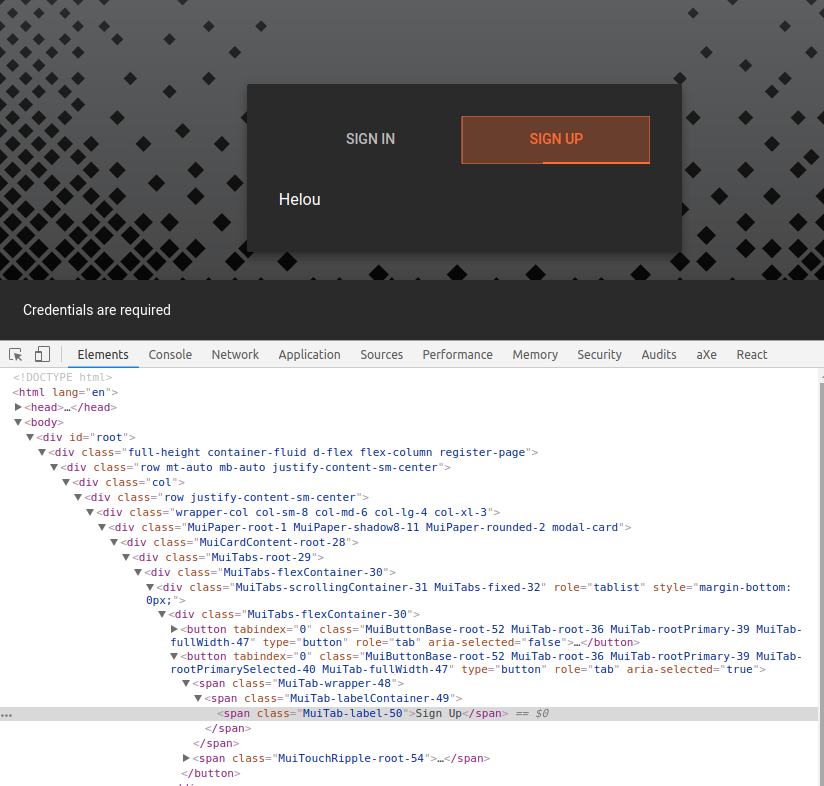
(In my app) after page reload the line goes under the second tab. It fixes itself on second render or on window resize.
Steps to Reproduce (for bugs)
I don't have a small project to reproduce this. I made only this video https://streamable.com/swsom
If you have no idea why it happens just close this issue (I will try to fix it later).
<Tabs
    indicatorColor="primary"
    textColor="primary"
    value={this.props.activeTab}
    onChange={this.onTabsChange}
    fullWidth
>
    <Tab label="Sign In" value="login" />
    <Tab label="Sign Up" value="register" />
</Tabs>
Your Environment
| Tech | Version |
|--------------|---------|
| Material-UI | 1.0.0-beta.31 |
| React | 16.2.0 |
| browser | Chromium 63.0.3239.132 |
 01e9
01e9
All 5 comments
I started making the second page (on second tab click) and again after refresh the line is shifted.
01e9
on 30 Jan 2018
@arteniioleg Do you have a reproduction link? codesandbox, repository, etc. ? We can't help without.
 oliviertassinari
on 30 Jan 2018
oliviertassinari
on 30 Jan 2018
I can't reproduce on codesandbox https://codesandbox.io/s/vjpvk106n3
My project has a more complicated structure (redux+router) so I can't upload the entire project on codesandbox.
A workaround would be to trigger the refresh of MUI components manually right after page load. Because the bug fixes itself when I resize the window or remove a SnackBar.
How to trigger the recalculation/refresh of the components from code?
01e9
on 30 Jan 2018
How to trigger the recalculation/refresh of the components from code?
@arteniioleg Use the action property + updateIndicator(): https://material-ui-next.com/api/tabs/#tabs.
oliviertassinari
on 30 Jan 2018
This fixes the problem
action={(actions) => setTimeout(actions.updateIndicator.bind(actions), 0)}
This doesn't
action={(actions) => actions.updateIndicator()}
Related issues
 rbozan
·
3Comments
rbozan
·
3Comments
 chris-hinds
·
3Comments
chris-hinds
·
3Comments
 newoga
·
3Comments
newoga
·
3Comments
 ryanflorence
·
3Comments
ryanflorence
·
3Comments
 zabojad
·
3Comments
zabojad
·
3Comments
Most helpful comment
This fixes the problem
This doesn't